We’ve all got one. It might be a drawer in the kitchen, a bin in the living room, or a shelf in the hallway that quietly collects everything that doesn’t have a proper home. The junk drawer is practically a universal ritual of modern life, a tiny monument to the honest truth that no one can assign a perfect place for every single possession. You tell yourself that you’ll sort it out next weekend, that you’ll finally separate the batteries from the loose rubber bands and the mystery keys, but somehow it always ends up becoming a magical portal where things disappear and reappear at the most inconvenient moments. That’s because the junk drawer isn’t just a random collection of odds and ends—it’s a system, albeit an unofficial one, for dealing with the leftovers of everyday living. The logic is relatively sound: when you don’t know where something belongs, you put it in the drawer, and at least you have one place to look. The problem is that the drawer eventually becomes a black hole. You’re sure the utility scissors are in there somewhere, but you can’t see them under the tangled earbuds, the loose stamps, the dried-out highlighter, and the roll of double-sided tape that you swear you bought last week. You dig around, pull everything out, find three other things you forgot you owned, and eventually give up and buy another pair of scissors. Then, a few days later, you find the original by accident and suddenly own two pairs. It’s not that you’re disorganized as a person; it’s that the drawer itself is too chaotic to function as a useful storage system. The junk drawer story isn’t really about laziness—it’s about the fundamental impossibility of having a dedicated spot for every little thing.
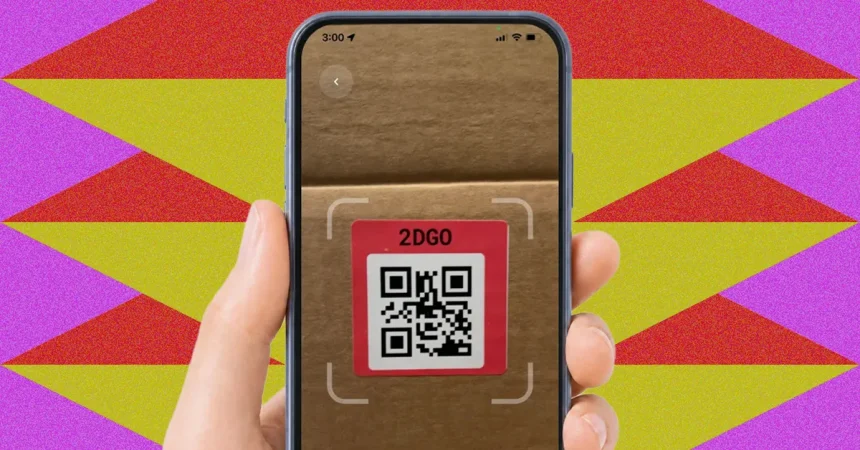
Regular organizing conventions don’t really solve this problem. You might invest in cute boxes, mason jars, or beautifully labeled bins, and for a while, everything looks lovely. But the glow of freshly organized shelves fades quickly when you realize that a label only tells you so much. “Kitchen stuff” is a label that means absolutely nothing when you’re standing in front of a box and trying to remember whether the pastry brush is inside or in the drawer by the stove. Even the act of labeling itself, while helpful, fails you if you misplace the label or forget where the labeled box ended up. You could label a bin “Christmas decorations” and then move it to the basement, only to forget that it’s not in the attic anymore. The system breaks down because the information lives on the outside of the container, but your memory lives somewhere entirely separate from the physical world. That’s where the idea behind SmartLabels becomes genuinely clever: instead of relying on your brain to remember what’s inside each bin, you outsource that memory to your smartphone. The system is simple—each package contains a set of QR code stickers, and you attach one to the outside of a drawer, bin, or box. When you scan that code with the companion app, you see a digital list of everything inside that container, along with photos. It’s like giving every storage space a photographic memory. You no longer have to guess what’s in the box labeled “miscellaneous” because the app will tell you, item by item, with visual proof.
The way SmartLabels works is refreshingly straightforward. Each package includes 48 unique QR-code stickers, which are arranged on four sheets of twelve. You download the free companion app, which is available for both iOS and Android, and then begin by selecting the QR code you want to use for a particular bin or drawer. The app asks you to take a photo of the QR code, essentially pairing that physical sticker with a digital record in your phone. Next, you photograph the contents that you’re planning to store. This is where the system asks a bit more from you than a typical organizing solution: you can’t just dump everything into a container and snap a quick picture from the top. Each item must be clearly visible in its own photo, or perhaps arranged in a way that the camera can pick it out individually. That means you need to lay the items out, take a picture of the scissors, then a picture of the stamps, then a picture of the roll of tape, and so on. The app simply won’t be able to catalog something it can’t see. This might feel like extra work upfront, but it’s also what makes the system so reliable. When you later open the app and tap that drawer’s entry, you see a neat little gallery of everything that’s supposed to be in there. No more squinting into a dim drawer and hoping you spot a pair of scissors. No more buying duplicates of things you already own. The app is free to use as a basic inventory tool, and if you want a few extra features, there’s a premium subscription for fifteen dollars per year that lets you export PDFs and spreadsheets of your inventories. For most home organizers, that premium tier isn’t necessary, but it could be helpful for someone running a small business or managing a large collection of items that needs to be shared with other people.
But let’s be honest: the system is only as good as your willingness to keep it updated. The SmartLabels app isn’t magic; it doesn’t know what you’re doing in the real world. If you take the double-sided tape out of the junk drawer and absentmindedly toss it into the wrapping paper bin in the closet, the app will still think the tape is in the junk drawer until you manually update the records. It won’t automatically follow you around the house and keep track of which box you dropped things into. It also won’t remember to ask you to add new items when you buy them, so if you toss a pack of thank-you notes into a storage bin without photographing them and adding them to the app’s inventory, the digital list for that bin will be incomplete. You have to be something of a gold-star user, someone who remembers to take a photo every single time you add something to a labeled container, and someone who remembers to move an item from one list to another when you relocate it. That’s a pretty big “if” for many of us, because we often don’t organize things in real time. We are more likely to hurry, to shove things into storage, to tell ourselves we’ll fix it later. If you don’t update the app, it starts to become a map of the past rather than a guide to the present. A year later, you might look at the inventory, see all the items you once stored, and have no idea where half of them actually ended up. The app can’t prevent absentmindedness; it can only record the things you notice and remember to log.
Still, if you can commit to the ritual of updating, SmartLabels has a lot to offer beyond the junk drawer. Think about all the places in your home where things vanish: the attic with its mysterious collection of boxes, the garage with shelves stacked high with plastic bins, the closet where holiday decorations and winter coats tangle together. Regularly organizing those spaces is difficult because you don’t go into them often enough to remember what’s there. The easiest way to lose track of something is to put it away and then not look at it for six months. When you finally need the string lights in December, you’re not going to want to open every single box in the attic to find them. With SmartLabels, you can simply stand in front of the bins, scan the QR code on the side of each one, and see exactly what’s inside before you lift anything. It turns an exhausting physical search into a quick digital search, which is a lovely feeling when you’re carrying a wobbly stack of boxes or balancing on a ladder. What makes it even more useful is that the inventory is not just a list of names—it includes photos, so you can actually see the shape and color of the item you’re hunting for. That helps in another subtle way: when you look at the picture of an old power drill or a favorite pair of gloves, you’re often reminded that you own those things and you’re reminded where they are. The app effectively gives you a photographic memory for everything you’ve stored away. It’s a bit like having a personal assistant who knows exactly where all your stuff is, provided you’ve given that assistant the right information and kept it in the loop.
At the end of the day, SmartLabels isn’t a miracle cure for disorganization, but it is a genuinely thoughtful tool for making the problem feel manageable. The real challenge with any organizing system is that life is messy. You buy new things, you move things around, you put things in the wrong place, and you forget what you did. A label can tell you that a container used to hold certain items, but it can’t tell you what’s actually there right now. SmartLabels attempts to close that gap by creating a living, digital connection between the physical container and your phone. It won’t help you if you refuse to update it, and it won’t stop you from absentmindedly placing your tools in the wrong bin. But it does give you a way to keep track of your treasures in a far more detailed and flexible way than a simple label ever could. The extra time you spend photographing items and updating lists is really an investment in your future peace of mind. Imagine a world where you never have to rummage through three boxes of old cables to find the one thing you actually need, where you can confidently tell a friend “I have a laser level, let me grab it,” and actually know exactly where to look. That’s the promise of SmartLabels, and for anyone who is tired of losing track of their own belongings, it’s a surprisingly satisfying idea. You still have to be willing to put in a little effort, but the payoff is that you get to feel organized instead of just looking organized. And in a house full of random boxes, mystery drawers, and forgotten treasures, that feeling is worth more than a thousand neatly labeled jars.