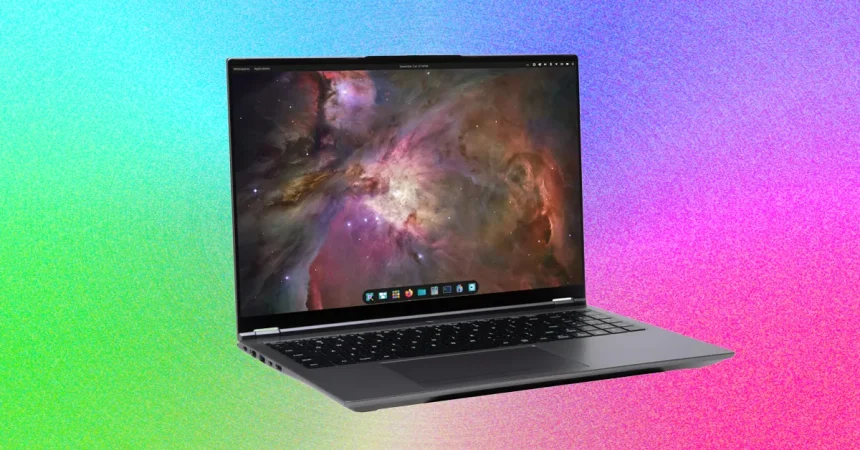
One of the first things that stands out about the System76 Pangolin Pro is its enormous glass trackpad. For many day-to-day tasks, that size is genuinely a pleasure. When you are doing something like photo editing, where you need to sweep the cursor across the screen with long, fluid gestures, the extra space feels luxurious. You never feel cramped, and there is something almost tactile about the smoothness of the surface. But there’s a trade-off to that spaciousness, and it took me a while to put my finger on it. When I would pause from typing and rest my palms on the palm rest, I occasionally found that the weight of my hands would be enough to click the buttons at the bottom of the trackpad. It wasn’t a constant annoyance, but it happened often enough that I learned to become more careful about where I placed my palms, almost subconsciously adjusting my posture whenever I stopped to think. It’s one of those quirks that you adapt to without really noticing you’re adapting, and after a while it faded into the background. Still, it’s worth mentioning because for anyone who spends long stretches typing and then thinking, it can cause the occasional unexpected input. The rest of the physical experience is solid, and the laptop feels well built, but the trackpad is the kind of design decision that will please some people and mildly frustrate others. The webcam is another area where you get exactly what you would expect from a modern Linux laptop: a 2-megapixel, 1080p camera that is perfectly fine for casual video calls with family and friends. If you spend your days hopping between professional Zoom meetings, however, you will likely notice that the image quality is just a little soft, and the low-light performance leaves something to be desired. For that kind of work, an external webcam is almost certainly worth the investment. Open-source enthusiasts should also note that Coreboot still does not support AMD Ryzen processors, which means the Pangolin Pro cannot run the open firmware that System76 has championed on some of its other machines. That is a real consideration for anyone committed to fully open-source laptops, even if it won’t matter to the average user.
The good news is that the Pangolin Pro is refreshingly easy to open up and repair, and for people who like to tinker with their hardware, that is a huge point in its favor. Turn the laptop over and you’ll find nine screws on the bottom of the chassis, all of them visible and none of them hidden under rubber feet or other annoying traps. It feels like a small miracle in an industry that increasingly asks you to heat up the back panel and peel it off like a tiny glass sandwich. Once you unscrew those nine screws, the bottom lifts off cleanly and gives you full access to the internals: the SSD slots, the RAM, the WiFi card, and everything else you might need to reach. There’s no frustration, no prying, no fear that you’re going to snap some delicate plastic clips. You just open it up, and there it is. That kind of straightforward design is becoming rare, and it means that buying the Pangolin Pro today doesn’t lock you into whatever configuration you choose right now. If you decide a few years down the road that you want more memory, or you want to swap out a drive for a larger one, you can do that easily. Even the idea of waiting for RAM prices to come down before upgrading feels plausible because the machine is built to be future-proof. Of course, nobody knows if prices will actually drop, but the point is that you have the option, and that is a kind of freedom that a lot of laptops simply don’t offer anymore. There is something deeply satisfying about a laptop that treats you like a capable human being rather than someone who should never be allowed to see inside the chassis. And in this case, System76 has done exactly that.
When you move from the hardware to the software, the Pangolin Pro shines even brighter, because it comes with System76’s own Pop!_OS Linux, which has long offered what I consider one of the best Linux experiences available anywhere. The Cosmic Desktop and the custom applications that System76 builds around it all work together to provide a level of stability that lets you use Linux every single day without even noticing that you’re using Linux. That’s a compliment, not a criticism. For me, the operating system should fade into the background and let you get your work done, and that’s exactly what Pop!_OS does. As someone who has used Linux for a long time, I know I’m probably biased, but I genuinely find Linux to offer a better user experience than macOS or Windows. There is something about the freedom to shape your environment exactly the way you want it that makes you feel like you’re working with the computer, not fighting against it. I mostly live in a terminal for writing, email, reading RSS feeds, and similar tasks, and I use a web browser for everything else. When I need to edit photos, I open Darktable, and when I am working on video, I use DaVinci Resolve. None of that really requires much from an operating system, but for some reason, it all feels easier in Linux. There’s less friction, fewer surprises, and fewer moments where the system tries to convince you to do things its way instead of your way. That may just be the perspective of a longtime Linux user, but it’s a perspective that colors how I feel about every laptop I review.
Pop!_OS is particularly strong when you balance the needs of newcomers against the desires of power users. A person who has never touched Linux can sit down, log in, and find their way around without confusion, which is not something that could be said for every distribution. The layout is intuitive, the settings are clear, and the default apps are sensible. But underneath that friendliness, there’s a deep layer of functionality for people who want to push the system further. If you don’t know what tiling windows are, you never need to be bothered with them; they just stay out of the way. But if you do want them, you can enable them with nothing more than a toggle switch in the settings app, and suddenly your workflow can change in ways that make you wonder how you ever lived without them. The system also has loads of customizable keyboard shortcuts for developers and anyone else who prefers to keep their hands on the keyboard rather than reaching for the mouse. It’s the kind of thoughtful design that acknowledges different kinds of users and tries to accommodate them all in the same default experience. There are also plenty of trackpad gestures to control workspaces, window focus, and other aspects of the desktop environment. With a little practice, you can fly through your tasks with very little effort, moving between virtual desktops and focusing windows with quick swipes. That combination of accessibility and depth is rare, and it makes Pop!_OS feel like an operating system that respects both your time and your intelligence. It’s no wonder that it has earned a loyal following, and it is a major reason why the Pangolin Pro feels so much more cohesive than a random Linux laptop running generic Ubuntu.
Now comes the question of whether you should actually buy the Pangolin Pro, and I said at the beginning that for most people, this laptop is overkill, which is true. If all you need is something to browse the web, check email, and edit the occasional document, you do not need a machine with this much power. But it is worth noting that the Pangolin Pro is actually cheaper than the smaller System76 Lemur Pro, which is an interesting position for a 16-inch laptop to be in. The Lemur Pro has long been the go-to recommendation for portability and battery life, and for many people, it is the better choice. It is smaller, lighter, easier to carry, and probably more than enough for everyday tasks. The Pangolin Pro, by contrast, packs more horsepower into a larger chassis, so you have to ask yourself what you value more. If you are doing something highly intensive with your laptop, like building local AI models, training custom agents, compiling large software projects, or running heavy virtual machines, then the Pangolin Pro is clearly the machine you want. It gives you the kind of performance that can keep pace with your ambitions, and it does so without demanding that you sacrifice too much in terms of weight or price. In fact, it is one of the best Linux laptops I have tested, which is saying a lot in a market that is filled with compromises. It strikes a nice balance between power, portability, and affordability, and it manages to do that while also being easy to upgrade and repair, which is almost unheard of in modern laptops.
If you are a Linux user looking for a 16-inch laptop with all the bells and whistles, and you want one that isn’t crazy expensive or crazy heavy, this is the machine I would get. It isn’t perfect, of course. The trackpad can be a little too eager to click, the webcam is only passable, and the lack of Coreboot support on AMD chips is a disappointment for open-source purists. But those are relatively minor issues when you look at the whole package. What you get is a powerful, repairable, thoughtfully designed Linux laptop with an operating system that feels polished and welcoming. You get a keyboard that feels great, a screen that gives you plenty of room to work, and a device that you can comfortably keep for years and upgrade as your needs change. The Pangolin Pro may be more computer than most people need, but there is something to be said for having room to grow. It gives you the confidence that when new software demands more resources, you won’t be left scrambling for a replacement. And for anyone who values freedom, both in terms of software and in terms of opening up the case and getting your hands dirty, that is a very good feeling. At the end of the day, the Pangolin Pro is not just a laptop; it is a statement about what a Linux laptop can and should be. It respects your choices, respects your money, and respects your ability to do things for yourself. That is a combination that I think more companies should take note of.