

There’s something genuinely exciting about the moment Amazon refreshes its Kindle lineup. The fall release has arrived with a whole new look this year: three brand-new Kindle models, gorgeous metallic colors that seem to catch the light in all the right ways, and a collection of new accessories to go along with them. I have to admit, the metallic finish has been turning heads everywhere. Friends who never talk about e-readers have suddenly started asking me about the new colors, and even my editor—someone who has never been particularly interested in Kindles—stopped to comment on how striking they look. That kind of buzz is rare for what is usually a pretty practical, understated gadget category. But here’s the funny thing: while all the attention is going to the shiny new devices and the eye-catching finishes, the single best thing in this entire drop is also the least expensive item in the lineup. The Amazon Kindle Click, priced at just $35, is the accessory I would tell anyone to buy before they even think about which metallic shade to pick. It’s a small, clever, surprisingly delightful little remote that solves a problem many Kindle owners didn’t even realize they had. And after spending time with it, I’m convinced it deserves a place in every compatible Kindle owner’s setup.
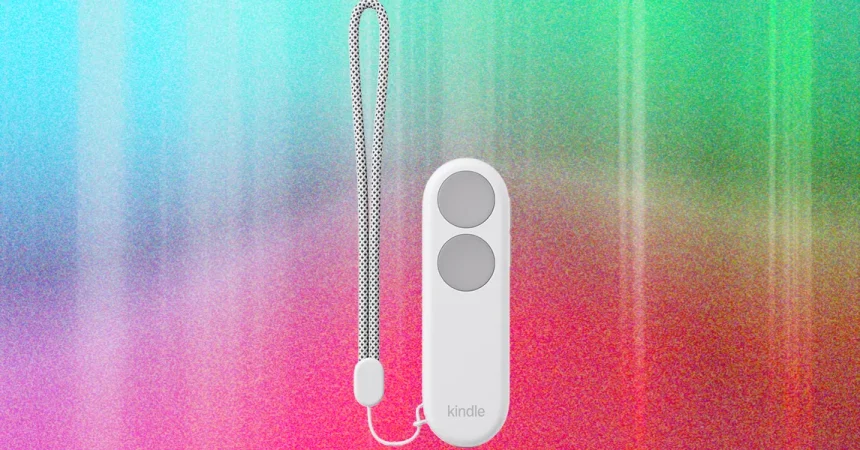
So what exactly is the Kindle Click? Simply put, it’s Amazon’s first official Bluetooth page turner designed specifically for Kindle e-readers. It pairs with the two latest generations of Kindles—the ones released in both 2024 and 2026—and it does exactly what you’d hope a page turner would do, but with a level of polish that third-party options have never quite managed. The device itself is a lightweight handheld remote that connects to your Kindle over Bluetooth. Once paired, you can use it to turn pages forward and backward, scroll up and down the screen, and even adjust the display brightness without ever touching the Kindle itself. The front of the remote features two large, comfortable buttons for page turning, while two smaller buttons on the right edge handle brightness adjustments. That brightness feature turned out to be far more useful than I expected. There were plenty of times when I was reading in bed and the room got darker, or the afternoon sun shifted and suddenly the screen felt too dim or too bright. Instead of reaching over to the Kindle and fiddling with settings, I just tapped a small button on the Click and adjusted everything from the palm of my hand. It sounds like a small thing, but it genuinely makes the reading experience feel smoother and more immersive. The Click charges via USB-C, which is convenient if you’re already using a modern charger, and it comes with a little wrist strap so you don’t have to worry about dropping it while you’re curled up on the couch. It’s a thoughtfully designed accessory from start to finish.
There is one small quirk that might trip you up at first. The button mapping is not quite what your eyes expect. When you’re holding the Click and you want to move down the page, you press the higher button. The lower button moves you back up to the previous page. At first, that feels a little counterintuitive because your brain naturally associates the top button with moving up and the bottom button with moving down. But once you think about it, the logic becomes clear: the button positions mirror the direction your thumb would naturally push, almost like you’re nudging the page forward. Still, for the first few minutes, you might find yourself pressing the wrong button and accidentally flipping backward when you meant to move forward. It doesn’t take long to get used to, but it’s worth knowing before you start so you don’t think the device is broken. In terms of battery life, Amazon hasn’t given a precise number, only saying that the Click “lasts for weeks.” That vague promise is a little frustrating for people who like exact specs, but I’m cautiously optimistic. The Click’s body is noticeably larger and sturdier than the cheap third-party remotes I’ve used in the past, which suggests there’s more room inside for a bigger battery. My hope is that it will outlast the tiny coin-cell-powered alternatives that always seemed to die at the worst possible moment. Even if it only lives up to the “weeks” promise, that’s still a massive improvement over the older aftermarket options I’ve tried.
Beyond the convenience factor, the Kindle Click is genuinely important as an accessibility tool. There are a lot of people who love reading but struggle with the physical act of holding a Kindle and tapping the screen over and over again. If you have arthritis, repetitive strain issues, or any kind of wrist or hand pain, the simple motion of turning pages can become exhausting or even painful. I say this from personal experience: I’ve struggled with wrist cysts for a while now, and holding a heavy tablet or even a lightweight e-reader in one hand while tapping with the other gets uncomfortable quickly. A page turner like this changes the entire experience. You can prop your Kindle up on a stand, settle into a comfortable position, and flip through pages with almost no effort at all. It’s a small device, but it can make a huge difference in how long you can read before your body starts complaining. Of course, you don’t need to have a medical condition to appreciate it. If you’re the kind of person who likes to read while eating, while lounging under a blanket, or while sitting in a position that makes reaching the screen awkward, the Click is a godsend. The one thing to keep in mind is that it works best when your Kindle isn’t also in your hand. If you’re holding the Kindle with one hand and the Click with the other, it feels a little redundant. But if you pair it with a Kindle holder or even a repurposed tablet stand, the setup becomes incredibly comfortable. I have a few favorite holders that I rotate through depending on where I’m reading, but honestly, there are so many good options out there now that you can easily find one that fits your space and budget.
The biggest reason I’m so enthusiastic about the Kindle Click, though, is how much better it is than the third-party page turners that Kindle users have been stuck with for years. Those older devices usually came in two separate parts: a clip that attached directly to the screen and a separate remote that you held in your other hand. The clip often blocked a chunk of the display, which was annoying even when it was positioned carefully. And because there were two components, you had to keep track of both of them, charge both of them, and hope they stayed paired with each other. It was a clunky, frustrating setup that always felt like a workaround rather than a real solution. The battery life on those tiny remotes was also a constant source of irritation—I can’t count how many times I sat down to read, only to discover that the remote had died since the last session. The Kindle Click does away with all of that. It’s a single, unified device. There’s no clip covering your screen, no second piece to lose, no separate charger to worry about. It costs a little more than some of the aftermarket models, but the price difference is completely worth it for the reliability and the clean design alone. This is one of those rare cases where paying a few extra dollars buys you a significantly better experience, not just a fancier logo.
At the end of the day, the Kindle Click is the accessory I’m recommending to everyone who owns a compatible Kindle. It’s not the flashiest product in Amazon’s fall lineup—that honor goes to the metallic-colored e-readers that have everyone talking—but it’s the one that actually improves your daily reading routine in a meaningful way. Whether you’re a long-time Kindle user with a shelf full of accessories or someone who’s just about to buy their first e-reader, the Click is a small investment that pays off every single time you sit down to read. It’s perfect for reading in bed, on the couch, at a desk, or anywhere else you want to be comfortable. It makes reading more accessible for people with physical limitations, more convenient for people who like to multitask, and more enjoyable for anyone who has ever wished they could turn a page without moving their hand. The metallic colors are beautiful and the new Kindle models are certainly tempting, but the Kindle Click is the quiet hero of this entire release. It’s proof that sometimes the best thing in a shiny new lineup is the one that doesn’t get the most attention—it’s just the one that works so well you wonder how you ever read without it.