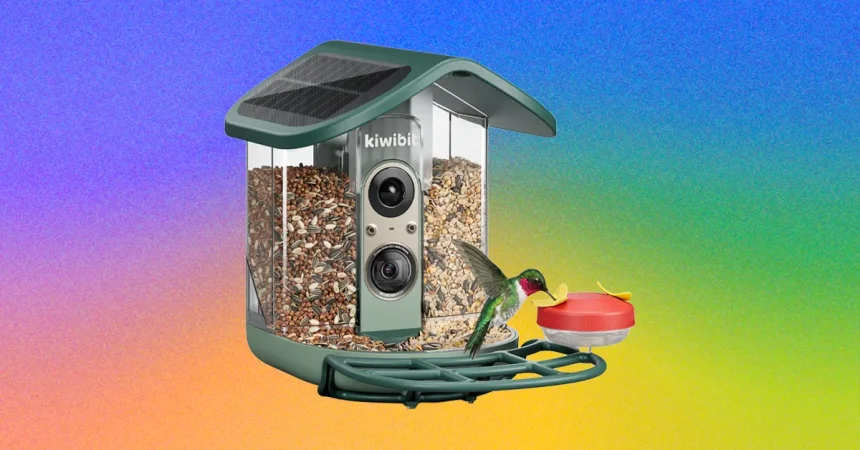
If you’ve spent any time looking into smart bird feeders, you’ve almost certainly heard the same two names over and over: Birdfy and Birdbuddy. They’re the brands that basically created the category and still dominate the conversation. But for the past couple of years, a quieter wave of competitors has been iterating in the background, and some of them have now reached the point where they’re genuinely giving the big names a run for their money. Kiwibit is one of those brands, and I’ve been testing their latest model, the Feeder 2 Pro, to see whether the hype is justified. My journey with Kiwibit actually started earlier, with its first feeder, the Beako. I was impressed by a lot of what it got right back then: a tough plastic build, a removable two-sided seed reservoir that made refilling and cleaning much less of a headache, and three-minute video clips that captured birds in long, watchable moments. Best of all, nearly every feature worked without requiring a paid subscription. The one big problem was the optional rooftop solar panel, which stopped working after about six weeks. That flaw kept the Beako from earning a spot in my overall recommendations. But Kiwibit listened, and when the Feeder 2 came out, the solar panel became standard, its output jumped from 4.4 watts to 5 watts, and the longevity issues were fixed. In fact, the Feeder 2 is now my top pick for Best Design. The Feeder 2 Pro builds on that by completely reworking the camera, adding phase detection autofocus and 4K HDR capture, which makes it one of the most technically impressive smart feeder cameras I’ve ever tested. But as I discovered over several weeks of use, great hardware can only take you so far when the software still has some catching up to do.
I ran the Feeder 2 Pro through a full month of testing, starting with one week at the free tier and then spending three weeks with the paid subscription, which Kiwibit calls Kiwibit Plus, though it’s also sometimes labeled “Family Premium” or “Premium Family” depending on where you look. The subscription costs $90 a year and unlocks a few major features: AI bird identification, 60 days of cloud recording, and a handful of new gallery views and weekly roundup reports. The feeder itself also supports microSD cards up to 512 GB, so you’re not completely reliant on the cloud if you’d rather keep things local. Without a subscription, you still get the full camera quality, which is worth calling out because some competing brands, like Birdbuddy, lock higher resolutions behind a paywall. Kiwibit doesn’t do that, and I appreciated that the 8-megapixel images and videos remained crisp and downloadable whether or not you pay. Videos start recording when a bird lands and continue for as long as the bird stays, up to three minutes, so you’re not missing the little movements and behaviors that make these feeders so entertaining. The phase detection autofocus works hard to keep birds sharp even as they hop around, and in most cases it does a great job. That said, I did notice something a little odd: the camera’s lens zooms in and out during capture, and that motion sometimes startled skittish birds. A few of them would stop eating and stare directly at the camera, clearly suspicious, and others just flew off. It wasn’t a constant problem, but it happened often enough that I felt I should mention it for anyone with a famously nervous bird population in their yard.
The free-tier experience, however, is pretty bare-bones. You get a feed of video captures, but there’s no AI identification to sort or label anything, which means you have to manually scroll through every clip to make sure you didn’t miss something interesting. That might be fine if you get a handful of visits per day, but in my yard, the same birds cycle through constantly, sometimes fifteen times or more in a single day. The thumbnails make this even more tedious because the camera angle and positioning mean they frequently show just the top of a bird’s head, or sometimes nothing useful at all. I found myself having to open clip after clip just to confirm that, yes, it was another dark-eyed junco. For a feeder with a $290 retail price, this feels out of step with the rest of the market. Most feeders in that price range either include a lifetime subscription or at least offer a much more generous free tier. Kiwibit seems to be betting that its hardware is compelling enough to justify the extra yearly cost, and to be fair, the hardware does justify a lot of the price. But the software gap is noticeable, and you should go into this knowing that you’ll either need to pay for the subscription or commit to doing a lot of manual bird-watching through the app.
The good news is that when you do pay for the subscription, the app becomes significantly more useful, at least in terms of bird identification. The same feed of video captures suddenly comes with species labels, so you can skip past the same old visitors and focus on anything new or unusual. There’s also a tile view under the “Visits” section that gives you a lifetime overview of which species have visited and when they were last seen. That’s a lovely feature for anyone who likes tracking yard biodiversity over time. But here’s where things get tricky: the AI identification is wrong a hefty percentage of the time, and I don’t mean subtle mistakes between two similar species. I mean wildly impossible IDs. I live in western Washington state, where fish crows, Cape May warblers, mangrove warblers, red fox sparrows, and grackles simply don’t exist. According to the Kiwibit app, though, all of those birds were regular visitors to my feeder. At one point, I got a notification that a pileated woodpecker had stopped by, which would have been genuinely exciting, except the video clearly showed it was just a regular crow. This kind of misidentification undermines the core purpose of a subscription that costs $90 a year. If you’re using the app to learn about the birds in your area, the AI will send you down plenty of wrong paths. It’s also worth noting that, unlike some competing feeders from Birdfy, the Kiwibit camera can’t identify multiple birds on the feeder at the same time. If a bunch of house finches show up together, you’ll only get a label for one of them, and the rest are just left out of the record.
On top of accuracy issues, the app experience itself can be overwhelming, especially for a company that is supposedly trying to compete with the cleaner, friendlier apps from Birdfy and Birdbuddy. Those brands have built their reputations on intuitive design, and that’s an area where they still have a clear edge. The basic non-subscription view in Kiwibit is simple enough, but the subscription layer tries to cram too much information into too many different places. There’s the tile view under “Birds,” a list of captures under “Feeds,” and a live view under “Live.” If you click into the live view, you suddenly get access to a calendar of captures organized by day. Then, if you dig into the “Me” section, there’s a completely different calendar view showing bird visit counts per day, plus a weekly report tab with stats from the past seven days. After four full weeks of testing, I still wasn’t sure where I was supposed to go first when I just wanted to see who had shown up that morning. The design feels like the company has tried to build every possible feature and then organized them with a structure that makes sense on a whiteboard but not in real life. That said, it’s not all bad. Downloading and sharing photos and videos is still easy, and the quality of the footage is genuinely excellent, so when you do want to show a friend the ridiculous tufted titmouse that came by, it’s a smooth process. It just takes some patience to learn where everything lives and to accept that you’ll be navigating multiple submenus to get a complete picture of your birds’ daily activity.
So where does that leave the Feeder 2 Pro? It’s a genuinely gorgeous piece of hardware with a design that stands out in a crowded market. The solar panel works, the build quality is excellent, the camera produces stunning 4K HDR video with crisp autofocus, and the fact that the camera quality isn’t locked behind a subscription is a major selling point. If you value hardware above all else and you don’t mind paying the $90-a-year premium for AI identification and cloud storage—or if you’re happy to use the free tier and identify birds yourself—the Feeder 2 Pro is a solid choice. But it’s not the complete package yet. The AI identification errors are too frequent and too absurd to ignore, the app’s information architecture is genuinely confusing, and the lack of a lifetime subscription option at a $290 price point feels like a miss when rivals offer more polished software with clearer pricing. For anyone who’s just getting into smart bird feeding and wants a setup that feels magical from the moment it goes online, the older, more polished options from Birdfy and Birdbuddy are probably still the safer bet. But for someone who already loves birding, doesn’t mind tinkering, and wants the best possible camera hardware you can attach to a feeder right now, the Kiwibit Feeder 2 Pro is absolutely worth considering. It’s a feeder that feels like it was designed by someone who genuinely cares about seeing birds in sharp, stunning detail, even if the software hasn’t quite caught up to the promise of the hardware. I’ll be keeping mine outside for a while longer, and I’m curious to see how Kiwibit continues to refine the app. If they fix the AI and clean up the interface, they won’t just be competing with Birdfy and Birdbuddy—they’ll be leading the pack.