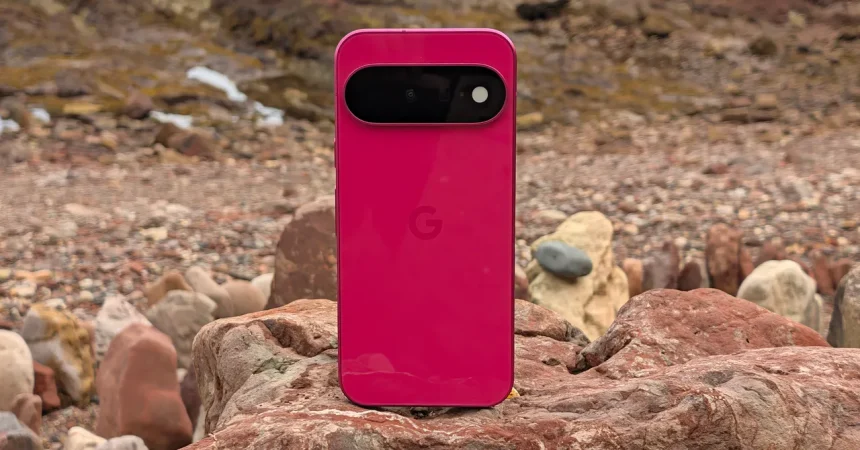
I’ll be honest: the first thing that made me happy about the Pixel 11 was the color. My review unit arrived in Hibiscus, which is really just a polished way of saying hot pink, and it’s the kind of shade that makes you want to put your phone on the table face-up just so people can see it. Google also sells a Pistachio model, a warm green that feels softer and more sophisticated, plus the usual Frost white and Obsidian black for anyone who wants zero drama. The one color I miss is Indigo, which was probably the most popular Pixel hue last year and is nowhere to be found this time. It’s frustrating because Google, like Apple, seems to have decided that the regular Pixel gets to be fun and vibrant while the Pro models have to dress like they’re going to a corporate meeting. The Pro colors are fine, but they’re not exciting. For me, the Hibiscus is proof that Google knows how to make a phone feel personal. It’s not just a slab of glass and metal; it’s a statement. And if you’re looking for a smaller phone but don’t want to give up that personality, this is exactly where the Pixel 11 earns its keep. I know color is subjective—one person’s hot pink is another person’s “too much”—but it matters more than specs to a lot of people. It’s also one of the main reasons to choose the regular Pixel over the Pro. Yes, the Pro models have bigger batteries and extra cameras, but they look so serious. The smaller Pixel, on the other hand, is allowed to be fun, and that’s a bigger deal than it sounds in a world where every smartphone looks like a black rectangle. The Pistachio is especially tasteful, by the way; if hot pink isn’t your thing, that’s the one I’d pick. It’s a green that can pass for neutral but still has warmth. So even though I’m mourning Indigo, I can’t stay mad for long, because the remaining palette is strong.
Once you stop staring at the color, you notice the size. The Pixel 11 has a 6.3-inch screen, which is technically large, but in 2025 that’s the new compact. I spent most of last year carrying the Pixel 10 Pro XL, and the first thing I noticed after switching was how much easier this phone is to use one-handed. I could reach the top of the screen without contorting my hand, and it slipped into pockets that never accepted the XL. It’s a little thick, but I actually like that. It gives you a better grip and makes the phone feel solid without feeling heavy. The profile is nearly identical to the bigger Pixel 11 Pro, which means cases designed for the Pro will work with this phone. That’s convenient if you’re upgrading from a Pro and want to reuse accessories. Still, I strongly recommend buying a case, because I already managed to scuff the paintwork after dropping it on the beach. The finish looks lovely, but it’s not armored. A case also lets you buy a color you like without worrying about keeping it pristine. The beach drop didn’t crack the glass or affect performance, but it did leave a tiny mark on the frame, and that was enough to make me wish I’d been more careful. To be clear, it’s not a tiny phone. It’s smaller than a so-called Pro Max, but it’s still a big screen. In an era where most premium phones have crept past six and a half inches, a 6.3-inch model feels almost retro, and that’s a compliment. I found myself using it more often with one hand, thumbing out messages and scrolling idly while standing on the train. When I did need two hands, it was never awkward. The weight distribution is good enough that the thickness doesn’t cause any fatigue. I should also mention that the interchangeable case compatibility with the Pro is rare and welcome. If you have a favorite case, you don’t have to buy a new one. For a small phone, it doesn’t feel compromised in the hand at all.
Now, the screen. The Pixel 11 uses the same 6.3-inch OLED panel as last year, with a resolution of 1080 by 2424 and a refresh rate that can be set to 60 or 120 Hz. That’s a little disappointing in one specific way: Google didn’t move to a variable refresh rate that can scale from 1 Hz to 120 Hz. That kind of display has become standard on high-end phones, and it can save battery by dropping the refresh rate when you’re looking at a static screen, like a photo or an ebook. On the Pixel 11, you have to choose between 60 Hz for battery life or 120 Hz for smoothness, and the default is 60 Hz. You can dig into Display settings and turn on 120 Hz, but of course most people won’t know or bother. I immediately toggled it on, and after that, scrolling was silky and animations felt fluid. The brightness, at least, is a real win: the panel has a peak brightness of 3,000 nits, and I never found myself squinting, even outside on a bright day. It’s not quite as bright or as sharp as the Pro model’s screen, and the bezels are a bit more noticeable. But you have to hold them side by side to really see the difference. In everyday use, the Pixel 11’s display is excellent. Colors look rich, blacks are deep, and the punchy brightness makes it feel far more expensive than the phone’s price suggests. At 60 Hz, the phone feels perfectly fine; most content is static. But the second you scroll through a long article or play a game, you notice the difference. I’d love to see Google embrace adaptive refresh rates next year. Still, for this year, if you’re okay with the default, you’ll be happy. The 3,000-nit peak brightness is more than enough for HDR content, and the extra brightness helps when you’re using navigation outdoors. Side-by-side comparisons with the Pro will show a slightly less sharp image and slightly thicker bezels, but those are nitpicks. Overall, the display is one of the strongest parts of the Pixel 11.
The Pixel 11’s biometric setup is a mixed bag. The fingerprint sensor is fast and dependable; I barely thought about it during my review. It unlocks with a quick tap, works in the dark, and doesn’t fail often. But Google’s Face Unlock is still a weak point. It doesn’t work in the dark, which is weird in a phone that costs this much. iPhone users are used to Face ID working at night, and they’ll find themselves staring at a locked phone in a dark room, holding it up to their face and waiting. That’s not a dealbreaker, but it is a noticeable regression in quality of life. The bigger change for US buyers is the removal of a physical SIM card slot. The Pixel 11 is eSIM-only in the US. That’s a bold move. Physical SIM cards used to make switching phones simple—you just pop the card out and put it in another phone. Now you need to go through your carrier’s app or website to activate a new eSIM, and if you’re switching abroad, you have to set up an international plan digitally. The good news is that eSIM activation has improved a lot. Many carriers now have QR codes and apps that let you switch in minutes. And especially with travel, you can buy an international eSIM online before you land, which is actually easier than finding a physical SIM at an airport kiosk. I’ll still miss the physical slot sometimes, but honestly, it’s becoming a nonissue. If you’re used to eSIM, you won’t think twice. After Apple made eSIM-only phones the norm in the US, Google was always going to follow. There’s something a little unsettling about not being able to pop out a SIM card and hand it to someone, but the convenience of having one fewer port on the side of the phone is fine. Most people will set this up once and never think about it again.
Under the hood, the Pixel 11 is powered by Google’s new Tensor G6 chip, which is supposed to deliver 20 percent better power efficiency, 25 percent faster browsing, and 15 percent faster app loading. Numbers like that are easy to ignore until you actually live with the phone. After using it for several days, I can say it feels fast. Not in a dramatic, day-and-night way, but in the small moments: apps open with less delay, web pages scroll without hiccups, and the camera app snaps into action a fraction of a second sooner. I compared it with my Pixel 10 Pro XL, and the difference was noticeable, especially when I was waiting for video from my Nest doorbell to load. The Pixel 11 received the notification and streamed the clip a couple of seconds faster than the older phone. That’s not a benchmark score, but it’s the kind of real-world speed that makes you feel like you’re not wasting time. The phone has 12GB of RAM and comes with either 256GB or 512GB of storage, which is generous enough for most people. Google’s Tensor chips have never been about raw gaming performance anyway; they’re about machine learning, photography, and everyday responsiveness. In those areas, the G6 nails it. I could run all my usual apps, jump between them, and never see a stutter. The improved power efficiency also means the phone doesn’t run hot during normal use, which is more than I can say for some older Pixels. If you’re someone who checks social media, takes photos, streams music, and handles email, the Pixel 11 will never make you wait. It’s a smooth, polished experience that reminds you why Google’s software and hardware integration is still special.
But gaming is where the Pixel 11 hits its limits. I’m not a serious mobile gamer, but I know enough to test a phone with something heavier than Candy Crush. Wuthering Waves is one of the most demanding mobile games around, so I loaded it up on the Pixel 11 to see how the Tensor G6 handled it. Short answer: it’s playable, but not great. There were moments of fluid animation, but the action stuttered noticeably during combat, and even when I switched to the Balanced graphics and performance mode, I still saw plenty of dropped frames. After an hour of gaming, the phone felt warm to the touch, and the battery had dropped from 40 percent to 26 percent. That’s a steep drain. Less demanding games like Mini Metro and Alto’s Odyssey ran perfectly, proving that casual games aren’t a problem. But if you’re looking for a phone to play graphically intense games on high settings, the Pixel 11 isn’t it. That’s not unusual for a Pixel—Google’s Tensor chips have always prioritized AI and camera over gaming. But it’s still a disappointment to see the gap remain, especially when competitors at this price point handle gaming more smoothly. The rest of the phone is so pleasant that I’m tempted to forgive the gaming weakness. I can live with it, because I don’t play Wuthering Waves every day. But if you do, you should either get a phone with a gaming-oriented chip or temper your expectations. The Pixel 11 is a fantastic everyday companion for people who care about cameras, colors, and comfortable one-handed use. It’s not the phone for AAA mobile gaming. For most folks, though, the pixel-perfect pink, the solid battery life in regular use, and the comfortable size make it a wonderful choice—provided you can get over the loss of Indigo and the missing SIM slot.