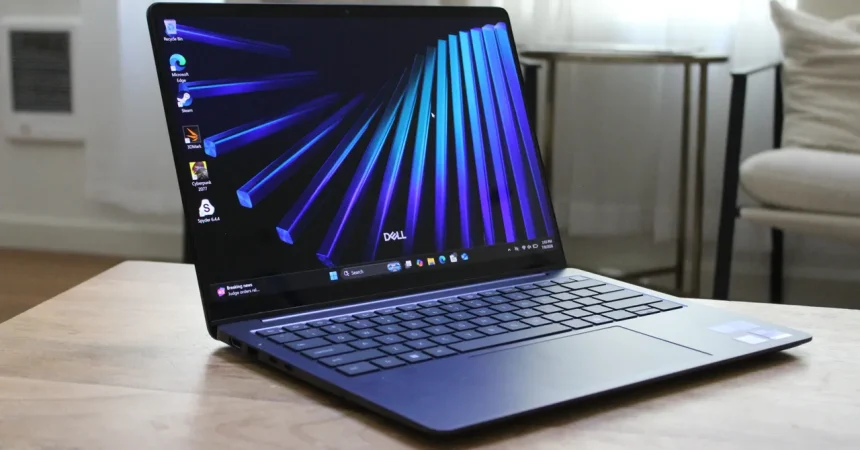
The Dell 14S arrives as a sensible, pragmatic workhorse in a market increasingly obsessed with extreme minimalism. While many ultra-premium laptops are stripping away utility in favor of aesthetics, Dell has wisely kept a robust selection of ports. Featuring two USB-A 3.2 Gen 1 ports—positioned conveniently on either side—alongside a modern HDMI 2.1 output, two Thunderbolt 4 ports, and a standard headphone jack, the machine feels respectful of the reality that most of us still carry a messy dongle bag. My only gripe is the omission of an SD card slot, which feels like a missed opportunity for a device pitched at productivity, and the lack of a secondary charging port on the right side, which would have offered that extra bit of flexibility when desks are configured inconveniently.
When it comes to value, the 14S finds itself in a bit of a tug-of-war with both its own siblings and the competition. At a starting price of $1,469 for the Core Ultra 7 355 model with 16GB of RAM and 512GB of storage, you have to ask yourself who this machine is truly for. It sits in a strange middle ground: it is $170 more expensive than the base 13-inch MacBook Air, yet it struggles to justify that premium against the sheer polish of Apple’s ecosystem. Furthermore, Dell continues to sell the previous-generation 14 Plus for nearly $600 less. Given that the performance jump—a mere 14 percent increase in graphics—is barely perceptible in daily tasks, the 14S requires a consumer to be very specific about their needs to justify the higher price tag.
The processor story is equally complex. While you can deck out the 14S with the cutting-edge Core Ultra X7 or X9 silicon, that kind of power is largely overkill unless you are a dedicated gamer or a heavy-duty video editor. For the vast majority of office workers, casual creators, and students, the Core Ultra 7 355 is more than enough. It handles general multitasking with ease, benchmarking impressively against Apple’s M4 and M5 chips in multicore performance. However, because the everyday user will rarely hit the thermal or processing ceiling of this hardware, the allure of the top-tier chips feels more like a marketing flex than a practical upgrade that will change how you actually get your work done.
The real headline for the 14S, however, is its endurance. The integration of Intel’s latest Core Series 3 chips makes a remarkable difference in power efficiency. During my stress tests, I reached the 20-hour mark of local video playback with half the battery still remaining—a level of longevity that truly changes the “range anxiety” often associated with Windows laptops. It is a massive step forward for the platform, ensuring that you can leave your power brick at home for the day without constantly hovering over your percentage icon to see how much life remains.
Despite those gains, the 14S still hasn’t quite cracked the “always-ready” performance of its Qualcomm-based rivals. While it shines during active use, the standby battery drain remains a lingering issue. If you treat your laptop like your phone—tossing it into a bag on Friday and expecting to pick it up on Monday with the same amount of charge—you will be disappointed. I noticed that leaving the device unplugged with the lid closed for a few days resulted in a roughly 50 percent drop in battery capacity. It isn’t a dealbreaker for most, but it’s a lingering reminder that the architecture still has a bit of catching up to do compared to the sleep-state efficiency seen elsewhere.
Ultimately, the Dell 14S is an exceptionally capable machine that suffers slightly from a crowded family tree. It is built well, feels reliable, and manages battery life in a way that would have felt like science fiction just a few years ago. Yet, by straddling the line between a budget-friendly workhorse and a premium powerhouse, it lacks a singular, undeniable identity. If you prioritize legacy ports and a rock-solid Windows experience, it’s a top-tier choice. But if you’re looking to get the most for your money, you might find yourself doing as much comparison shopping with Dell’s own catalog as you do with the competition.