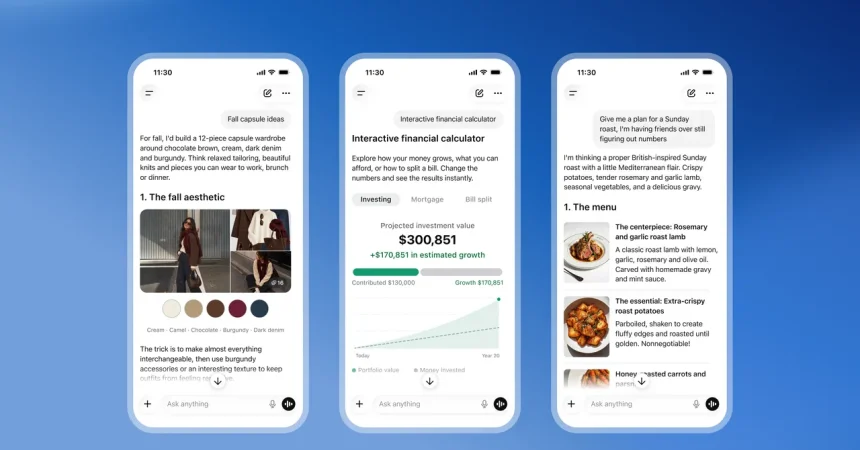
For as long as chatbots have been part of our digital lives, asking one a question has usually meant preparing yourself for a dense block of text. You type something in, wait a beat, and then receive a carefully worded essay that tries to answer everything at once. Sometimes there’s a helpful image pulled from the web, sometimes there isn’t. But that familiar experience is about to change in a significant way. OpenAI has announced a major overhaul to how ChatGPT responds to prompts, introducing what it calls an “Intelligent UI” update. Instead of always defaulting to paragraphs, ChatGPT will now be able to generate visual, interactive, and custom elements when they genuinely help answer your question. The new experience is powered by the company’s latest model, GPT-6, which began rolling out to paid users on launch day and will reach free users the very next day. I had the chance to try this new interface before it went live, and after spending some time with it, I can honestly say it feels like a breath of fresh air. The era of the unbroken wall of text may finally be coming to an end, replaced by something far more dynamic and personal.
The first thing that struck me during my hands-on time with ChatGPT’s Intelligent UI was how naturally these visual elements blended into the conversation. It didn’t feel like a gimmick or a forced attempt to make things look flashy. It felt like the interface was actually listening to what I needed. For example, when I asked for a diagram of a slug, I expected maybe a simple image with a few labels. Instead, ChatGPT generated a detailed, anatomy-focused visual that let me explore the creature at my own pace. There were buttons for each different part, from the upper tentacles all the way down to the muscular foot. I could press one, learn something specific, and then move on to the next. It was interactive, educational, and oddly delightful. Then I tried something more practical: I asked for a San Francisco apartment affordability calculator. The chatbot didn’t just give me a list of tips or generic advice. It built a working calculator with movable sliders right there in the interface. I could adjust my income and other expenses, and the tool would show me what percentage of my take-home pay different units would cost. It was personalized to my input, instantly responsive, and genuinely useful in a way that a static paragraph never could be. This is not just a cosmetic upgrade; it’s a shift in what a conversation with an AI can actually do.
My favorite moment during the entire preview, though, was an airplane seat explorer. I’ll admit, I have strong opinions about where I sit on a plane, and I’m not a fan of exit rows. Something about the responsibility, the lack of a seat in front of you, and the extra legroom that always feels a little too exposed just doesn’t appeal to me. So I asked ChatGPT to build me a custom tool that would compare the cabin layouts of four different Alaska and Delta planes. The result was exactly what I wanted. The interface displayed a seat map for each aircraft, and I could tap any seat to see more details about it. The exit rows were highlighted in green, which made it incredibly easy to avoid them. I could flip between plane models, compare configurations, and get a real sense of where I’d want to sit on my next trip. It felt less like chatting with a bot and more like using a specialized travel app that had been built specifically for me in a matter of seconds. And that’s the real magic of this update. It’s not just about adding images to answers. It’s about generating functional, interactive software on the fly, software that is tailored to your exact question, your preferences, and your quirks. For a moment, I forgot I was talking to a chatbot at all.
Of course, not every answer you get from ChatGPT is going to suddenly include a chart, a graphic, or a set of buttons. OpenAI has been careful about that. The company has a design team that spent a great deal of time thinking about when these visual additions actually add value and when they just create clutter. Aarush Selvan, a product manager at OpenAI, emphasized this exact point. He explained that the team focused on figuring out when a diagram or an interactive element is truly helpful, and when it starts to make the interface feel overwhelmed. That restraint is important. A screen full of sliders and buttons for a simple factual question would be exhausting. But when the technology is deployed thoughtfully, it can transform an answer from something you read into something you interact with. And if you’re not someone who wants visuals at all, you can simply tell ChatGPT to generate fewer of those outputs. The system is designed to adapt to your preference, not to force the same style on everyone. That level of personalization is what makes this feel human rather than robotic. It’s a recognition that different people think, learn, and understand in different ways, and that the interface should be flexible enough to meet those needs.
This isn’t just an OpenAI idea, either. Google announced something similar earlier this year when it expanded the bespoke results you might see in Search. Their version is called “generative UI,” and it works in much the same spirit. For example, if you want to understand deep space better, Google Search can output an adjustable graphic that breaks down how black holes work using multiple sliders. You can tweak the parameters, see how different factors change, and build a more intuitive understanding than you could get from reading alone. This convergence between the major players in AI signals that chatbot experiences are becoming increasingly multimodal. Text, images, voice, and now interactive interfaces are all blending into a single, seamless user experience. When OpenAI launches an updated ChatGPT that is easier on the eyes and more interactive for over a billion users, it’s hard to deny that the multimodal era is truly here. But this shift also raises some deeper questions. If AI is starting to dictate what software looks like for each individual user, what happens to the role of the human designer? There is a very real possibility that this trend toward generative user interfaces will spark an identity crisis for designers who have spent their careers carefully crafting layouts, user flows, and visual hierarchies. If an AI can generate a custom interface in seconds, the traditional process of designing for the average user suddenly feels almost obsolete. Yet there is also an opportunity here. Designers can shift their focus from designing static pages to designing the systems that generate those pages, defining the rules, the aesthetics, and the boundaries within which the AI can play. The role doesn’t disappear, but it does evolve.
Looking ahead, it’s clear that the future of chatbots is deeply personal. With AI tools now able to quickly generate custom software, the experience of asking a question online is becoming less about retrieving a fixed answer and more about creating a tailored environment for exploration and understanding. You won’t just receive information; you’ll receive a tool that was made for you in that moment, for your specific query, your preferences, and even your mood. The implications are enormous. Education, travel, shopping, health, research, and countless other fields could all be transformed by interfaces that adapt to the person using them. We are moving away from a one-size-fits-all web toward something far more fluid and individual. And honestly, it’s exciting. As for me, I already know exactly what I want to see more of. I want slug diagrams with every anatomical detail mapped out, apartment calculators that make sense of impossible housing markets, and airplane seat maps that keep me far away from exit rows. Good riddance to the walls of text that used to greet us every time we asked a question. The future is visual, interactive, and wonderfully specific to what each of us needs. It’s a future where the software bends to fit our lives, rather than the other way around. And if that means I never have to squint at another generic block of text again, then I’m all in. This is more than an update. It’s a whole new way of talking to machines, and it’s only just beginning.