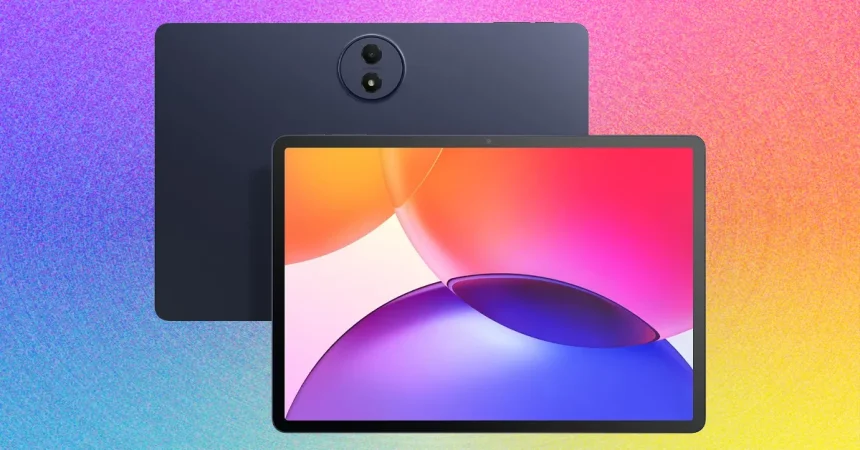
The TCL Tab A1 Plus stands out in the crowded market of budget-friendly Android tablets by offering a refreshing blend of utility and thoughtful design. One of its most impressive software additions is the “Magic Hub,” a clever sidebar feature that acts as a digital junk drawer for your clips, images, and text snippets. While I’ve experimented with this tool on TCL’s smartphones in the past, it finally feels like it has found its true home on this larger screen. When you’re multitasking in split-screen mode, being able to drag and drop information between apps isn’t just a nice-to-have; it’s a genuine productivity booster that makes moving content between tabs feel effortless, saving you the headache of constant copy-pasting.
The device also bridges the gap between a standalone tablet and a laptop accessory through its display modes. With “Extend Mode,” the Tab A1 Plus effectively transforms into a secondary monitor for your primary computer, which is a lifesaver when you’re working on the go and find yourself missing the extra screen real estate of your desk setup. There is also a “Mirror Mode” if you need to project your screen elsewhere, though I personally find the dual-monitor workflow much more compelling. It essentially turns a portable entertainment device into a functional workstation, adding a layer of versatility that many other budget tablets simply fail to offer.
On the software front, TCL has leaned into the trend of integrating artificial intelligence directly into the tablet’s ecosystem. Features like Gemini, Writing Assist, and a Smart Translator come pre-installed and, quite impressively, operate entirely on-device rather than through a cloud connection. Because these tools run offline, there is a distinct advantage regarding data privacy; you don’t have to worry about your personal musings or documents being uploaded to a server. That said, expect a trade-off in the complexity of the responses you get. These local AI tools are perfectly capable for day-to-day, straightforward tasks, but they lack the heavy-duty analytical power you’d find in more robust, cloud-based alternatives.
When it comes to the “real-world” experience, battery longevity is often the make-or-break factor for any tablet, and the A1 Plus holds its own with remarkable resilience. During my testing, the battery held up through a punishing daily cycle of web browsing, intensive multitasking, and several hours of streaming—including catching a few baseball games—without dying on me before the day was done. Even when you do finally hit zero, the sub-three-hour charging time is reasonable, and the tablet’s standby mode is exceptionally stingy with power. You can leave the device on your nightstand for a day or two and find that you haven’t lost more than a negligible percentage of juice.
Comparison is where the A1 Plus truly earns its stripes, as it sits comfortably at the top of the budget-tier hierarchy. When stacked against the Lenovo Idea Tab Plus, the TCL comes out on top; while both offer crisp 2.5K resolutions, the TCL’s 120-Hz refresh rate provides a vastly smoother experience, and its color accuracy makes the Lenovo’s display look somewhat washed out by comparison. Though Lenovo does offer a slightly more robust promise regarding long-term Android software updates, that doesn’t quite outweigh the superior day-to-day visuals of the TCL. Even the industry-standard Samsung Galaxy Tab 11, which carries a respectable reputation, struggles to keep pace here, as its 1080p screen simply cannot compete with the sharpness and clarity delivered by the A1 Plus.
In summary, if you are in the market for an entry-level Android tablet that doesn’t force you to settle for bottom-tier performance, the TCL Tab A1 Plus is the gold standard right now. It occupies a unique space, offering a refined, smooth display and a set of practical productivity tools that make it feel like a budget-conscious cousin to the base-model iPad. While it isn’t going to outperform a top-of-the-line flagship device in heavy creative workloads, it more than satisfies the needs of 95% of users. It is reliable, vibrant, and surprisingly capable, making it an easy recommendation for anyone who wants a high-quality tablet experience without the premium price tag.