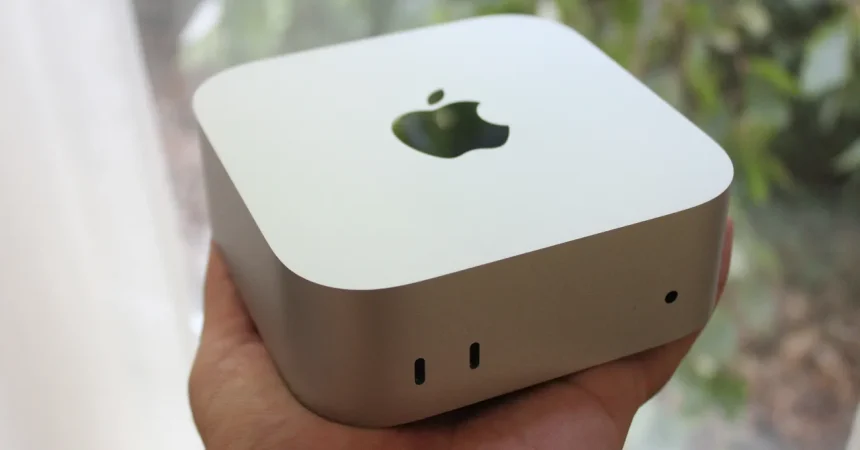
There is something reassuring about the way Apple refuses to mess with a winning design. The M6 Mac Mini shows up in 2026 with the same small, silver aluminum chassis that has been around for what feels like a decade, and honestly, that’s part of the appeal. It’s compact, it’s quiet, and it weighs hardly anything. You can hide it behind a monitor, toss it into a bag, or leave it sitting on your desk as a tiny, elegant paperweight that just happens to be able to edit 8K video. If you’ve never owned a Mini before, here’s what you’re in for: the unboxing is quick, the setup is easier than just about any desktop PC you’ve ever wrestled with, and within five minutes you’ll find yourself wondering why anyone still buys a tower. There are no excess lights, no obnoxious fans, no unnecessary flashes of gamer aesthetic. It’s just a block of aluminum with a set of carefully chosen ports and a power cord. It’s an exercise in minimalism that Apple has long since mastered, and it remains one of the most likeable computers the company makes. But the design isn’t new, and anyone who picked up an M1 or M2 Mini will feel immediately at home. That’s fine, though, because the real story, as usual, is underneath the hood. Still, before we dig into the silicon, it’s worth taking a quick tour around the outside, because even here there are a few pleasant surprises and one or two genuinely questionable choices. That balance between what’s brilliant and what’s annoying is what gives this machine its personality, and I mean that in the most affectionate way possible. The Mac Mini has always been a computer you love despite its quirks—not because of them. And this generation is no different. It’s just more capable, more powerful, and more ready to handle the kinds of heavy-duty workloads that used to require a workstation. All of that, wrapped up in a chunk of aluminum small enough to fit in the palm of your hand. That’s the magic of the Mac Mini.
Let’s talk about the ports, because the Mini’s connectivity is one of its biggest selling points, and Apple has made some genuinely thoughtful choices here. On the front, you get two USB-C ports running at 10 Gbps, a headphone jack, and a tiny power LED. This is the kind of layout you end up loving after a few weeks of ownership. The ports you use most often—flash drives, portable SSDs, camera cables, a pair of wired headphones—are all right there within reach, while the back stays clean and organized for your permanent connections. Around the back, you’ll find three Thunderbolt 4 ports, an HDMI 2.1 port, an Ethernet jack, and the power adapter barrel. It’s a comprehensive selection that would have cost a fortune in a Mac Pro just a few years ago. But what really gets me excited is the display support. This little box can run two 5K 120 Hz external displays, like Apple’s own Studio Display XDR or the BenQ 5K MA270S, at the same time. Prefer to stick with 4K? No problem. You can also run three 4K panels simultaneously, each one showing more pixels than your average TV. For the first time, a base-model Mac Mini can genuinely rival machines with dedicated graphics cards from just a couple of generations ago. Whether you’re a video editor with a timeline spread across two monitors, a day trader with a wall of charts, or just someone who likes a lot of screen real estate while writing, editing, or researching, the M6 Mini has you absolutely covered. It’s fast, it’s fluid, and it doesn’t stutter. It just gets out of your way and lets you work. That’s something you used to expect only from the big, expensive iMacs or Mac Pros. Instead, here it is, hidden behind a monitor in a box that’s smaller than a thick novel and twice as unassuming.
Alright, let’s get to the elephant in the room—the power button. Yes, Apple has done it again. The power button is still tucked underneath the back left corner of the Mac Mini, completely hidden from view and irritatingly hard to reach. If you know the trick, it becomes second nature pretty quickly; you just slide the Mini to the edge of your desk, tilt it up a little, and reach your finger underneath until you press the small white button. It’s a bit like trying to scratch an itch on your back through a letterbox, awkward but ultimately doable. However, if you’re new to the Mini, or if you’ve just connected all your cables and suddenly realize you haven’t a clue where the power button is, you’ll end up flipping the entire machine over, cables and all, just to find it. It’s a genuinely silly design decision, made even sillier by the fact that Apple has had twelve years to fix it, and yet here we are. Worse still, the Mac Mini pairs in spirit with Apple’s own Magic Mouse, which still charges from its bottom, meaning you can’t use it while it’s plugged in unless you enjoy living like a monster. Yes, these are relatively minor annoyances in the grand scheme of things, and yes, I know you could simply plug in a regular mouse and move on with your life. But they’re worth mentioning because they’re so typically Apple: the same company that obsesses over the curve of a bezel will happily place a power button in a spot that defies all logic. It’s puzzling. It’s frustrating. And honestly, it’s kind of endearing, because it means the Mac Mini isn’t just another ruthlessly efficient piece of machinery—it has just enough weird stubbornness to give it character.
If you’re a photographer or videographer, you have my full permission to groan. The Mac Mini is an absolute dream machine for content creators, with enough horsepower under the hood to chew through massive file exports and 10-bit video without breaking a sweat. Yet Apple, in its infinite wisdom, still refuses to include an SD card slot on the Mini. You want to pull footage off your mirrorless camera? You’ll be reaching for a USB-C dongle or a dedicated card reader, because the SD slot simply isn’t there. It’s a huge miss, especially when the larger Mac Studio has one right on the front of the chassis. That one addition would have turned the Mac Mini into the perfect upgrade for thousands of shooters who don’t need the full power of a studio machine. Instead, it feels like a deliberate nudge to push you toward a more expensive model, or at the very least a clumsy, annoying adapter that costs extra and adds extra bulk to your bag. And while we’re on the subject of what’s missing, let’s talk about color options. The Mac Mini comes in exactly one shade: silver. That’s it. No midnight blue, no space gray, no cheerful sunrise yellow or pastel pink. The iMac looks like a celebration of the rainbow, but the Mini is, and always has been, understated to the point of monotony. Two small complaints, to be sure, but they start to add up when you’re using a machine that otherwise nails all the fundamentals. Still, I try not to let a couple of missing ports ruin my day. Not when the M6 chip inside is this important.
Now for the main event: the M6 chip itself. This isn’t just a modest spec bump; it’s a genuine generational leap. Apple has moved to a 2-nanometer process node, which means they’ve managed to pack roughly 46 billion transistors onto a single slice of silicon—a figure that would have sounded like science fiction just a decade ago. Compared to the M4, that’s about a 35% increase in transistor density, which directly translates to better energy efficiency and more raw performance at the same power draw. The M6 Mac Mini also adds two extra CPU cores compared to the M4, bringing the total to 12, and Apple claims a 21% boost in single-threaded performance along with a 36% improvement in multi-threaded tasks. Those numbers are nothing to sneeze at, but here’s where the story gets a little more complicated. If you’re coming from an M5-based MacBook Air, the improvements are considerably less dramatic. In my single-core testing against the M5 Pro chip inside the MacBook Pro, the M6 was only about 10% faster in typical everyday tasks. And when it comes to heavily multi-threaded workloads, the MacBook Pro’s additional performance cores actually let it pull ahead. So what does that all mean for you? Simple. If you’re upgrading from an Intel Mac or an M1-era machine, the M6 Mac Mini will feel like you’ve strapped a rocket to the underside of your desk. Everything happens instantly, exports fly by, and you’ll wonder how you ever managed with a slower laptop. If you bought an M4 or M5 machine recently, you’ll definitely notice a difference, but it’s not going to blow your socks off—unless your workflow is especially demanding, in which case the M6 is more than happy to step up.
Let’s take a moment to talk about thermals, because nothing kills a desktop experience quite like a computer that sounds like a jet engine every time you lean on it. The Mac Mini does have a fan inside. It’s not a large fan, but it’s there, and when you really put the M6 chip under load, you’ll definitely hear it spin up. It’s a gentle whir, more of a low hum than a whine, and it quickly fades into the background even during long, intense rendering sessions. But it’s present, and if you’re coming from a completely silent, passively cooled MacBook Air, you will notice the difference. That’s not necessarily a bad thing, though. The flip side of that acoustic trade-off is sustained performance. Because the Mac Mini has active cooling, it can run flat out for hours without throttling, which is something the MacBook Air simply cannot do. The Mini will happily chew through a massive video export at full speed while your lap-friendly laptop starts to slow down and get uncomfortably warm. So if you’re someone who regularly exports long video files, compiles big chunks of code, or renders complex 3D scenes, the Mac Mini will finish the job faster, and it won’t peel your paint in the process. As for the future, we’ll have to wait for the M6 MacBook Air—which, if the rumor mill is correct, probably won’t show up until 2027—to see how the two compare side by side. But for now, the Mac Mini represents one of the best desktop values Apple has ever offered. It’s fast, it’s quiet, and it’s more than capable of handling whatever you throw at it. Yes, the power button placement is maddening. Yes, the missing SD card slot is a genuine frustration. And yes, I would love a few more color options. But when I step back and look at the whole package—the price, the performance, the tiny little chassis—those complaints fade into the background. This is a computer for someone who wants to get things done, whether that means running a home office, editing a short film, writing a novel, or just enjoying a computer that feels quick and responsive every single day. It’s a computer for the student who needs a powerful Mac without selling a kidney to afford it. It’s for the creative professional who wants pro-grade performance in a box that doesn’t dominate the room. And it’s for anyone who’s ever looked at a massive, blinking, RGB-soaked gaming tower and thought, “There has to be a better way.” There is. It’s called the Mac Mini, and it has never been better.