Let’s be honest: shopping for a monitor can feel like wandering through a maze of specs, acronyms, and price tags that all blur together. I’ve spent a lot of time with a lot of displays, and the truth is that the right monitor has less to do with what’s objectively “best” and more to do with what fits your workspace, your eyes, and your budget. If you’re a Mac user, for example, you might have noticed that not every monitor feels like it belongs next to a MacBook or Mac Studio. BenQ has actually made a name for itself in this space, and the company’s MA series is specifically designed to play nicely with macOS. The 27-inch 4K MA270U is a great example: it gives you that crisp, comfortable Retina-like experience without forcing you to spend Apple-level money. It’s not the only Mac-friendly BenQ out there, but it does hit a sweet spot for people who want sharp text, good color, and a clean design without going overboard. The company also offers models with similar features but fewer pixels, which can save you a few bucks if you don’t need the full 4K sharpness. The point is, even if you’re deep in the Apple ecosystem, you don’t have to buy a monitor with an Apple logo on it to feel at home. There are plenty of thoughtful options that quietly get out of the way and let you work, create, and binge-watch in comfort.
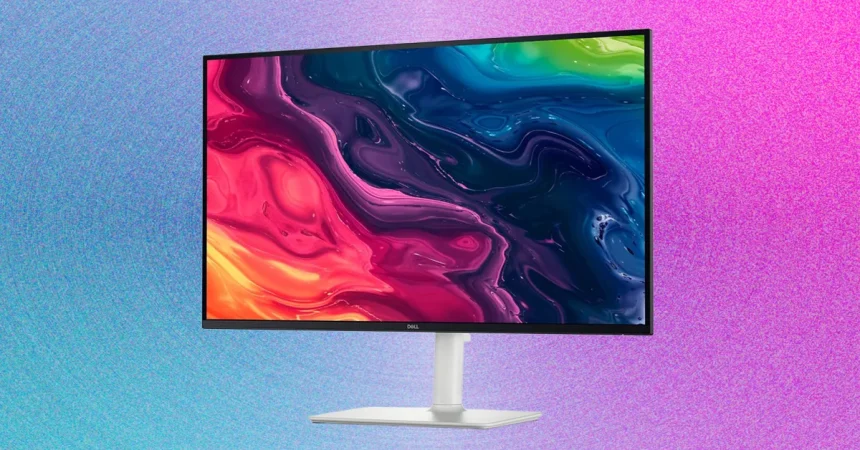
Now let’s talk about the cheaper end of the market, because not everyone needs or wants a $1,000-plus display. In my eyes, a budget monitor is anything under $200, and the shelves are full of them. The problem is that many of those cheap monitors are old, dim, and color-inaccurate. It takes a little digging to find something genuinely worth owning. That’s why I wasn’t surprised when the Dell 27 Plus ranked among the very best in my testing. It costs just $150, but it delivers surprisingly strong 1080p performance in both brightness and color. It’s not just a pretty picture, either—the monitor also rocks a 144-Hz refresh rate, which is almost unheard of at this price. That smooth motion gives it a premium feel you’d expect to pay twice as much for. And unlike a lot of budget displays, it comes with all the adjustability features you actually want, plus a VESA mount on the back for easy arm mounting. Once it’s on your desk, you’ll forget it’s a “budget” monitor until you look at the resolution. But maybe you want to spend even less than that. Under $100, you’re inevitably going to accept some compromises, but you can still do decently. The MSI Pro MP243W E14 is one of the better options I’ve found in that bargain bin. It stands out where it counts most: image quality. In my testing, it hit about 359 nits of peak brightness, and its color coverage was surprisingly good in both saturation and accuracy. It even has a 144-Hz refresh rate, so it can double as a cheap gaming monitor in a pinch. The all-white exterior and thin bezels make it look far more expensive than it is, but the flaws are there—the ports are limited, adjustability is almost nonexistent, and the screen can only tilt slightly. It’s also just 24 inches, which might feel a bit small if you’re used to a bigger display. If that’s the case, the upgraded MSI MP273QW E14 is worth a look. It keeps the same basic design and limitations, but it bumps the resolution up to 2560 x 1440 and gives you a more standard 27-inch size. The result is a sharper, more enjoyable picture for everyday work, and it still stays pretty affordable. These aren’t flashy monitors, but they prove you don’t have to sacrifice every comfort just to save some cash.
Moving up the ladder, things get a lot more exciting. The Dell 32 Plus 4K QD-OLED Monitor, model number S3225QC, is one of the favorite displays I’ve tested in the past couple of years. It’s part of a new wave of OLED monitors designed specifically for content creation and entertainment, and it does something special: it brings the stunning contrast and vibrant colors of OLED to a much wider audience. When it first arrived, it was among the first QD-OLED monitors aimed at people who want to make and watch high-quality HDR content, not just gamers chasing high frame rates. That’s a big deal, because one of the reasons HDR video has been slow to catch on is the lack of affordable screens that can actually display it the way it was meant to be seen. This Dell monitor changes that. With a 120-Hz refresh rate and plenty of ports, it’s also a solid gaming monitor when you’re done working. OLED’s fast response time combined with that higher refresh rate means motion looks crisp and fluid, whether you’re editing footage or chasing enemies in a fast-paced shooter. I should say that gaming monitors aren’t the focus of this particular roundup—they’re really their own category, and we have separate recommendations for those—but it’s nice when a professional display can hold its own after hours. What makes the Dell 32 Plus 4K so compelling is that it doesn’t force you to choose between work and play. It’s a versatile, gorgeous screen that feels like a treat every time you turn it on, and for anyone who’s been intimidated by OLED pricing in the past, this is the moment to start paying attention.
If your work truly revolves around professional, HDR video, however, there’s still nothing quite like what Apple has on offer. The Studio Display XDR—a 27-inch 5K Mini-LED monitor—feels like the new king of HDR performance in many ways. We all waited a long time for Apple to revisit its display lineup, and while the eventual product was a bit more modest in scope than we’d hoped, the actual image quality is remarkable. It has 2,304 dimming zones, and in my testing it hit around 1,905 nits of peak HDR brightness in a 25-percent window. To put that in perspective, the Dell 32 Plus 4K tops out around 946 nits in just a one-percent window. The difference in perceived brightness, detail, and contrast is huge, and that matters most if you’re color-grading video or editing high-contrast images. At 27 inches and 5K, it’s also fantastically sharp. But because Apple shrank the panel from 32 inches down to 27, there’s now a gap in the market for large displays that don’t lose any sharpness. Enter the LG UltraFine Evo 6K Monitor. This thing delivers a pixel density of 224 pixels per inch, which makes it the sharpest big-screen display I’ve ever tested. It’s not just about raw pixels though—this is one of the most beautiful monitors I’ve ever had on my desk. The stand and base are gorgeous and share more than a passing resemblance to the Apple Studio Display. And like that display, the LG UltraFine 6K comes with a monster pair of built-in speakers that are crystal clear. You won’t need to buy separate computer speakers for most setups, which is honestly rare and appreciated. That said, it’s not perfect. The ports are placed in an awkward, hard-to-reach spot, and while the stand looks great, it has some practical limitations—there’s not much cable management, and the height adjustment range is narrower than I’d like. It’s also limited to a 60-Hz refresh rate, which is fine for productivity but not ideal for gaming. And then there’s the price. The LG launched at $2,000, which was painful, especially compared to the Asus ProArt 6K, the only other 6K monitor on the market. These days the price difference has narrowed to just a couple hundred dollars, and both displays go toe-to-toe in image quality. I tend to prefer the LG for its design, better speakers, and more powerful ports, while the Asus offers a longer three-year warranty at a slightly lower price. Whichever you choose, you’re getting the sharpest 32-inch monitor money can buy, and that’s a special thing.
Finally, let’s talk about smart monitors, because these are getting harder and harder to ignore. I genuinely enjoyed dipping my toe into this world. If you want a monitor that can just as easily double as a television, Samsung and LG are leading the charge, and I recently tested two Samsung smart monitors that expanded my idea of what a monitor can do. My favorite of the bunch is the Samsung 32 M9 Smart Monitor. It’s an OLED 4K display that’s that rare screen equally good for working, gaming, and watching movies. It comes with a remote control, and Samsung packs in a ton of extras like free live TV channels to sweeten the deal. You can also connect a gaming console directly to it thanks to the HDMI 2.1 port, which means it’s not just a computer accessory—it’s practically a standalone TV experience. What really sets the M9 apart, though, is the OLED screen. The image quality is fantastic, with deep blacks, punchy colors, and the kind of contrast that makes movies feel cinematic. It finally feels like a smart monitor that doesn’t compromise the full TV experience just to add streaming apps. For a bit of extra fun, I even tested out the non-OLED version of this monitor on Samsung’s Movingstyle Rolling Monitor Stand. It’s incredibly niche, sure, but for the right home, being able to roll out a proper TV when you need it is genuinely handy. I love the idea of having a TV that’s mobile rather than a permanent fixture bolted to the wall or weighed down on a media console. The Movingstyle stand is a pretty compelling solution for that, and it makes you think about the living room, office, or bedroom in completely new ways.
At the end of the day, there is no single perfect monitor. The best one for you depends on how you work, what you watch, and how much you’re willing to spend. If you’re on a tight budget, the Dell 27 Plus is a fantastic bargain that feels far more premium than its price suggests. If you want to go even cheaper, the MSI Pro MP243W E14 is a decent little screen that knows its limits, and its 1440p sibling gives you more sharpness without breaking the bank. For those who work with color and HDR, the Dell 32 Plus 4K QD-OLED is a game-changer, and the Apple Studio Display XDR remains the gold standard for serious HDR work, even if it’s not perfect. The LG UltraFine Evo 6K and Asus ProArt 6K are also stunning choices for anyone who craves resolution and big-screen sharpness, with the LG standing out for its design and speakers. And if you want a monitor that can moonlight as a TV, the Samsung M9 Smart Monitor is incredibly fun and versatile, especially when paired with a rolling stand for that mobile TV fantasy. The monitor market is more exciting and more accessible than ever, and whether you’re a student, a professional creator, or just someone who wants a better screen for Netflix, there’s something out there with your name on it. It’s not about chasing specs for the sake of specs—it’s about finding the display that makes you feel more comfortable, more productive, and maybe even a little more inspired every time you sit down to use it. And that, more than any number of nits or pixels, is what really matters.