
In an era where our digital lives are scattered across cloud subscriptions, smartphone galleries, and aging hard drives, reclaiming control over your data has never been more important. Network-Attached Storage, or NAS, is essentially your own private, personal cloud. It acts as a central hub for your home or home office, allowing you to back up precious family photos, store massive media libraries, and share files across all your devices without paying monthly fees to big tech companies. After spending the last few months putting several top-tier NAS devices through their paces, I’ve found that these machines are no longer just for IT experts; they have become intuitive, powerful, and indispensable tools for the modern family looking to build their own digital sanctuary.
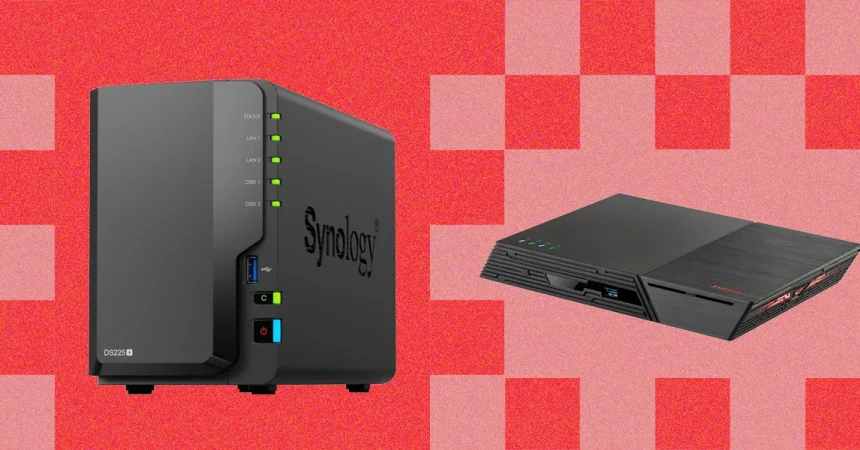
Choosing the right NAS often feels like joining an exclusive club, and in that world, Synology remains the undisputed heavyweight champion. My top recommendation for the average home is the DiskStation DS225+. It manages to strike a near-perfect balance between high-end performance and user accessibility. In my testing, this unit delivered lightning-fast transfer speeds, making the process of moving large files feel instantaneous. Its hardware is robust, featuring a snappy Intel quad-core processor and plenty of room to expand as your digital life grows. What truly sets it apart, however, isn’t just the raw power—it’s the ecosystem. Synology has mastered the “out-of-the-box” experience, ensuring that even someone without a background in networking can be up and running in minutes.
The real beauty of the Synology experience lies in its software. When you log into the web interface or open the accompanying mobile apps, you realize that the company has invested heavily in making the experience polished and frictionless. Whether you are using it to host a Plex media server to cut down on your streaming subscriptions or setting up a secure VPN to protect your family’s browsing, the interface is intuitive and consistently responsive. The “app store” feel of their software repository is unmatched, offering everything from advanced security camera management tools to seamless photo backup solutions that organize your memories by faces and locations, much like the giants of Big Tech, but with the data remaining safely within your own four walls.
However, it is important to go into this investment with eyes wide open. Synology devices are a premium purchase, and you still have to buy the hard drives separately, which adds to the initial setup cost. There was also a moment of tension recently when the company flirted with locking their systems to proprietary drives, a move that alienated some enthusiasts—though they have since walked this back. Additionally, if you were hoping to plug your NAS directly into a TV via HDMI, you’ll be disappointed to find that features like that are absent here. You are paying for a network-first experience that relies on streaming to your devices rather than acting as a direct physical media player, which is a design choice worth considering based on your specific home theater setup.
For those who find the technical side of things intimidating and just want a “set it and forget it” backup solution, the Synology BeeStation series is an interesting departure. It strips away the complexity of a traditional NAS, coming pre-configured and ready to sync your phone and computer files immediately. It is perfect for someone who isn’t interested in setting up servers or managing RAID configurations and just wants to know their photos are safe. While it lacks the raw power and the extensive app support of the DiskStation lineup, it solves the “digital clutter” problem with elegant simplicity, providing a user-friendly entry point for anyone who has ever panicked at the thought of losing their phone’s camera roll.
Ultimately, your journey into NAS ownership is about finding the right compromise between control, cost, and convenience. If you are looking for a project that will grow with you, allowing for everything from home automation hosting to professional-grade backups, the versatility of the DS225+ makes it a best-in-class investment that pays dividends in data security. Conversely, if your goal is simply to reclaim your digital sovereignty from subscription services without the headache of a massive learning curve, the ecosystem Synology has built provides a clear path forward. By moving your data off someone else’s server and onto your own, you aren’t just buying hardware; you are investing in a more private and reliable way to live in our hyper-connected world.