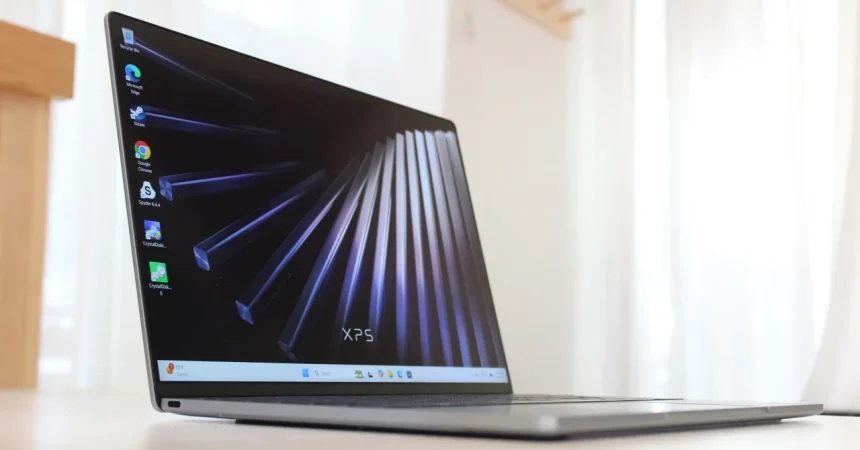
Let’s start with the moment you first pick up the Dell XPS 13. In the world of Windows laptops that cost less than $1,000, it usually takes no time to find the corners that were cut. The plastic feels hollow. The screen is a murky 1080p with poor viewing angles. The touchpad is stiff and unpleasant. The Dell XPS 13 doesn’t do any of that. From the instant you get your hands on it, this machine feels like it belongs in a much more expensive category. The all-aluminum chassis is solid, with no worrying flex in the base or the lid, and you can open it with one finger without having to hold the base down or watch the display sway back and forth. The hinge is smooth, confident, and lets the thin screen sit exactly where you put it. Around that screen are some of the smallest bezels you will see on a 13-inch laptop, which gives the whole product a modern, almost tailor-made look. It is suitably thin, at just about half an inch thick, sitting right next to the MacBook Neo in terms of wow-you-can-put-that-in-a-different size. These are the things you feel within the first minute of handling it. The base configuration also includes a 2560 x 1600 touchscreen with a 120Hz refresh rate, measured brightness of up to 427 nits, and very good color reproduction. That means even over the simplest model, you don’t have to choose between a nice screen and everything else. At a price that usually means “you get what you pay for,” the XPS 13 gives you a high-resolution OLED-like clarity, smoother scrolling, a larger touch surface, and in many cases the better build quality is a more expensive Ultrabook. The glass touchpad is another part: it’s large, smooth, and clicks with satisfying precision. The kind of touchpad, especially in a lower-cost machine, is often a visit with a cheap button. Here it’s part of what makes the day, and not a reason, feel so nice. This is not a laptop you have to apologize for. It’s a laptop you want to show off. It has the looks, the tactile surface, the close-up and the last display quality that typically enchants are the best laptops, all before you even plug in a single cable.
Now put it next to a MacBook Neo and you’ll start to notice what the XPS 13 actually includes in the base price. The Neo doesn’t have a touchscreen, for example. The Dell has a touchscreen be right in front of you. The Neo’s display is fixed at a lower 60Hz refresh rate, while the XPS has built 120Hz which makes scrolling feel smooth and animated. The XPS not only has a edge row of keys, but it also has a backlit keyboard. The MacBook Neo may or may not use a backlit keyboard depending on the config, but Dell is doing it here. Ports are another huge plus. I know that’s not the most dramatic thing forward, but after spending time with more minimal laptops, having two USB-C ports on a small ultrabook, one on each side, it is almost a turning back. Each of these ports is genuinely up-to-date and supports the entire 10Gbps transfer speed. Both ports can also push a 4K display signal at 60Hz, which means you can have two external 4K monitors connected at once while you still have the lid on. And if you close the lid, Dallas could grow that three 4K monitors, which sounds like a strange niche, but it’s the kind of flexibility that turns a $1,000 Windows machine into a true workstation. Storage speed is also fast. That’s not something always visible in the box, but it’s one of the first things you feel when you copy files or open the library. The only bit of this that makes me sad—and I’ll say it old school—is the missing headphone jack. The MacBook Neo has one; it’s still useful. It’s a pain to dig around secret, or USB-C dongle just to plug in a wired pair. I know dongles are alive, but it seems like an unnecessary omission on a chassis that tight. I don’t want to ignore it, because some people absolutely need it. But beyond that, Dell didn’t skimp on the I/O the machine does have. The fact that the three simple ports are 10Gbps and video-capable is a level of quality that doesn’t do in this price range. You’re not getting some stale legacy ports that are slow and limited; you’re getting future-proof connectors that can charge, transfer, and connect to a display.
Those same thoughtful choices continue into the audio and camera, two places where laptops in this class usually completely fall apart. Dell hasn’t magically fixed the problem of great laptop speakers, but they did throw in two tweeters and 8W of total output. That’s enough to make music sound like music, enough to make a word pressure sound full, and enough to make you not immediately reach for a pair of Bluetooth speakers every time you open a video. It’s at least on par with the MacBook Neo, which is decent but not the strongest praise. The webcam is a 1080p camera, which is good enough for video calls. It doesn’t have a sea of noise, but it can handle a normal desk well, and plus an IR camera means you can use Windows Hello to log in with your face. I actually appreciate that. A budget laptop with facial recognition is a small luxury that makes parking much more enjoyable. Even the camera is not amazing, but it’s a webcam that does its job, and the IR sensor is useful. So you have a strong screen, great trackpad, high-quality ports, a keyboard backlight, fast storage, 120Hz touch, and enough of a camera to want you to do it. All the pieces that make a modern laptop feel modern are there, and none of them feel like with the cheapest version of the component. It’s still a lot of tools for $700. It’s just that when you spend around $700 on a laptop, you don’t need to be resentful, or you don’t need to be embarrassed, and you don’t have to hope you don’t see the weird weird.
So, you’re probably thinking, how is Dell selling all of this for a starting price of $700? That’s the famous catch. I think in the current environment, people like us are always suspicious. A $700 laptop with all these features? It’s a low-powered Intel processor, the Core family series, specifically the Core 5 320. This is an important cue, because as the last few years have shown, the urge in affordable Windows laptops is to use old technology or processors that are already with badware. But this is one of the first laptops to use the new Intel Wildcat Lake line, which is a deliberately modest slot, but it’s newly developed. I have to say, to my surprise, I was genuinely impressed by this little piece of silicon. It felt more jumpy, more responsive, more ready to deal with web pages, off ce docs, streaming, and general background work than I expected from something called “Core 5.” A big reason is that the chip was made to compete with other power-efficient processors like Apple’s A18 Pro inside the MacBook Neo, and the Qualcomm Snapdragon X chip that has been popping up in many Windows machines. That means the XPS 13 is not trying to brute-force its way through work; it’s trying to be efficient-but-that, a little energy-efficient. Some other laptops, like the Lenovo IdeaPad Slim 3i, use a bigger Core 7 350 chip, but that’s a 16-inch laptop, so it’s not a real competitor to the Dell’s compact size. The XPS 13 and the little Wildcat Lake is turning into a small, inexpensive, light machine that uses energy more than expected. But I’ll be honest: the processor is still a compromise. If you are a hardcore user who wants to run huge muscle trees or play heavy games or crunch video all day, this chip won’t be your best friend. It’s goal is efficient getting things done with acceptable speed for mobile, school, work, and normal life. It’s the opposite of flamboyant. But that’s the catch. Dell is saving money on the processor, and the rest of the speakers stay at a high level. And that trade seems a little to me. You get a nice notebook, a great display, and a solid port design, and in return you agree not to do any beautiful video rendering while away from an outlet.
The second compromise, the one that carries the heading “More Memory Please,” is perhaps the most direct. It’s not the first thing a new buyer notices, but it’s the one that can eventually not be ignored. The processor choice does save the price, but there’s also a limit that tells you what the rough sense of greed is. The Dell XPS 13 wants to be light, small, and offer good value, but memory has to give. If you open 30 audio tabs and run a video call, or if you jump between large PDFs and a coding editor, you may hear the sound of your mind asking for more. The this is not a machine you can treat as a desktop replacement forever. It’s a laptop, and the amount of memory is enough for everyday stuff, but it’s not enough, especially once you’ve got the futuristic small power you should? Remember there is no additional involution maybe? The urge to say “More memory please” becomes very real. The other person is not looking at the parts of it in the specs; it’s the part of it speaks as you try to live in it with, say, half a week of teamwork and open apps at once. To be fair, if you are in the 8GB budget laptop status, this XPS is not alone. But I’m hearing it as a cause for concern. It would be a significant choice if you are thinking of this as your only computer and something you want to keep for more than a couple years. One reason the beloved under-$1,000 laptops sometimes age badly is that the cheap storage cuts memory and storage, and it’s very difficult for users to upgrade later. So the second compromise may be no speed, but the actual experience of running out of RAM. You can add a million people to back long hair. The year for more is real.
But perhaps the most honest way to summarize the XPS 13 is to look at where the compromise gives up when it offers. It is physically great, with high-quality aluminum build, thin small look, one-hand lifting deep, no visible flex, and a screen that can be used. In your daily activities, the laptop doesn’t feel like a budget product. Touchscreen display, 120Hz support, glass touchpad, and backlit keyboard are all the features that the base configuration doesn’t only exist. The ports are genuinely modern, with 10Gbps USB-C on both sides, appropriate support for the 4K external display, and fast storage. The missing headphone jack is a distinct compromise, although if you live in a Bluetooth world, it’s a compromise that doesn’t matter. The processor is efficient and does a reasonable job, but a heavier workload will shake its limits, and the memory options step out in the opposite direction of the “more please” problem. The speakers and webcam, finally, are just okay. They’re not abysmal; they don’t ruin the laptop; they stick next to the MacBook Neo, but they’re not going to surprise you. The truth is that Dell has a more aware, attentive decision to do this. They took a very high-quality piece of plastic and put the money where most consumers can’t see it, in the feel, in the the screen, the fast speed of the connector, and the small everyday gestures of interaction. They then saved a little money on the inside, cost of the battery of the processor and memory, so that a good-looking laptop can be sold at a low price. It wants to carry a “for the first time, you don’t have to choose” attitude: “Buy the good screen, the one that has and the good body. We’ll accept the internal that’s enough for most but not always for the content.”
So the question is: Do you buy it? It depends on your daily habits. If you want the smallest, most lightweight 13-inch Windows machine, you don’t It’s a great compromise between money and the idea of mainstream laptop quality. You will be impressed by the screen, the touchpad, the aluminum build, the thin bezel, the 120Hz touch experience. You’ll enjoy the bothsided convenience of USB-C and the ability to connect an external monitor with a single cable. You’ll also accept the fact that the processor is not here to take huge numerical memory, and that the RAM won’t win any head-to-head number game. If you only need a laptop for writing, web, video call, teaching, traveling, a classroom, a road-warrior machine, all that. This is a great computer, and one of the first “under 1,000 machines to make you feel like the “regular budget laptop” have stopped at the door. If you need a native headphone jack, if you’re someone who maxes out their laptop memory every afternoon, or if you use programs that just cannot afford the super-efficient chip, you’re better off picking a thicker, heavier machine. But don’t be fooled: this is not a laptop that is hiding too much. It’s just a spread-out where the money goes. The Dell XPS 13 is an unusual thing, a very shareable premium laptop that actually bears a budget number, and it makes you wonder why can’t we make all laptops this happy. It’s not an absolute all-around winner, but it is a real proof that a low price can still lead to a smartly designed, ever-a-conscious, human-sized tool. It is not the best laptop for everybody, but for the person who says “I still want things to feel nice” with enough money, is the exact answer. And that’s a rare kind of machine—a practical one, a lovely one, and one worth considering seriously.