Few things in online gaming are more maddening than watching your character stutter across the map or freeze just as you line up the perfect shot. Packet loss and high ping always seem to strike at the absolute worst moment, whether you are sneaking up on an unsuspecting opponent or powering into a tight corner in a racing sim. You can blame your internet service provider, your Wi-Fi setup, or even the game servers themselves, but sometimes the real culprit is sitting right there in your room: a substandard router that simply cannot handle the demands of modern gaming. That is why dedicated gaming routers have become so popular. They promise rock-solid connections, prioritize game traffic over less time-sensitive data, and often come with aggressive styling and customizable RGB lighting that make them feel like true centerpieces of a gaming setup. But here is the honest truth: you do not absolutely need a special gaming router. A great router is a great router, and plenty of excellent general-purpose options will serve you just as well. You can also improve your connection dramatically by simply running an Ethernet cable from your router to your PC, cutting out the wireless variables entirely. Still, after testing many gaming-focused models, I can confidently say that the best ones go beyond the gimmicks, and my current top pick happens to be the fastest router I have ever tested.
If you are in the market for a gaming router, the brand I recommend above all others is Asus. The Taiwanese company has deep roots in gaming culture, with dedicated sub-brands like Republic of Gamers, or ROG, that have built a loyal following among enthusiasts. What makes Asus especially attractive for gamers is the combination of raw performance and customization. Their routers are fast, highly configurable, and packed with features that you rarely find elsewhere. Unlike some competitors that lock advanced capabilities behind subscription fees, Asus includes robust security software, extensive parental controls, and a whole suite of gaming extras at no ongoing cost. The ports are usually generous too, so you can connect multiple wired devices without needing to buy a separate switch. Another major advantage is AiMesh compatibility, which lets you combine different Asus routers into a single mesh system to extend coverage throughout your home. That flexibility is a real win if you upgrade later or have dead zones you need to eliminate. Of course, there are downsides. Asus routers tend to be pricey, especially the ROG models, and their firmware can occasionally be buggy. Also, to truly unlock the best performance, you will likely need to dig into the configuration settings, which can feel intimidating if you just want to plug and play. But for gamers who are willing to tinker and learn, the payoff is well worth it.
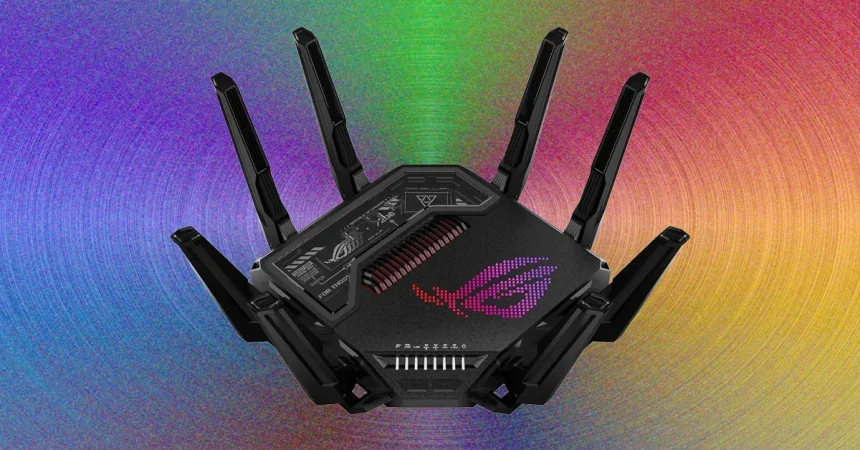
At the top of my testing charts sits the Asus ROG Rapture GT-BE98 Pro, a supremely capable quad-band Wi-Fi 7 gaming router that left me genuinely impressed. In terms of raw speed, this is the best router I have tested to date, and it makes the gaming-focused design feel justified rather than just a marketing gimmick. It is very similar to the RT-BE96U, which I recommend in my general router guide, but Asus has added a second 6-GHz band alongside the existing 2.4-GHz, 5-GHz, and 6-GHz bands. This creates a quad-band layout that massively increases available bandwidth, giving you plenty of room for multiple gaming streams, VR headsets, 8K video, and everything else you can throw at it. It also means you can dedicate one of the 6-GHz bands entirely to a wireless backhaul if you decide to set up a mesh network using Asus’s AiMesh technology, which keeps your main channels clear for devices. The port selection is equally impressive, with one 10-Gbps WAN/LAN port, two 10-Gbps LAN ports, four Gigabit LAN ports, plus USB 3.2 and USB 2.0 ports for storage or NAS devices. Those USB ports are especially handy if you want to share files across your network or set up a personal cloud. The extra 10-gig ports are a significant step up over the standard RT-BE96U, but they also add cost. If you do not have multiple gaming streams or a network-attached storage setup that can actually use those speeds, you can save some money with the RT-BE96U and still get outstanding performance. There is no denying this router is a physical beast. It stretches nearly 14 inches across, weighs over four pounds, and features eight huge antennas that make it look like something from a sci-fi movie. It will not blend into your living room, and finding a place to put it can be tricky, but if you embrace the aesthetic, the Aura RGB lighting lets you customize the glow to match your setup. There is no subtleness here, but that is exactly what many gamers want.
Beyond sheer hardware capability, the ROG Rapture GT-BE98 Pro is loaded with software and features that make it more than just a speed demon. Asus includes its AiProtection Pro security suite, powered by Trend Micro, at no extra cost. This comprehensive package bundles a firewall, intrusion prevention, malicious site blocking, automatic updates, and more, giving you peace of mind without a subscription. The parental controls are also quite robust, offering scheduling, website filtering by age group, and usage statistics so you can keep an eye on what is happening across your home network. You also get VPN support, which is increasingly important for privacy-conscious gamers, and there is even a promotion that lets you redeem a free year of NordVPN service with the router. That alone adds significant value. Naturally, the gaming features receive special attention. Asus’s game acceleration technology works on three levels to prioritize gaming traffic through port forwarding and packet analysis, ensuring that your game data gets where it needs to go with minimal delay. If you own other Asus ROG gear, you can prioritize that equipment with a single click, which is a nice ecosystem advantage. There is also server acceleration through the WTFast service, which helps minimize latency on supported games by routing your connection through optimized paths. But there are caveats to keep in mind. The size, cost, and sheer visual presence may be too much for some people. More importantly, the 6-GHz band has limited range and struggles to penetrate walls, so to take full advantage of this router’s Wi-Fi 7 capabilities, you really need compatible devices nearby. Ideally, the router should be in the same room as your gaming PC or laptop. And while this model was originally expected to receive Automated Frequency Coordination, or AFC, support in North America, that feature never materialized on this particular router. If AFC is something you want, you will need to look at one of the alternatives below.
One alternative that offers many of the same benefits at a slightly lower price is the Asus ROG Strix GS-BE12000, which currently sells for around $400. If you are set on a tri-band Wi-Fi 7 router, want an abundance of ports, and cannot justify the cost of the GT-BE98 Pro, this model could be an excellent fit. In my testing, it proved stable and seriously speedy on both the 6-GHz and 5-GHz bands, delivering impressive throughput and low latency for gaming sessions. It supports 320-MHz channels on the 6-GHz band, Multi-Link Operation, and 4K-QAM, all of which sound technical but essentially mean faster, more efficient connections for compatible devices. The port layout is fantastic too, with a 2.5-Gbps WAN port and seven 2.5-Gbps LAN ports, two of which are dedicated gaming ports. That is an unusually generous setup, and it means you can connect multiple gaming consoles, PCs, and other wired devices without sacrificing speed. You also get a USB 3.2 Gen 1 port for storage, and most of the same excellent software and gaming options that make the top pick so appealing. Essentially, this is a scaled-down version of the more expensive BE18000 model, which costs around $530. The main difference is that the GS-BE12000 uses 2 x 2 MIMO on the 6-GHz band instead of 4 x 4, but in practical terms, most users will not notice a huge gap in performance. In fact, I think the GS-BE12000 is a better buy for most folks, especially if you catch it on sale. It is also worth noting that both this model and the more expensive BE18000 have official AFC support, which extends the range of the 6-GHz band and makes it much more comparable to the 5-GHz band when it comes to wall penetration. Unfortunately, I cannot test AFC here in the UK because it is only available in North America and requires your precise real-world location so that local regulators can authorize the higher power levels. But if you live in the United States or Canada and you want the best possible range on Wi-Fi 7, this is a feature worth seeking out.
If you want to stay in the Asus family but keep your budget in check, the TUF Gaming BE9400 is worth a serious look. At around $265, it represents the cheaper end of Asus gaming routers, but it does not make nearly as many compromises as the price might suggest. This is still a tri-band Wi-Fi 7 router, and in my testing, it performed far better than expected. At close range, it kept pace with my top pick, which is genuinely remarkable for a router in this price bracket. Naturally, there are some trade-offs to get the cost down. You get one 2.5-Gbps WAN port and three 2.5-Gbps LAN ports, which is still solid, plus a USB 3.2 Gen 1 port. But you miss out on some of the ROG-exclusive gaming features, the design is not as flashy, and there is no RGB lighting to show off. That might not matter if you prefer a more understated look and just want strong performance without spending a fortune. The coverage is the other area where the TUF Gaming BE9400 shows its budget nature, as it does not extend quite as far as the more expensive models. If you are gaming in a single room or a medium-sized apartment, that might be perfectly fine. But if you need to cover a larger home or want to spread the wireless love across multiple floors, you may need to invest in a mesh system or look at a higher-end model. Ultimately, the choice comes down to your priorities. For the absolute best performance and the fullest feature set, the ROG Rapture GT-BE98 Pro is the one to beat. For a slightly more reasonable price with excellent specs and AFC support, the ROG Strix GS-BE12000 is a fantastic middle ground. And for budget-conscious gamers who still want Wi-Fi 7 and dependable low latency, the TUF Gaming BE9400 delivers exceptional value. No matter which route you choose, remember that a good router is only part of the equation. Proper placement, updated firmware, and maybe a wired connection can make all the difference when the stakes are high and the match is on the line.