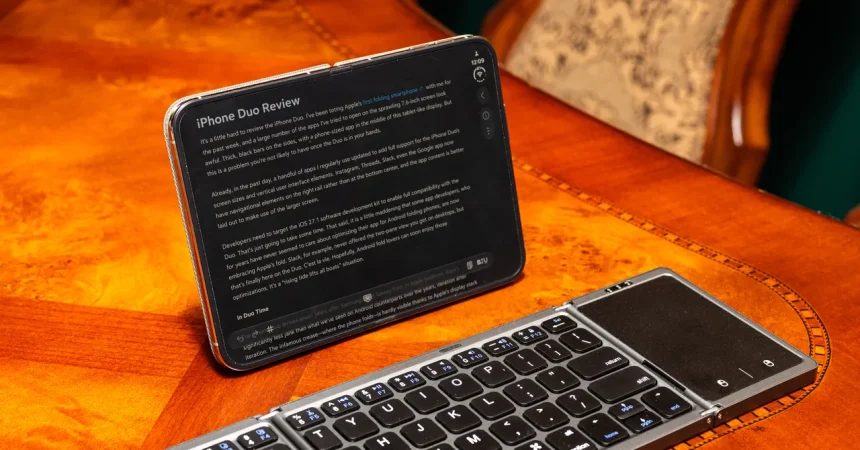
Here’s the thing about the iPhone Duo: it makes you do math before you ever get to feel the hinge. Apple’s pricing strategy isn’t subtle — the iPhone 18 Pro costs $1,199, a standard iPad goes for $449, and if you’ve been living the two-device lifestyle, you know exactly what that adds up to. That’s $1,648, and it’s not hard to imagine spending a few hundred more on cases, chargers, and the little things that make carrying a phone and a tablet feel practical. By the time you finish accessorizing, you’re hovering right around $1,999, which happens to be the exact price of Apple’s first foldable smartphone, the iPhone Duo. That’s no coincidence. Apple is making a very deliberate argument: why carry two devices when one unfolds into a 7.6-inch screen? Why manage two batteries, two sets of daily charging rituals, two different devices that never quite sync the way you expect? The appeal sounds seductive in a minimalist sort of way. One gadget, in your pocket, that can theoretically handle phone duties and tablet work without making you choose. The money math isn’t perfect — you’ll spend a few hundred dollars more than you would on the separate devices — but the idea is that you’re buying the same overall capability in a single object. And that’s a powerful promise. It’s the kind of promise that makes you ignore the obvious compromises, like the extra thickness of the folded phone or the fact that the screen has a crease. But the real question isn’t whether the Duo can open and close beautifully. It’s whether that gorgeous 7.6-inch display can actually replace the two-device arsenal you’re already comfortable with. So I decided to find out the only way that matters: I lived with the Duo, worked on the Duo, and wrote my entire review on the Duo. Not a quick email, not a few text messages — the full review, from my first notes to the final draft. The experience taught me that the future of multitasking is genuinely exciting, but also that Apple’s software can be its own worst enemy.
For the writing experiment itself, I chose Bear, a note-taking app that’s mercifully optimized for the Duo’s larger screen. That meant I could see my words, my formatting options, and my outline without feeling like I was squinting through a peephole. In that respect, the Duo genuinely felt like a mini-laptop. The keyboard on the bottom half was comfortable enough, the text was crisp, and the big active area let me concentrate on the actual writing rather than on fighting the interface. I’m happy to report that the experience didn’t make me want to throw the phone across a room. Surprisingly, I didn’t hate it. But here’s the catch: Bear is the exception, not the rule. Most apps haven’t been optimized for the Duo’s strange canvas. They open, they function, but they look like a smartphone app that’s been stretched on a rack. Text might float awkwardly, buttons land in odd places, and images appear too large or too small. The author of the original review notes that it could take weeks or months for the entire app ecosystem to look right on this new format. That’s not a trivial concern — it’s the very thing that defines whether a foldable succeeds or feels like a pricey developer unit. On Android, foldables have had years to grow into their form factor, and designers have learned to build fluid layouts that adapt as the screen changes shape. On iOS, the Duo is essentially launching before the party has been decorated. So while I genuinely enjoyed writing in Bear, I kept a mental asterisk next to every other app I opened. Would this be okay in a few months? Probably. But when you’re spending $1,999, “probably” is a bit of an unsettling thought. The larger point is that the Duo works beautifully when the software cooperates, but it demands a kind of patience that most people don’t sign up for when they buy a premium gadget. Still, the fact that I could write an entire review on it is a small triumph. A couple of years ago, this would have been impossible on any phone, foldable or not.
Then came the inevitable round of headaches that stem from iOS itself. The pulse of any serious work session often involves a mouse or a trackpad, especially if you’re trying to select text, right-click through menus, or navigate a document quickly without lifting your fingers from the keyboard. But here’s the thing: iOS doesn’t even recognize a Bluetooth mouse or trackpad by default. You can connect one, and it will work in a rudimentary way, but it’s not treated as a native input. Instead, you have to go digging through the accessibility settings and enable AssistiveTouch — a feature originally designed for people with motor impairments — before the cursor becomes useful. Once you flip that switch, you get an iPad-like cursor that lets you glide around the interface and select text. It works, sort of. But the fact that this is hidden deep in settings says a lot about Apple’s intentions. The company doesn’t want the Duo to feel like a computer, even if it’s trying to replace one. It wants you to tap and swipe, because tapping and swiping are what iPhones are about. That’s fine for casual browsing and social media. But for writing, editing, and research, the ability to hover, highlight, and manipulate text is non-negotiable. Once I got the cursor working, I felt like I’d unlocked a secret level. The cursor is genuinely useful for selecting a paragraph or repositioning a sentence. But it’s still not as precise or effortless as a real trackpad on a laptop. Every small action takes longer than it should. You move your finger to the screen, then you move the cursor, then you correct the placement, and then you finally get what you wanted. It’s a little bit like learning to walk with crutches when you already know how to run. You can get where you’re going, but you keep longing for the moment when you can let go and sprint.
The slowness became especially real when I tried doing standard research tasks. I needed to paste hyperlinks into the written piece, search the web for a few quick facts, and switch over to WIRED’s content management system to prepare the review for publication. All of these tasks are trivial on a desktop or even a laptop with a browser and a decent internet connection. On the Duo, they were grind-it-out chores. Pasting a hyperlink required me to fiddle with the cursor options, long-press a word, carefully adjust the selection handles, then position the text in the right spot — all moves that feel impossibly inefficient when your brain has an internalized tempo from years of keyboard shortcuts. No matter how smoothly the screen unfolds, no matter how fast the processor is, the interface’s hidden seams slow you down. I suspect this is the same problem every foldable has faced: the hardware is ready, but the software has to catch up to the reality of how we actually work. We don’t just read, type, and scroll. We drag, drop, highlight, right-click, open multiple tabs, cross-reference sources, and make split-second adjustments that feel automatic on a conventional screen. The Duo can handle these tasks, but each one requires a conscious effort to re-learn the gesture or dig through yet another menu. I had to keep switching to my desktop for final touches — and I wasn’t even approaching the kind of workflow a professional video editor, spreadsheet wizard, or coder would need. This is where the dream of a single device replacing two starts to wobble. The Duo is handsome, clever, and often delightful. But a phone isn’t yet a workstation just because you can unfold it to the size of a small tablet. It still behaves, under the surface, like a phone with a gloriously big screen — and phones don’t always respect the demands of deep focus, precision, and multi-window chaos.
Apple’s own software rules make the situation even more frustrating. The company has always prided itself on controlling the user experience, and that philosophy extends to multitasking on the Duo. When you open two apps in split-screen view, you’re locked into an equal 50-50 split. You can’t drag the divider to give one app more room — something that feels completely natural on a desktop or even on many Android tablets. If you want to read an article while taking notes, both app windows are equally sized, whether or not the content calls for that symmetry. If you want to have a chat app on the side while working in a full-width editor, you’re out of luck. The system simply won’t let you adjust the proportions. Apple’s engineers presumably have reasons for this — maybe it avoids weird layout bugs, maybe it keeps interface elements from feeling cluttered — but from the user’s perspective, it feels like an arbitrary constraint. It’s like being handed a desk where every drawer must contain exactly the same amount of stuff, regardless of what’s inside. There’s a similar problem when you turn the Duo into portrait mode and try to stack two apps vertically. You’d think you could put a note-taking app on the top and a browser on the bottom, both sized to your liking. Instead, the system only lets you pin video apps to the top with another app underneath. So if you’re the kind of person who likes to watch a tutorial while reading through a document — an incredibly common work pattern, especially among students and researchers — you’ll be forced into a layout that Apple has decided is best. You never get a sense of true freedom, of shaping your workspace to fit your brain. Instead, you’re working inside a beautifully designed cage. The hardware of the Duo promises flexibility, but the software keeps reminding you that Apple knows better than you do. It’s a weirdly paternalistic feeling, and it undermines the very reason you’d spend extra money on a foldable: to do more, in more ways, in less space.
Thankfully, there’s one feature that does feel genuinely thoughtful: app pairs. Apple lets you pin two apps together so they live side by side in your recents, ready to be summoned whenever you need that combination again. If you always want to view your email and calendar together, you can save that split and restore it instantly. If there are two documents you like to compare, you can lock them into a paired session. The gesture is simple: tap the bar in the middle and the pair exists as a little bundle of productivity. This is the kind of small delight that makes you feel like the Duo’s designers have actually watched people work — that they understand the rhythm of glancing from one thing to another and back again. App pairs don’t solve everything. They don’t fix the missing adjustable split sizes, the portrait-mode limitations, or the mouse discoverability issues. But they give you a hint of what a refined multitasking experience could eventually look like on an iPhone-shaped device. When the software catches up to the hardware, the Duo might be a truly brilliant workstation. For now, it’s more like a gorgeous prototype with a few unforgivable quirks. So what’s the verdict? The Duo can absolutely function as a primary phone. It can even serve as a secondary productivity tool for certain kinds of work — especially if you’re doing focused writing in an app that’s been optimized for its larger screen. But the fantasy of replacing both your iPhone and your iPad with a single pocket gadget is mostly just that: a fantasy, at least for now. The few hundred dollars you save by buying one device instead of two get eaten up in extra time, extra effort, and the occasional need to switch back to your desktop. Still, there’s something irresistible about the Duo. It’s a glimpse of a future where our devices become more flexible, more intimate, and more capable. If you’re an early adopter who loves being on the cutting edge even when it’s a little rough, the Duo is a fascinating toy. But if you want a single tool that can effortlessly replace two, I’d wait for the next generation — and hope that Apple’s software learns to match the magic of its hardware.