When I set up a digital wall calendar at a friend’s house a couple of months ago, I could see the excitement in her face as we hung it in the kitchen. She had been talking about wanting something to replace the paper family calendar for a long time, and after I synced it with her Google Calendar and showed her how to add events for the kids, she seemed genuinely thrilled. But then she stood back, tilted her head, and asked the question I’ve asked myself dozens of times while testing these devices in my own home: “Does it have a voice assistant?” I laughed because I recognized the moment all too well. For all the magic of a dedicated digital wall calendar, there is always that little gap where you expect to be able to just say, “Add soccer practice at 3 p.m.” or “What’s on the agenda for tomorrow?” and have the screen respond. That kind of voice interaction has become so woven into our lives through smart speakers and phones that when a new piece of technology shows up in the home, we instinctively assume it should be ready to listen and answer. Digital wall calendars have become increasingly popular this year, especially thanks to the rise of devices like the Skylight Calendar. And I understand why. These devices take the digital calendars you already use—Google Calendar, iCalendar, Outlook Calendar, whatever you rely on—and pull them all into one clean, dedicated screen that hangs on the wall. They solve a very real problem, especially for families like mine, where my husband and I live by our Google Calendars but don’t want to be constantly glued to our phones just to figure out who needs to be where and when. A wall calendar becomes a shared family command post. You can glance at it while making breakfast. You can point at a date and say, “We have that thing on Thursday.” It brings everyone into the same conversation without forcing anyone to open an app. These devices also do so much more than calendars. They can double as meal planners, chore trackers, to-do lists, and digital photo frames that cycle through your favorite family pictures when you’re not checking the schedule. Some even offer tools for family financial management. But through all the models I’ve tested, the one feature I kept missing was the most natural one of all: the ability to talk to it like a person and have it actually listen.
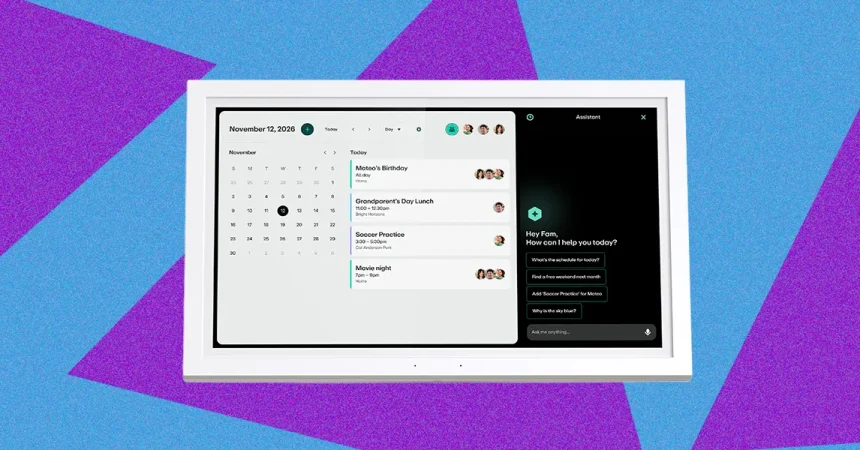
The Greenlight Family Hub has been a fascinating exception in the world of digital calendars because it tries to be so much more than a calendar. Greenlight originally started as a banking tool for parents and their teenagers, a way to teach kids how to manage money with a prepaid debit card and an app that allowed parents to monitor spending, assign chores, and automate allowances. Over time, it grew into a bigger family management platform. The Family Hub takes that foundation and transforms it into a wall-mounted command center for the entire household. It doesn’t just show your family’s schedules. It also offers financial management right on the screen, so kids can see their balances, complete chores, and understand the relationship between work, earning, and spending. It can show where family members are, using the Greenlight app on a phone to display a live location, or you can buy a separate GPS tracker for younger children who may not have their own phones yet. That’s a lot of responsibility for one screen, but it makes sense when you remember the company’s story. Greenlight began with family money, and now it’s moving into family life as a whole. The most intriguing part for me, though, is that the Greenlight Family Hub finally answers the question I’ve been asking for so long. It has a voice assistant. And not just a basic voice assistant that can set a timer. It’s an AI-powered assistant that Greenlight has designed specifically for families, and it’s been both easy to use and surprisingly thoughtful in the answers it gives. The assistant is one of the features that sits behind a $10-a-month membership paywall, which might make some people hesitate. But once you use it, you start to understand what you’ve been missing from other digital calendars. For the first time, I can look at a wall calendar and have a conversation with it. I can ask what’s happening on Friday, ask it to add an event to my calendar, or ask for help with a chore routine. It feels like the device is finally meeting families where they are, rather than making them adapt to a limited set of buttons and taps.
The big question that has stuck with me through all my testing is why every digital wall calendar doesn’t have a voice assistant like this. It’s such an obvious feature. We’ve had smart speakers for over a decade, and voice interaction is deeply embedded in how people expect to control their homes. But the digital calendar market seems to have missed that shift. Most of the popular devices on the market are built around a simple idea: provide visual clarity and reduce screen time. They want to make a beautiful display that can be read from across the room, not a miniature tablet that you talk to. Adding a voice assistant changes the whole design challenge. It means the device needs a microphone, which raises privacy concerns. It means the device needs software that can accurately handle speech recognition, natural language understanding, and calendar commands across multiple different calendar services. It means ongoing maintenance, cloud processing costs, and years of firmware updates. For a market that really became mainstream because of the Skylight Calendar’s simple, user-friendly appeal, voice support may have felt like too much complexity too soon. There’s also the question of whether families actually trust an always-listening microphone on a wall-mounted device in the middle of the kitchen. I think they might, given how comfortable we already are with phones and smart speakers in those same spaces, but it’s still a different threshold when you’re talking to a screen that also displays your children’s schedules and financial data. Greenlight’s Sharma, the company’s chief product officer, put it well. He said voice assistants have been around for over a decade, and yet when Greenlight was building the specs for the Family Hub, they noticed voice support was completely absent from the digital calendar market. Greenlight wanted to create an all-in-one command center for busy families, a way to engage with technology that feels natural and seamless. By combining a voice assistant with a centralized home display, they can limit the number of devices families need in their home. That idea has real power. Instead of buying a wall calendar and then still shouting at Alexa to add an event, you get one device that does both.
The flip side of that argument is just as interesting: why haven’t smart displays, which have had voice assistants for years, simply added full-page calendars and chore charts and become the digital wall calendar we all want? We’ve seen Amazon’s Echo Show, Google’s Nest Hub, and similar devices try to dip their toes into home organization. They can show calendar widgets, set reminders, and even display photos. But they often feel like side features rather than the main event. The design priority of a mainstream smart display is still media consumption, video calls, shopping, and general assistant queries. Their calendars are usually small, cramped widgets that live alongside the weather forecast and a recommended YouTube video. They don’t feel like the family command center that a dedicated digital wall calendar provides. There’s also something about the form factor. A smart display is a general-purpose device that you place on a countertop or a side table. A digital wall calendar is mounted at eye level in a shared family space, designed to be the primary visual hub for everyone who lives in the house. It’s a different relationship. A smart display can answer you when you ask a question, but it doesn’t command your attention the way a full-page calendar does. To create a true wall calendar experience on a smart display, companies would have to completely redesign their interfaces, and they would have to be willing to sacrifice some of the multimedia features that make those devices valuable to their broader user base. That’s a hard trade-off. It’s also a matter of business incentives. Amazon and Google make their money from services, subscriptions, and data. A wall calendar that disappears into the background is not exactly the best vehicle for driving those revenue streams. A dedicated digital calendar is more like an appliance. It’s meant to be functional, reliable, and only occasionally interactive. The makers of those devices usually charge a higher upfront price or require a subscription, like Greenlight does with its membership. That means they have a different relationship with the user. They can focus on one experience and make it excellent, rather than trying to be everything to everyone.
What I love about the voice assistant in the Greenlight Family Hub is how thoughtfully it has been designed for family life. Greenlight says its family AI assistant uses frontier large language models combined with its own proprietary safety tools, built specifically with family safety in mind. That matters more than you might think. If you have a child standing in front of the kitchen screen asking about changing the weather, the last thing you want is the assistant drifting into sensitive or inappropriate topics. You also don’t want it to accidentally ruin a childhood illusion by matter-of-factly explaining that Santa Claus isn’t real. Greenlight has designed the assistant to avoid those pitfalls while still being genuinely helpful. It can schedule a timer, answer day-to-day questions, and manage tasks and events. When I used it, I found it to be more conversational and reliable than I expected. There’s a conversation panel that appears on the right-hand side of the screen as you speak, which reminded me a lot of the Alexa+ experience on an Echo Show device. You can see the exchange visually, almost like a chat log. That feels like a bridge between the old world of voice assistants and the newer generation of AI-powered helpers. It gives you confidence that the device heard you correctly, and it allows other family members to see what was just asked and answered. There’s also a deeper reason why this matters especially for younger children. Not every kid can read and type fluently, as Greenlight’s Sharma pointed out. Voice support makes a wall calendar accessible to children who can simply say, “What am I doing after school?” and get an answer. It also makes it easier for parents with their hands full, cooking or carrying a toddler, to manage the family schedule without dropping everything to poke at a screen. That accessibility is at the heart of why voice assistants in the home have become so beloved. They are not just about convenience. They are about removing barriers between people and technology.
In the end, the digital wall calendar is still a young category, and the Greenlight Family Hub shows where it might be heading. The fact that voice support is such a highlight at all tells you how much room there is for innovation. I suspect we will start to see competitors adding voice assistants soon, perhaps in more limited forms, but it’s also possible that some will resist because the simplicity of a silent, glanceable calendar is part of its appeal. There are households that just want a pretty screen with everyone’s schedule on it. They don’t want another talking device in the kitchen competing with their smart speakers. But for many families, especially busy ones with kids and conflicting activities, the ability to talk naturally to the calendar will feel like the missing piece. When my friend asked me if the calendar had a voice assistant, I had to tell her that most models didn’t yet, but that I had found one exception. I showed her the Greenlight Family Hub and explained what it could do. She was especially interested in the idea of being able to ask about her children’s schedules without opening her phone, and she loved the thought of her six-year-old being able to talk to the screen even before he could read well. As we stood in her kitchen, I found myself thinking about how far these devices have come and how far they still have to go. The digital wall calendar has earned its place in the home because it solves a real visual problem. But the next generation of these devices may finally understand that the best family command center should not only be beautiful to look at. It should also be ready to listen, speak, and truly understand the rhythm of your family life. That is the future I hope to see. And when it arrives, I know exactly which question to ask.