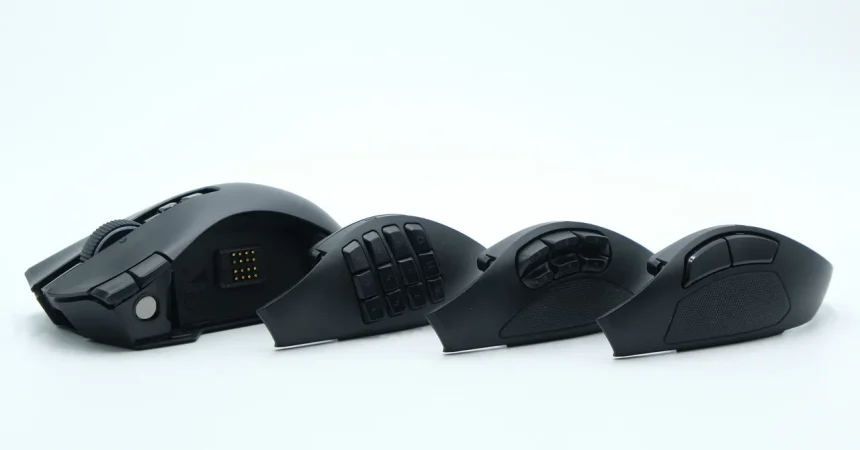
The Razer Naga V3 Pro arrives as a masterclass in ergonomic engineering, specifically tailored for those marathon gaming sessions where comfort is just as critical as performance. Whether you are grinding through high-stakes raids in Destiny 2 for hours on end or opting for a more laid-back experience in titles like The Big Walk, the mouse feels like a natural extension of your hand. Its shape encourages a relaxed grip, effectively minimizing fatigue even during the most intense gameplay loops. It isn’t just a tool for precision; it is a reliable companion built for the long haul, proving that sometimes, classic, well-researched geometry is superior to the experimental designs often seen in modern peripherals.
A common concern with multi-button gaming mice is their physical heft, yet the Naga V3 Pro defies expectations in this department. Weighing in between 113 and 116 grams depending on your side panel configuration, it manages to avoid the “clunky” sensation one might associate with such a feature-rich device. By keeping the center of gravity low and distributing the weight evenly, Razer has effectively masked its true mass. Unless you are jumping straight from an ultra-lightweight 60-gram competitive shooter mouse, the Naga feels surprisingly nimble. It balances that substantial, premium build quality with a lightness that allows for agile movement, ensuring you never feel as though you are dragging a brick across your mousepad.
However, the design isn’t without a few minor grievances, the most notable being its aesthetic limitations. In a market where personalization and desktop color-matching are becoming the norm, the Naga V3 Pro remains strictly monochrome, offered only in a standard matte black. While black is a timeless, sleek choice that fits virtually any setup, a peripheral this specialized—often targeted at power users and enthusiasts—would have been a perfect candidate for a wider color palette. A white or silver variant could have elevated the “pro” aesthetic, making it feel less like a generic piece of hardware and more like a centerpiece for a customized creative or gaming workspace.
The standout feature of this device is, unsurprisingly, its button layout, which can only be described as an embarrassment of riches. For the average user, the sheer volume of customizable inputs can feel overwhelming, yet for the enthusiast, it is a dream come true. Razer has masterfully ensured that these buttons never interfere with the primary clicking experience. By placing them strategically around the chassis, the mouse allows for extreme versatility without ever feeling cluttered. If you do find a specific button to be a nuisance—like the third-click function—the hardware provides an easy, physical lockout switch on the underside, demonstrating a thoughtful approach to user control that many competitors overlook.
Beyond the gaming realm, the mouse functions surprisingly well as a powerhouse for productivity. Drawing inspiration from the versatility of the Logitech MX Master series, the Naga V3 Pro features a highly customizable scroll wheel that can toggle between smooth and ratcheted scrolling, as well as a “precision tactile” mode. The addition of a tilt-wheel for horizontal scrolling is a game-changer for those who spend their time in spreadsheets or timeline-heavy video editing software. Because you can remap these buttons to virtually any macro, the mouse transforms from a gaming weapon into a specialized control deck, streamlining repetitive tasks and complex workflows that would otherwise require cumbersome keyboard shortcuts.
Ultimately, the Naga V3 Pro succeeds because it manages the difficult balancing act of being both a specialized tool and a daily driver. It possesses enough raw functionality to satisfy the most demanding MMO players, yet its build quality and ergonomics are refined enough for the professional creative who lives in editing suites. It avoids the pitfalls of over-complication; it doesn’t force you to use its extra features, but it ensures they are there when you need them. By prioritizing a “relaxed grip” philosophy and intuitive weight distribution, Razer has crafted a device that respects the user’s need for comfort, solidifying its place as a top-tier choice for anyone looking to optimize their workflow and their play.