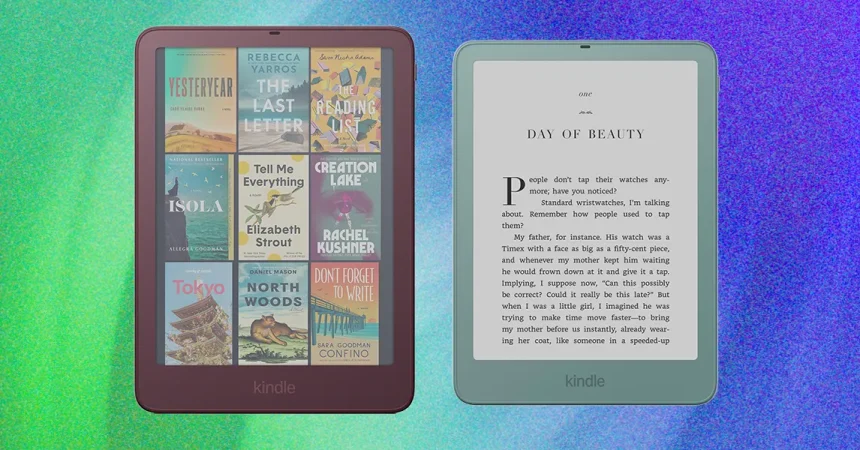
There’s something about picking up a new gadget that makes you feel like you’ve already upgraded before you even switch it on, and that’s exactly the sensation I got with the 2026 Kindle Paperwhite Signature Edition and Kindle Colorsoft Signature Edition. Both of these devices carry over everything that made the previous Signature Editions appealing: auto-adjusting front lights that adapt to your environment, wireless charging convenience, and generous storage for all your books, audiobooks, and comics. But the 2026 versions go a step further with a brand-new aluminum-backed frame that gives them a noticeably more premium feel and a shiny, polished look. It’s the kind of design choice that makes these e-readers feel less like disposable plastic gadgets and more like the kind of objects you’d want to keep around for years, maybe even display on a coffee table. That aluminum construction does come with a trade-off, though. The new Signature Editions weigh 8.1 ounces, up from the 7.2 ounces of their predecessors. You can definitely feel the extra heft in your hand, especially if you’re used to the featherlight nature of older Kindles. But here’s the thing: the taller form factor actually makes that weight feel better distributed. I’ve spent hours reading with one hand, and while I was aware of the added mass, it never felt like it was dragging me down or causing the kind of hand fatigue you might expect. The weight sits more evenly across the device, so it feels balanced rather than heavy. That’s a big deal for an e-reader, because comfort is everything when you’re settling into a long reading session. Add in the pogo pins on the back, which are there to pair the device with new Kindle accessories, and you can tell Amazon is thinking about this as more than just a reading device. It’s becoming a platform. The aluminum body also changes the tactile experience in subtle ways, making the device feel cooler to the touch at first and more solid when you grip it. If you’re someone who values premium hardware, this is a welcome evolution, even if it means sacrificing some of the old model’s almost weightless charm.
Color has always been a personal thing with Kindles, and the 2026 lineup makes some bold choices about how and where you can get it. The most colorful finishes are now essentially locked into the Signature Editions, at least if you want one of the 7-inch models. The base, 6-inch plastic Kindle still has a purple color option, which is nice for budget shoppers, but the base Kindle Paperwhite and the base Kindle Colorsoft are only available in black. That’s a bit of a letdown if you were hoping to get a fun color without shelling out for the premium model. The Signature Editions, on the other hand, are where you’ll find the personality. I tested the Paperwhite Signature Edition in Seaglass Green, a soft, calming shade that feels like it was made for reading by the ocean, and the Colorsoft Signature in Fig, a deep purple that leans more sophisticated than playful. Both colors look gorgeous in person, and the aluminum backing gives them a slightly metallic sheen that makes them stand out from the flat plastic finishes of past models. But I have to admit, I was disappointed that it’s only one color per model. Given how expensive these Signature Editions are, and considering that the aluminum version of the base Kindle gets two color choices, it feels like Amazon could have offered a little more variety. You’re asking people to pay a premium, and part of the fun of owning a premium gadget is being able to make it feel like yours. Having just one color option per device limits that sense of ownership. It’s not a dealbreaker by any means, but it’s the kind of small frustration that lingers when you’re spending this much money. I would have loved to see the Seaglass Green available on the Colorsoft, or maybe a warm coral or a soft blue to round out the lineup. Instead, you have to choose between the device features you want and the color that speaks to you, which feels like an unnecessary compromise in a product line that’s otherwise so thoughtful.
The real reason I’d consider choosing a Signature Edition over a base model, though, isn’t the color at all. It’s the compatibility with a brand-new accessory from Amazon called the Kindle Page Turn Cover, which costs $80. This might sound like a simple thing, but for longtime Kindle fans, it’s a big deal. Amazon used to make an e-reader with physical page-turn buttons called the Kindle Oasis, and it was beloved by a passionate group of readers. But Amazon discontinued it years ago, and since then, the company has relied on touchscreen controls for page turning. A lot of us have been waiting for physical buttons to come back, and instead of building them into one of its standard e-readers, Amazon has chosen to make them an add-on accessory. According to Amazon, only about 5 percent of Kindle users are vocal about wanting page-turn buttons, which is a small but loud minority. I think this is actually a smart move. It lets Amazon cater to that niche without risking a potentially unpopular device that might not sell well in mass quantities. The Page Turn Cover is essentially a slim case with buttons on the side that connect to the Kindle through those pogo pins on the back. It snaps on easily and immediately starts working, turning pages with a satisfying click. There’s something deeply comforting about going back to physical page-turn buttons after years of tapping a screen. It feels more like reading a traditional book, and it’s easier to hold the Kindle in a way that feels natural, especially if you’re someone who likes to read with one hand and maybe sip a coffee with the other. The cover is lightweight and sleek, and it looks and feels almost identical to the new slim covers Amazon has released for its aluminum models. It’s discreet enough that you don’t feel like you’re carrying around a clunky accessory, and the buttons are positioned perfectly for your thumb to find them without any awkward stretching.
Using the Page Turn Cover in real life is mostly a joy, but there is one quirk that took me a while to get used to. The cover works beautifully for turning pages forward, which is what you’ll be doing most of the time when you’re reading. But if you want to go back a page, or if you’re reading something like a web article or a PDF where you need to scroll up and down, the experience feels a little backward. The higher-up forward button will move you down a page, when visually you expect it to move you upward. It’s the kind of thing that sounds minor, but it can be disorienting when you’re trying to navigate through a document. You end up pressing the wrong button, then correcting yourself, and then repeating the process until your brain finally rewires itself. That said, once you get used to it, it’s easy to ignore. The cover itself is otherwise excellent. It pops onto the Kindle without any fiddling, and it’s ready to go almost instantly. There’s no Bluetooth pairing, no charging, no complicated setup. You just snap it on, open your book, and start reading. I love that the whole experience feels frictionless. You don’t need to worry about whether the case is going to add too much bulk or whether the buttons are going to feel mushy. The click is crisp, the design is slim, and the buttons are right where you expect them to be. It makes me wish Amazon had brought back page-turn buttons years ago. There’s something about the physical feedback that makes reading feel more intentional, more involved. You’re not just swiping a screen; you’re actively engaging with the book. It’s a small change, but it makes a real difference in how much I enjoy the reading experience.
The downside, of course, is the cost. The Page Turn Cover adds another $80 to your purchase, and you already need to upgrade to a Signature Edition to use it. That’s $40 to $50 more than the base models, before you even think about the accessory. The cheapest combination is with the Kindle Paperwhite Signature Edition, but even then, you’re going to end up paying over $300 for the privilege of having physical page-turn buttons. That’s a lot of money, and it becomes especially hard to justify when you look at the competition. The Kobo Libra Colour, which is my favorite e-reader that isn’t a Kindle, comes with page-turn buttons built in, and it costs about the same as the Kindle Paperwhite Signature Edition plus the Page Turn Cover combo. It also includes a stylus, so you can use it as a digital notebook. That’s an incredible value by comparison. You’re getting a device with built-in buttons, color support, note-taking capabilities, and no need to buy an extra accessory. When you put it that way, the Kindle combo starts to feel like a bit of a hard sell. It works well, and I genuinely enjoy using it, but the price hurts when you consider what you could get elsewhere for the same amount of money. And if you’re not picky about your page-turning accessory, there’s an even cheaper alternative: the Bluetooth Kindle Click remote, which costs $35 and works with older Kindle models. It’s not as elegant or integrated as the Page Turn Cover, but it does the job for a fraction of the price. You just clip it to your finger or your book, pair it via Bluetooth, and tap to turn pages. It’s a practical, budget-friendly option that makes the $80 cover feel like a luxury purchase.
So, do you actually need any of these devices? If you’re already a Kindle user, it’s hard for me to say yes. The upgrades are nice, but they’re not transformative, and the older models are already disappearing from Amazon’s website. That might sound like a push to upgrade, but it also means you’re not losing much if you stick with what you have. Your current Kindle will keep working just fine. But if you’re in the market for your first Kindle, or if you’re coming from an ancient model that’s finally given up the ghost, I’d still recommend choosing a Paperwhite. It’s the sweet spot in the lineup, with a sharp display, warm lighting, and enough features to keep you happy for years. And since the older Paperwhite isn’t any cheaper anymore, you might as well choose the newest model and get the improved design and the aluminum frame. The Signature Edition is a worthwhile upgrade if you care about wireless charging, extra storage, and especially if you’re intrigued by the Page Turn Cover. Just go into it knowing that you’re paying a premium for a feature that used to be standard on an Amazon product. It’s a fun, well-designed accessory, and I’m glad it exists, but it’s also a reminder that sometimes the best features are the ones we have to fight to get back. Whether that’s worth the price is up to you. For me, the joy of pressing a physical page-turn button is real, but I can’t help wishing it came a little cheaper and with a few more color choices.