INSERT GROUP ASSET: IMG_3735 and IMG_3734
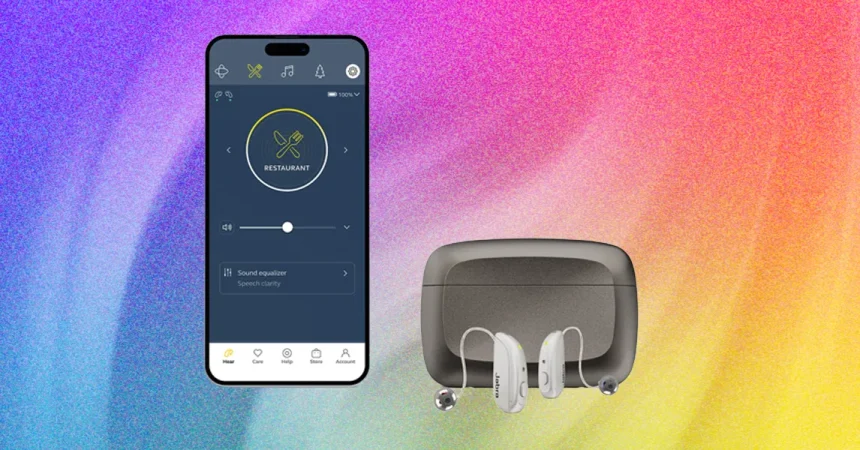
Screenshot: SoundScape app via Christopher Null
Let’s be honest about hearing aids: they are not supposed to be exciting. But every once in a while, a device comes along that makes you stop and think, okay, this is actually getting better. The new Jabra M3 hearing aids, as seen in the two SoundScape app screenshots above, are that kind of product. From the moment you launch the app, it feels different from the clunky, clinical software that most hearing aid manufacturers ship. The interface is clean, with large buttons and a logical flow that makes you feel in control rather than overwhelmed. There are no hidden menus, no cryptic icons. You can see the battery status, the volume, and the noise reduction level all at a glance, which is more than I can say for many flagship earbuds. The headline feature is what Jabra calls an advanced adaptive listening mode. The idea is simple: the hearing aids are supposed to sense whether you are in a crowded restaurant, an open outdoor space, or a quiet living room, and then automatically shape the sound to fit the moment. It’s a genuinely ambitious concept. I tested it for days, and the results were mixed. The environmental modes often did not match my surroundings. A loud café might trigger the “outdoor” setting, or a quiet park might leave me with too much background hiss. What worked best, in the end, was to ignore the adaptive presets entirely. Instead, I kept the hearing aids in the all-around mode and manually adjusted the levels—especially the noise reduction slider—as conditions changed. It required a little more effort, but the payoff was a far more natural hearing experience. If you are expecting a magical set-and-forget device, the M3 may disappoint. But if you are willing to spend a few minutes customizing the sound, it rewards you with clarity and control.
Where the M3 truly shines is in the quiet moments. Sitting across from a friend at a coffee shop, with the ambient noise low, the clarity of speech was nothing short of excellent. Every word arrived intact, every consonant crisp and distinct. Watching television at home, voices had a clean, present quality that made me forget I was wearing hearing aids at all. I did not have to strain to catch dialogue; it just landed in my ears with a natural ease that reminded me how much I had been missing. The key, I discovered, was to resist the urge to turn up the volume. Jabra’s M3 hearing aids have a sweet spot at around 30 percent. At that level, speech becomes beautifully intelligible, while the faint electronic hiss that all hearing aids have stays mercifully in the background. Push the volume higher, and the hiss grows louder—not just a little, but geometrically. Every small nudge upward adds a disproportionate amount of noise, so you end up trading speech clarity for a persistent, maddening sizzle. This is not a problem unique to Jabra; most hearing aids struggle with the same trade-off. But the M3’s sharp ceiling makes it more noticeable. Once I learned to live at 30 percent, though, the experience was genuinely lovely. I could hear the soft rustle of a page turning, the subtle ticking of a clock across the room, the quiet hum of a refrigerator I had forgotten was there. It was a reminder that hearing aids are not just about making sound louder—they are about making the world feel whole again. In quiet environments, the M3 does exactly that.
Out in the real world, the M3 takes on a different personality. In a busy restaurant, where plates clatter and conversations overlap, the automatic environmental modes often felt like they were guessing rather than knowing. Sometimes they overcompensated, shutting down too much background noise and leaving voices sounding hollow and distant. Other times they let too much chaos through, and I found myself straining to keep up with the person across the table. I tried every scene-based option—restaurant, outdoors, and the others—and none of them consistently outperformed the simple, honest all-around mode. The environmental modes, in other words, were not very useful. The experienced answer to noise, I found, was a manual one. Keeping the M3 in all-around mode and manually raising the noise reduction level cut through the clatter better than any automatic setting. It was not flashy, but it worked. Speech remained intelligible, and the cacophony faded into a distant murmur rather than a distracting roar. It took a little practice to adjust the controls discreetly, but the app makes it easy, and the on-device controls help too. Once I developed a routine, the M3 became a reliable partner in loud spaces. It is not a silver bullet. You will still lean in. You will still miss a word now and then. But you will not feel trapped, and that matters. The bigger point is that Jabra’s new adaptive technology is not something I came to rely on. It is a nice idea, and it works occasionally. But for real-world noise, the old-fashioned combination of a stable mode and a slider is still the best path to clarity.
Bluetooth streaming has always been the weak link in Jabra’s hearing aids, and the M3 does little to change that story. To be fair, the new devices support Auracast, a promising standard that allows public audio sources—airport departure boards, lecture hall microphones, even televisions in bars—to broadcast directly to your hearing aids. It is a feature that could make hearing aids feel like translation earbuds for the world. But in daily use, I do not see myself relying on any of the streaming modes. The audio quality from phone calls, music, and movies is only a marginal improvement over previous generations. On paper, that sounds fine. In practice, it is frustrating. Unless you push the volume to its maximum setting, music arrives thin and washed out, as if the audio has been run through a layer of foam. Details are lost, bass is almost nonexistent, and vocals often get buried beneath the instruments. Movies are even worse: whispered dialogue can vanish, while action sequences become a muddy blur. If you turn the volume all the way up, things improve, but then you have to deal with the same hiss issue that plagues the amplification modes. And here is the real killer: any ambient noise—a car passing, a dishwasher running, a conversation in the next room—completely destroys the streaming experience. The hearing aids do not seem to know how to separate the direct Bluetooth feed from the environmental sound, so your music is constantly being pushed aside by the clatter of the world. It is a significant limitation, and one that makes the M3 feel less like a multimedia device and more like a traditional hearing aid with a Bluetooth afterthought. If you are looking for something to replace your earbuds, this is not it.
The app is where the M3 experience comes together, and it is remarkably similar to what Jabra has offered before. If you have used a previous Jabra hearing aid, you will find familiar menus, familiar sliders, and the same logical layout. The SoundScape app is not trying to reinvent the wheel; it just wants to give you a comfortable, dependable cockpit for controlling your hearing. There is a lot to be said for consistency. Change is stressful, especially for older users, and Jabra clearly understands that. But the real highlight is not the interface—it is the human support behind it. Every purchase of the M3 includes three years of access to Jabra’s on-staff audiologists. That is a genuinely unbeatable perk. I called in during my testing, expecting a virtual queue or an impersonal email loop. Instead, I got a live audiologist on video chat who could adjust my hearing aids in real time. She made a few tweaks, explained what she was doing, and patiently answered my questions about fitting and noise reduction. It felt less like a customer-support call and more like a visit to a trusted clinic, except I was sitting in my own living room. For new users, this is a lifesaver. There is no one-size-fits-all setting for hearing, and having a professional who can tune your devices live over video chat takes the guesswork out of the process. And if you prefer to do it yourself, Jabra’s built-in self-test is one of the best in the industry. It walks you through a series of tones and beeps, then creates a precise audiogram from scratch in just a few minutes. The process is so polished that it feels almost like a game, but the results are serious. By the time you finish, your M3s are calibrated to your specific hearing profile. That combination—easy self-testing and real human backup—makes the app side of the M3 arguably the best reason to buy them.
After testing the M3 hearing aids in a variety of settings, I can report that they work just as well as previous Jabra generations—which is another way of saying they are very good at what they are designed to do. In quiet environments, they are nearly perfect. In loud ones, they are manageable with a little manual intervention. The adaptive mode is more promise than payoff, and Bluetooth streaming remains an afterthought. But the core hearing experience—the amplification, the clarity, the noise reduction—is solid, dependable, and surprisingly comfortable to live with. The key, as I kept discovering, is to find the settings that work for you and to resist the temptation to overcomplicate things. Keep the volume around 30 percent, stick to all-around mode, and use the noise reduction slider to tame the world. That simple formula carried me through coffee shops, phone calls, television shows, and quiet evenings at home without much frustration. For people who are new to hearing aids, the M3 offers a gentle and effective introduction, especially with the generous three-year audiologist support and the intuitive app. For people upgrading from an older Jabra model, the changes will feel modest—not a reason to rush out and replace a working pair, but a welcome refinement if you are due for an update. For people expecting a miracle of adaptive intelligence or a high-fidelity streaming earbud, the M3 will disappoint. It is not a smart gadget. It is a hearing aid, and a good one. The world it reveals is real, not enhanced. And sometimes that is exactly what you want.