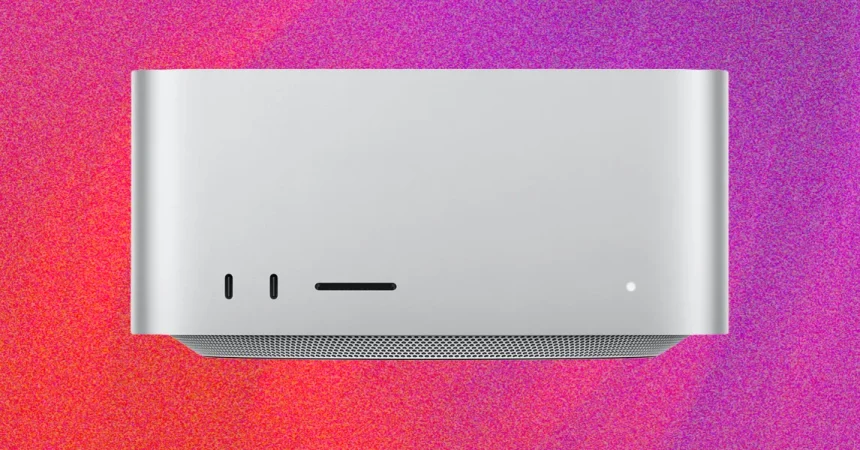
I’ve been spending a lot of time lately with the Mac Studio, specifically the M5 Ultra model, and I wanted to see what all that horsepower actually means for real-world, on-device AI work. So I fired up Draw Things, an app that lets you generate images and videos locally, and put the machine through its paces. I used the MiniMax H3 model, which is a serious video generation model, and asked it to produce a 15-second clip. The result? It took more than eleven minutes to finish. That’s not a typo. Eleven minutes for a 15-second video, all computed on the device itself. In a way, that’s genuinely impressive — you’re doing something that used to require a data center on a computer sitting on a desk. But let’s be honest: waiting eleven minutes for a brief snippet of AI-generated video is not what most people would call a seamless experience. Cloud-based services can do it much faster, and a high-end discrete GPU like an RTX 5090 or 5080 would likely chew through the task in a fraction of the time. So if you’re buying an M5 Ultra Mac Studio specifically because you think it’s going to replace your cloud AI subscriptions or a beefy PC workstation, you might be a little disappointed right now. That said, this is still early days. The hardware is here, the software is still catching up, and as models get more efficient and quality continues to improve, the Mac Studio’s local AI capabilities are only going to get better. It’s a niche use case, no doubt — spending this much money to run AI locally is a choice that only makes sense for a particular kind of user. But for those users, the future is promising, even if the present feels a bit slow.
One thing that became really clear during these AI tests is that the Mac Studio is not just a quiet little box that sits innocently under a monitor. It’s a serious piece of hardware with serious cooling demands, and when you push it hard, you know about it. During those video generation runs, the machine got noticeably warm — not just “hmm, that’s a bit toasty” warm, but “I probably shouldn’t touch that” warm. You definitely don’t want to set anything on top of it, and you want to give it plenty of breathing room, especially behind the unit, because that’s where the hot air gets pushed out. The thermal design is actually pretty clever in places. The front-facing ports stay surprisingly cool, even under full load, because the vents for the cooling system are situated right underneath the chassis, so the airflow does its job before any of that heat reaches the front. But the fans themselves are another story. They can spin up quite loudly when the GPU is maxed out, and it’s not the kind of noise you can ignore in a quiet room. It’s also worth noting that the fans don’t immediately go into full jet-engine mode — like all modern Macs, it takes a couple of minutes for them to really ramp up as the temperature builds. So you get this little window of silence before the system decides it’s time to start moving some serious air. It’s not unpleasant, exactly, but it is a reminder that high-performance computing has physical consequences. If you’re coming from a laptop, or from a Mac mini, you might be surprised at how much heat and noise a desktop workstation can generate when it’s actually working hard. This is not a passive experience. It’s a machine that demands a little respect in terms of placement, clearance, and expectations.
But here’s where the Mac Studio really starts to make sense: memory. The top-end M5 Ultra model comes with a staggering amount of unified memory — up to 256GB — and that’s something you almost can’t get anywhere else in a machine this size. Traditional mini PCs, especially those running Windows, typically rely on laptop-class processors that top out at around 64GB of RAM. That’s a hard ceiling for most of them. So if your AI models need to load into memory all at once — and many of the larger ones do — the Mac Studio is in a class of its own. That huge memory pool is what makes local AI workloads even possible, because the model weights, the context, and the intermediate data all need to live somewhere accessible. It’s also why the top-end M5 Ultra can justify its sky-high price, at least from a purely technical perspective. You’re not just paying for a faster chip; you’re paying for a massive amount of fast, unified memory that few systems can match. And Apple isn’t stopping there. There’s an upcoming option for 512GB of memory, which is just absurd in a desktop computer, and Apple has also added the ability to connect four Mac Studios together and use them as a single computer. That turns what was already an extremely niche product into something almost entirely without rivals. There’s really no other comparable single machine that offers this kind of memory capacity and the ability to scale out like that, especially for local AI work. It’s a specialized tool for a specialized audience, but within that narrow band of users, nothing else comes close.
The base M5 Max Mac Studio, however, is a different story. It’s a very capable machine, but it’s not without competition, and some of that competition is looking increasingly attractive. For example, you can pick up a Geekom A9 Mega Mini PC for $2,399 that comes with 64GB of RAM, a 1TB SSD, and AMD’s new Ryzen AI Max+ 388 processor. That’s more memory and more storage than the base Mac Studio offers, and it costs less. Now, memory capacity isn’t everything, but in the world of local AI, it matters enormously. And here’s the interesting part: AMD’s Ryzen AI Max+ chips use unified memory in a very similar way to Apple Silicon. That’s a big deal because unified memory is crucial for running AI models efficiently. The CPU and GPU can access the same memory pool without copying data back and forth, which saves both time and power. For years, Apple Silicon’s unified memory architecture was one of its biggest selling points for AI work, and now AMD is bringing that same concept to Windows and Linux machines. It’s still early, and we don’t yet know how the Geekom A9 performs in real-world tests compared to the Mac Studio, but the potential is definitely there. We’re hopefully going to get one in for testing soon, and I’m genuinely curious to see whether it can hold its own in actual AI workloads, not just on paper. If it does, it could be a very compelling alternative for people who want local AI capabilities without locking themselves into Apple’s ecosystem — and without paying the Apple tax.
And the competition isn’t going to stop there. Nvidia, which has been the dominant force in AI hardware for years, is getting ready to push into this space with its RTX Spark “superchips.” These are designed to bring unified memory to both laptops and mini PCs, with support for up to 128GB of memory. That’s not quite the 256GB that the Mac Studio can offer, but it’s a significant step in the right direction, and it’s likely to put some real pressure on Apple’s position. For a long time, the Mac Studio was almost the only option if you wanted a compact, relatively quiet machine with a massive amount of unified memory. But that’s changing. Nvidia has the software ecosystem, the developer mindshare, and the raw AI performance to make a serious dent in this market. And even if RTX Spark systems don’t reach the same memory capacity right away, they’re going to force Apple to keep innovating, to keep pushing the envelope, and to keep making the Mac Studio better. That’s good for everyone. Competition breeds progress, and more options mean more people can eventually get access to local AI tools without having to spend an arm and a leg. It also means that the Mac Studio’s “unbeatable” status is going to be tested in ways it hasn’t been before. Apple has a head start, and the memory advantage is real, but the rest of the industry is clearly moving in this direction, and they’re moving fast.
So where does that leave us? The Mac Studio, especially the M5 Ultra, is a remarkable machine — but it’s not for everyone, and it’s not for every task. For local AI generation, it’s still very much a work in progress, and the eleven-minute video I generated is proof that we have a long way to go before this feels like a mainstream alternative to cloud-based services or a dedicated workstation with a powerful GPU. But it’s also proof of how far we’ve come. The fact that a 15-second video can be generated entirely on a desktop computer, without any internet connection, is nothing short of astonishing. The heat, the noise, and the cost are all real considerations, but they’re the price of doing this kind of work locally, and for some people, that price is worth paying. The Mac Studio’s massive memory capacity gives it a unique place in the market, and for developers, researchers, or artists who need to load huge models into memory, there’s really nothing else like it. But the landscape is shifting. AMD is bringing unified memory to more affordable mini PCs, Nvidia is on the horizon with its own compact AI systems, and the software tools are improving all the time. We’re still in the early days of local AI, and it would be foolish to bet on any single winner right now. The M5 Ultra Mac Studio might be the king of the hill today, but the hill is getting more crowded, and the climb is getting easier. For now, it’s an incredible piece of hardware with an equally incredible price tag, and whether it’s worth that price depends almost entirely on what you plan to do with it. If you need that huge memory capacity and can tolerate the heat and the fans, it’s a tool unlike any other. If you don’t, you might be better off waiting to see what the next wave of competitors brings. Either way, these are exciting times for anyone who cares about running AI locally.