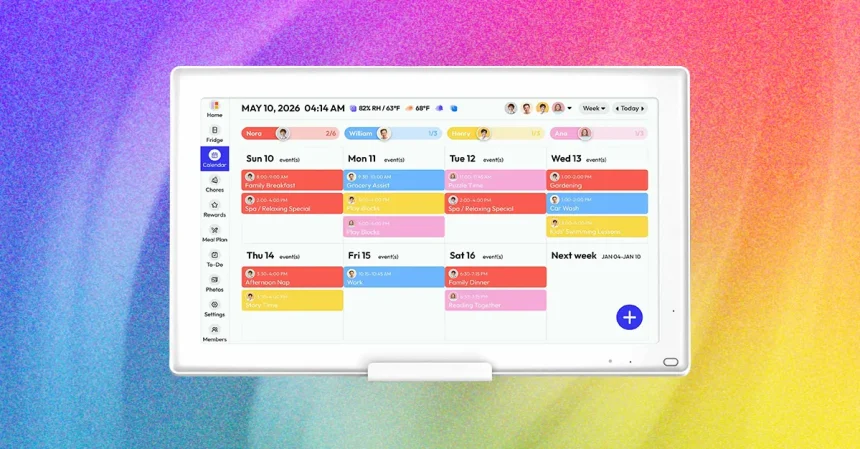
As someone who spends most of my waking hours surrounded by the latest tech—smartphones with foldable screens, AI-assisted earbuds, and home robots that do everything except tuck you in—people often assume my favorite gadget of any given year has to be something flashy and futuristic. But this year, the device that genuinely made my life calmer, more organized, and honestly a little more joyful, is a digital calendar. It doesn’t have a futuristic name, it doesn’t fold, and it can’t browse the internet, but it solved a very real problem in my household. With a child in school, a partner with a packed schedule, a demanding career, and all the little appointments that come with life, our family was drowning in fragmented schedules. To-do lists lived on sticky notes, event reminders buzzed on different phones, and someone was always missing something important. Then I started testing digital calendars, and everything changed. I’ve tried the big names like Skylight, along with several lesser-known brands you’d only discover if you trawl the internet like I do. And after months of testing, I’ve found the one that I genuinely recommend to anyone who wants clarity without a monthly fee.
At first, I wasn’t sure a digital calendar was much more than a glorified tablet stuck on the wall. But these devices do something surprisingly powerful: they take the contents of your favorite calendar apps—Google Calendar, iCal, Outlook, and others—and display them beautifully on a dedicated physical screen. No more digging through your phone to answer, “What’s happening this weekend?” You simply glance at the wall and see your entire day, week, or month spread out in front of you. But the real game-changer is the ability to layer multiple calendars at once. I’m not just seeing my own appointments anymore. My husband’s work commitments, my son’s school events, and even a separate calendar I created to track my pregnancy milestones all appear on one unified display. It’s like having a family mission control center in my kitchen. There’s something deeply comforting about never having to ask, “Wait, when is that dentist appointment?” because the answer is always right there. And because these screens are always on, they don’t wait for a button press. They’re not locked behind an unlocking swipe. They’re just there, quietly keeping the whole family on track.
The more I tested, the more I realized digital calendars offer far more than just a giant view of your schedule. Many of them act as playful chore trackers, turning boring household responsibilities into a visual game for kids. Some even go further: there’s a calendar that will automatically pay your children their allowance once they complete their assigned chores. Others double as digital photo frames, letting you rotate family memories in between your weekday appointments, and many include meal planning tools that help you decide dinner without arguing at 6 PM. Honestly, as someone who has used smart displays for years—the kind with voice assistants and video calls—I found that these simple digital calendars were far more useful in day-to-day life. Smart displays try to do everything, and sometimes that’s exactly the problem. They give you a million distractions. A digital calendar, on the other hand, does one thing beautifully. It brings order to the chaos. It’s replaced the clutter of paper schedules and the anxiety of missed events. In my testing, the calendar became the default family hub, the first thing you look at in the morning and the last thing you check before bed. It’s a quiet, unassuming hero that made me wonder why we ever moved our schedules into our phones in the first place.
Now, about the options. I tested five different digital calendars this year, and Skylight Calendar has long held a special place in my heart. It’s polished, easy to set up, and the display is gorgeous. But after living with it for a while, I hit a frustrating roadblock: some of my favorite features are locked behind a subscription paywall. The photo screensaver, which turns your calendar into a family photo frame when idle, requires a monthly fee. The meal planning feature, which would genuinely help me organize dinners, is also part of the paid tier. I understand companies need recurring revenue, but when I’ve already paid several hundred dollars for a device, it stings to be asked for even more money just to use basic features. That’s why I found myself gravitating toward a different device, one that delivers an incredibly similar experience to Skylight but does it without forcing you into a subscription. It’s called the Everblog HomeCal, and it instantly became my top recommendation for anyone who values simplicity and smart spending.
The Everblog HomeCal 21.5″ Calendar is built around the idea that you should own your calendar completely. It packs all the essential tabs you’d expect from a high-end digital calendar: chores, to-dos, rewards (which let you gamify task-completion for kids), and meal planning. The setup process is straightforward through the companion app, which lets you link your favorite calendar services and create individual profiles for each family member. It handles the same multi-calendar magic, pulling together everyone’s schedules into one clear, color-coded display. There are a few trade-offs for sure. For instance, the photo uploader in the Everblog app is noticeably slower than Skylight’s because you can only upload one image at a time. It took me a few patient afternoons to fill the screensaver with all our pictures. But I happily accept that minor inconvenience, knowing I will never see a paywall. My only true wish for this device is a built-in voice assistant, which would make hands-free changes a dream. But honestly, almost no digital calendars offer that, and the one that does charges you for the privilege. In this market, Everblog’s decision to give you everything without a subscription feels like a breath of fresh air.
Practically speaking, the Everblog HomeCal is also very easy to live with. Its 21.5-inch screen is large enough to read comfortably from across the room, but not so enormous that you can’t find a spot for it in a small apartment or busy kitchen. It comes in the box with everything you need to mount it on the wall, which is how I use mine, but it also has a flat base so it can stand on a countertop or sideboard. During testing, I did find the standalone tabletop setup a little wobbly for my liking, so if you plan on keeping it on a counter, I’d recommend spending a little extra on the dedicated Calendar Stand, which runs $39. It adds a much sturdier footprint and a more polished look. There are also beautiful wooden frames available for about $99 if you want to help the device blend seamlessly with your existing home decor rather than looking like a piece of tech. Right now, the accessories aren’t on sale, but the calendar itself is, which means you can save enough money to justify snagging that stand or frame. The 21.5″ model is currently $300 at Amazon, which is a solid $100 off, and also $50 off directly from Everblog’s website. That discount gives you plenty of breathing room in your budget. So if you’re ready to bring a little more calm to your household, ditch the subscription fees, and finally get everyone on the same page, this is absolutely the moment to grab one. Here’s to your most organized holiday season ever!