Amazon has always understood that the tablet is not just a piece of hardware; it is a doorway into a universe of content. From the earliest Fire tablets to today’s Alexa Tablets, the company has never been shy about making its own services front and center. When you pick one up, the first thing you notice is that the home screen is not just a grid of apps waiting to be opened. It is a curated space designed to keep you inside Amazon’s ecosystem, and it does that work from the moment you wake the screen. There is something almost cozy about it, like walking into a beautifully arranged bookstore where every shelf has been tilted toward your tastes, but also something a little relentless. Amazon knows that the longer you stay within its walls, the more likely you are to read, watch, shop, and listen through its services. That is why the interface is not neutral. It is a friendly, colorful, gently pushing companion. The tablet is not simply offering you a blank canvas; it is offering you a very specific way to spend your time. And if you are someone who lives inside Amazon’s world, that can feel seamless and convenient. If you are not, it can feel like a walled garden that is always humming with suggestions. But Amazon is betting that most people will accept the trade-off, because the tablet itself is affordable, and the ecosystem is rich enough to keep you entertained for hours. The whole experience is designed to feel less like a cold piece of technology and more like a comfortable living room where the television, the bookshelf, and the photo albums all happen to belong to the same family business.
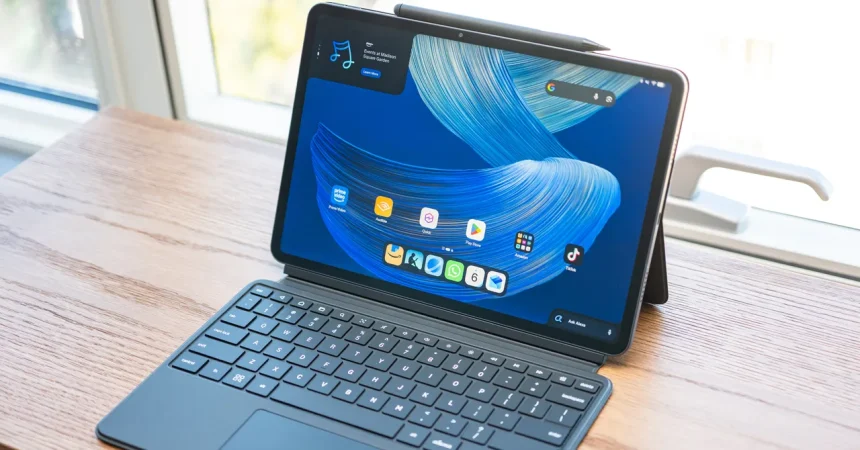
Take, for example, the Dynamic Tab, which sits in the top-left corner of the home screen like a persistent little companion. It is not the kind of widget you have to add or configure; it is just there, and it has a quiet job to do. The Dynamic Tab is scrollable, and what it shows you are the threads of content you have already been pulling on across your other devices. If you were reading a novel on your Kindle, the tab might remind you of that book, letting you dive right back into it. If you were halfway through a movie on Prime Video on your iPhone, you might see that movie waiting for you, ready to resume on the larger screen. If you snapped a batch of photos on vacation and uploaded them to Amazon Photos, the tab can pull those up as well, turning your tablet into a family album that knows your history. The beauty of this widget is that it feels less like an advertisement and more like a memory. It is not shouting at you to buy something new; it is simply saying, “You were here, and here is where you left off.” That kind of continuity is genuinely useful. The tablet becomes a bridge between the Kindle in your bag, the phone in your pocket, and your personal photo library. It acknowledges that you live in multiple places and that you should not have to dig through menus to find the thing you were just enjoying. In a world where our digital lives are scattered across apps and devices, the Dynamic Tab feels like a gentle attempt to stitch it all back together. It is not perfect, and it occasionally feels like Amazon is gently steering you toward its own content, but mostly it just feels like a warm welcome back to whatever you were doing before.
Swipe right, and instead of the usual Google Discover feed that you might expect on an Android tablet, you are greeted with Amazon’s For You experience. This is where the tablet’s personality becomes unmistakable. Amazon’s Fire tablets were always a vehicle for putting Amazon content in front of your eyes, and that has not changed with the Alexa Tablets. The For You page is a continuous, endlessly scrolling stream of stuff that Amazon thinks you will love. There are tabs for movies and television, games, and Kindle books, each one offering a handpicked selection of titles from Amazon’s own catalogs and partnerships. There is also a news feed, which pulls stories from various sources, and you can tap Alexa prompts to get more information about a particular story. It all feels a bit like having a very enthusiastic friend who keeps handing you things to watch, read, or play. You can lose yourself in this feed for hours if you are not careful. It is designed that way, of course. But there is also something comforting about it. Instead of being dropped into a chaotic open web, you are given a curated set of recommendations that are tailored to your habits. Amazon has learned what you like from your previous purchases, your browsing history, and the time you spend with different kinds of content. The For You page uses all of that information to create a surface that feels personal. It is not just a random collection of trending videos or viral articles; it is a living catalog that changes as you do. The downside, if you see it that way, is that everything is filtered through Amazon’s lens. You are not exploring the open internet; you are exploring Amazon’s version of the internet. For many people, that is fine. The tablet is a place to switch off and consume, not necessarily a place to work or do deep research. It is a leisure device, and the For You page makes that clear from the moment you swipe.
The most distinctive and genuinely thoughtful feature of the Alexa Tablet, however, is what happens when you open the Kindle app. It is a feature called Kindle mode, and it transforms the tablet into something that feels much closer to a dedicated e-reader. When you open the Kindle app, the tablet knows exactly what you are doing. It turns off all notifications, so you are not disturbed by text messages, emails, or app alerts. It also turns on a blue light filter, which warms the screen and makes it easier on your eyes, especially if you are reading at night in a dimly lit room. Battery life is extended dramatically, with Amazon claiming you can get around twenty hours of reading on the larger tablets and somewhat less on the smaller models. You know the feeling of getting lost in a book and suddenly realizing you have been reading for hours? Kindle mode is designed to protect that feeling. It creates a quiet room inside a noisy device. There are no badges, no pings, no buzzing. There is only the page in front of you. It is a beautiful idea, and it works because the tablet is not just dimming the screen; it is changing its whole personality. The home button, the app switcher, the taskbar all remain available if you need them, but the tablet is intentionally stepping back so that you can focus on the words. When you exit the app, notifications come back on, and the screen returns to normal. The spell is broken, and you are back in the busy, connected world. But while you are reading, the tablet does everything in its power to make you forget that it is a tablet at all.
Part of what makes Kindle mode so enjoyable is that you have choices about how the page looks, and those choices go far beyond simply making the text bigger or smaller. Amazon offers three display treatments that change the character of the screen in subtle but noticeable ways. The first is a subtle warmth with natural color, which is the closest to a conventional reading experience on a glass screen. It adds a gentle amber glow that mimics the feeling of reading under a warm lamp. The second treatment is a softened paper tone, which makes the background look more like an actual physical page. It is less bright, less stark, and perhaps a little easier to settle into, especially if you are reading for a long stretch. The third option is monochrome, which strips all color out of the experience and turns the tablet into something that resembles a traditional e-ink reader. It is a lovely way to cut down on visual noise, and for some readers it becomes the only way they want to read. There is also a fun page-turn effect that mimics the physical act of turning a page in a book. Instead of the screen simply swapping to the next page, there is an animation that simulates the curve and motion of paper. It is a small thing, but it can make the experience feel much more tactile and human. Best of all, if you are using the stylus, any annotations you make in Kindle mode will sync with Kindle apps on other pen-supported devices. That means you can highlight a beautiful sentence on your tablet and later find that exact annotation waiting on your phone or your other reading devices. It is a thoughtful detail for people who like to write in the margins of their digital books. All of this adds up to a reading experience that feels surprisingly deliberate. It is not just about displaying text; it is about honoring the act of reading as something that deserves its own special atmosphere.
When you finally close the Kindle app and step back out into the regular tablet interface, the transformation is immediate and almost jarring. Notifications return with a soft buzz or a little banner, and the screen brightens back to its full color. The home screen is once again a busy mix of widgets, app icons, and Amazon suggestions. It is a reminder that the Alexa Tablet is a dual-purpose device. It can be a focused e-reader when you want it to be, but it is always ready to become a full-fledged entertainment tablet the moment you are ready to leave your book behind. In many ways, that is the central tension of the device. Amazon has designed it to be a portal to its own vast library of movies, music, books, games, and news. The For You feed, the Dynamic Tab, and the always-present Amazon content all point in that direction. But with Kindle mode, Amazon has also acknowledged that sometimes you do not want a portal. Sometimes you want a quiet place to sit with your thoughts and read a few pages. That balance makes the Alexa Tablet a genuinely interesting companion, especially for people who already live inside Amazon’s ecosystem. It may not be the most open or flexible tablet on the market, and it is certainly not trying to replace your laptop. But it does something that many devices fail to do: it gives you a comfortable, personalized, and deeply human way to interact with the content you already love. It remembers where you left off, it greets you with familiar faces, and it knows when to get out of your way. In that sense, the Alexa Tablet is not just a piece of hardware. It is a gentle reminder that the best technology is the kind that makes you feel at home.