Managing a household of five is a relentless exercise in logistics, often feeling like a high-stakes balancing act of competing work schedules, three different school calendars, and a dizzying array of extracurricular commitments. For years, my husband and I relied on a shared digital calendar, but as our lives grew more complex, that tool began to feel insufficient for the constant churn of errands, meal planning, and house maintenance. It was this creeping sense of chaos that led us to integrate a Skylight Calendar into our home—a move that fundamentally shifted how we function as a family. Because my children are now teenagers, they are finally at an age where they can take active ownership of their daily lives, moving away from relying solely on me to keep their worlds moving.
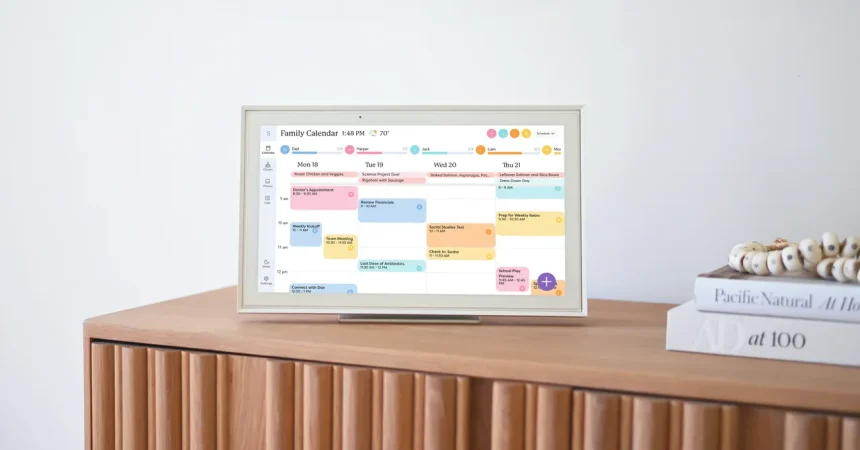
The transformation began the moment the 15-inch touchscreen landed on our kitchen counter. Getting started was surprisingly intuitive; my 12-year-old took the lead, unboxing the unit and guiding the setup process with the ease of a digital native. We synced our existing Google accounts seamlessly, allowing us to import our baseline schedules while giving each family member their own dedicated, color-coded section. Beyond just mapping out rehearsals and appointments, we even color-coded household chores, which suddenly turned monotonous tasks like recycling into a structured, visible responsibility. It brought a newfound sense of transparency to our home, turning what was once a private, maternal burden into a shared family dashboard.
What truly surprised me, however, was how much my kids actually enjoyed participating in this system. For the first time, they weren’t just passive observers of their own lives; they began proactively checking the calendar to coordinate their own social plans around our family commitments. This shift in autonomy was a major win for me, as it effectively offloaded a significant amount of the mental load I had been carrying. Instead of fielding constant questions like “Can I hang out with friends on Thursday?” they now look at the screen, assess the situation, and self-regulate. It’s an empowering cycle of responsibility, even if it does come with a minor privacy trade-off—my kids now see the private notes I once kept solely for myself, like reminders for birthday gifts, forcing me to refine how I use my digital task-management tools.
The grocery situation, which had long been a source of domestic friction, also received a much-needed upgrade. Our old system—a loose piece of paper clinging to the fridge by a flimsy magnet—was a recipe for repeated store runs and forgotten essentials. With the Skylight app linked to everyone’s phone, the grocery list is now a living, democratized document. Whether we are at school, work, or home, anyone can add an item as soon as they realize we are out of it. It has eliminated the guesswork, the constant second-guessing, and the inevitable “I-forgot-the-bread” emergencies that used to punctuate my evenings. It is a small change, but it has removed a persistent layer of background stress from my daily routine.
While the core device is excellent, we also explored the “Plus” subscription, which unlocks the platform’s more sophisticated tools, including the AI assistant, Sidekick. After fifteen years of manually typing out school handouts, permission slips, and activity schedules, Sidekick felt like a revolutionary gift. Being able to snap a photo of a crumbly paper flyer or forward a chaotic email and have the AI translate that information into a calendar event saves me hours of tedious data entry each month. While the AI isn’t always 100% accurate, it provides a functional starting point that slashes “administrative” time, allowing me to spend less time glued to screens and more time actually engaging with my kids.
Ultimately, integrating the Skylight Calendar has been less about the hardware and more about changing the culture of our household. It has created a unified “source of truth” that everyone can access and contribute to, moving us away from being a top-down, command-and-control organization to a more collaborative team. Between the meal planning features—which allow us to archive favorite recipes and drop them straight into our weekly schedule—and the shared responsibilities, the device has acted as a digital glue for our busy lives. For any family hitting that transition point where kids start to juggle their own independence, shifting to a shared, interactive display might just be the best way to reclaim your collective sanity.