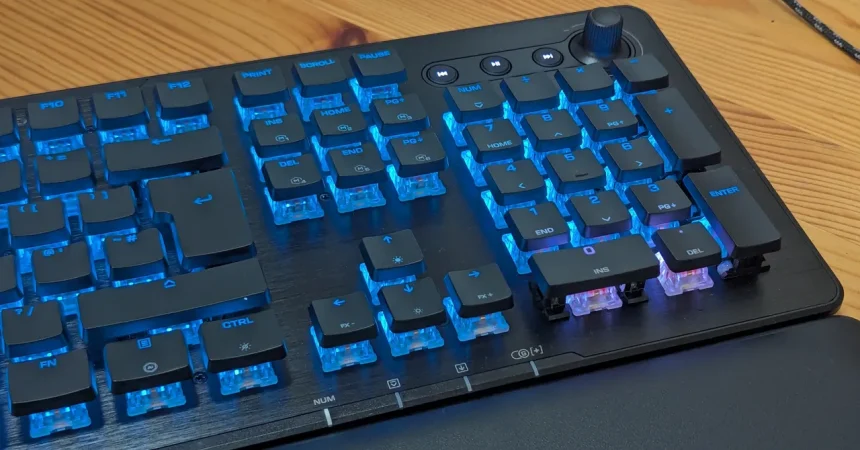
I remember when a keyboard was just the thing you typed on—gray, clunky, and utterly forgettable. If it had a Windows key and a volume knob, you felt like you were living in the future. That’s why reviewing a keyboard like the Turtle Beach Vulcan II XP feels a little surreal. It’s a piece of hardware that practically glows when you take it out of the box, with every key shimmering under per-key RGB lighting and a brushed metal top plate that screams “gamer.” But as with so many things that look impressive on the surface, the real story is in what lies beneath. The Vulcan II XP is not just a pretty face. Turtle Beach has crammed an astonishing amount of customization into this board, and the more you dig into its software, the more you realize this is a keyboard that wants to bend to your every whim. You can remap inputs down to the individual key, meaning if you never use the right Shift key, you can turn it into something useful, like a push-to-talk button or a shortcut to your favorite emote. You can store those configurations as one of five onboard profiles, which is perfect for people who like to keep a layout for fast-paced shooters, another for sprawling RPGs, and another for work. There’s even a macro manager that lets you create custom input sequences and command combos, down to the number of milliseconds before a keypress activates. That sounds intimidating at first, but it’s surprisingly approachable, especially because the keyboard comes with dozens of default presets for popular games—everything from competitive staples like Counter-Strike and Overwatch to single-player epics like Skyrim, where modding communities often thrive on bespoke controls. It even has presets for office applications and Photoshop, which is a nice touch that adds to the Vulcan’s versatility. And if none of that is enough, you can import new layouts and share them with others, so there’s always a way to make the board feel like yours.
But a keyboard can be the most feature-packed gadget in the world and still fail the simplest test: does it feel good to type on? Fortunately, the Vulcan II XP mostly passes that test with flying colors. I’ve been testing the version with linear switches, though Turtle Beach also offers a model with tactile switches, both in black or white, so you can choose your poison. If you’re new to mechanical keyboards, the difference is simple. Linear switches press all the way down in one smooth motion, with no extra feedback along the way. Tactile switches have a little bump of resistance right at the point where the key registers, so you feel the keystroke before you bottom out. It’s a matter of personal preference, but I’ve always been a linear fan—there’s something satisfying about the uninterrupted glide of each key. And for the most part, this keyboard is a joy to type on. The keys are spaced precisely, with just enough room between them to avoid accidental presses, and they make a delightful, crisp “clack” when fully pressed. You know you’ve hit the key, but it’s not so loud that it will annoy everyone in a five-mile radius. The only real issue I noticed is a strange one: the factory-lubed linear switches are so smooth and so quiet until that final clack that it’s easy to accidentally hold a key down a fraction too long. It’s not a big deal when you’re typing, where the worst case is an errant string of letters when you pause to think mid-sentence—I produced more than a few “nnnnnnn” moments that made me feel like I was having a stroke. But in games, where every millisecond matters, it did trip me up a couple of times until I got used to the feel. Once you adjust, though, it’s a wonderfully expressive keyboard that makes you want to keep typing just for the sake of hearing the keys click.
Under the keycaps, there are more compromises to consider. The Vulcan II XP uses hot-swappable switches, which means you can pop out the existing switches and replace them without soldering. That’s a huge win for people who love to tinker, because it opens the door to endless customization—you can mix and match switches, or replace a broken one in minutes. The keycaps themselves are flat and pop off easily, which also makes cleaning the board a breeze. But here’s the catch: unlike Turtle Beach’s earlier Vulcan II TKL Pro, these switches aren’t Hall effect. Hall effect switches use magnets and are incredibly durable and precise, with a lifespan of about 150 million keystrokes. The Vulcan II XP’s switches, by comparison, are rated for 50 million keystrokes. That’s still a lot—enough for years of heavy use—but it’s only a third of what the more premium board offers, and it feels like a quiet admission that this is a mid-range product. The gaming performance is also solid but not cutting-edge. You get a 1,000-Hz polling rate, which translates to a 1-millisecond response time. That’s competition-grade and perfectly fine for most players, but it falls short of the 8,000-Hz keyboards that have started to appear at the high end. If you’re the kind of player who can feel the difference between one millisecond and a fraction of that, you might be disappointed. If you’re not a professional e-sports athlete, you’ll probably never notice. The real magic happens in the Swarm II software, where you can activate features like Easy-Shift, which essentially duplicates keys so you can put common actions within easier reach, and ReacTap, which assigns two different commands to the same key—useful for games that demand lightning-fast reactions. Just be aware that some competitive scenes might ban ReacTap under automation rules, so if you’re planning to play in tournaments, you might want to turn it off.
These advanced features are powerful, but they can also be a little fiddly to set up. The software gives you an enormous amount of control, and that’s both a blessing and a curse. I spent a fun evening tailoring a bunch of controls for Borderlands 3, and once I got the hang of it, I was dropping Psychos like never before. The ability to create custom input fields and build layouts that work exactly as you need is genuinely empowering. But there’s a learning curve, and not everything works perfectly. I encountered a frustrating bug where, while trying to revert a specific input to its default, the software would sometimes revert the entire profile to its original state, wiping out all my careful customization in one click. That’s the kind of annoyance that makes you sigh, grit your teeth, and start over from scratch. It’s not a dealbreaker, but it’s a reminder that the software is not as polished as it should be for such a customizable device. You can work around it by experimenting slowly and saving often, but you shouldn’t have to babysit a keyboard’s software just to avoid losing your settings. Still, for the tinkerer, the payoff is real. Once you’ve built a layout that feels perfect, the Vulcan II XP transforms into a tool that feels uniquely yours, and that’s a special thing.
Then there are the little gremlins that lurk in the hardware, and here is where the Vulcan II XP starts to feel like a bit of a compromise. On my review unit, the media wheel was inverted by default. Turning it counter-clockwise, toward the minus symbol, turned the volume up instead of down. I updated the firmware through Swarm II, hoping that would fix it, but no luck. Eventually I had to go into the software and remap the direction myself, which at least proves how deep the customization goes—you can even remap the dial’s rotation direction. But honestly, I shouldn’t have to do that. A volume wheel should work correctly out of the box, full stop. That wasn’t the only quirk. The LEDs under the “0” and “.” keys on the numpad don’t seem to work properly. They glow a stubborn, glaring white no matter what color or pattern I assigned. I tried everything: turning off every other key’s light, manually assigning a specific color to just those keys, even setting the whole keyboard to a rainbow wave and watching those two keys refuse to participate. They just sat there, white and unbothered, like two tiny rebellious teeth in an otherwise perfect smile. These issues are small, but they add up. The keyboard also has a shiny metallic top plate that looks beautiful at first glance but hides a cheaper plastic base underneath. It’s another reminder that this is a product aiming for a balance between price and performance, and sometimes that balance tips in surprising directions. The Vulcan II XP dazzles at a glance, but the closer you look, the more flaws and small annoyances reveal themselves. It’s like a first date who’s charming and funny, but then you notice they’re chewing with their mouth open and humming through the movie—not enough to walk out, but enough to make you wonder.
For the price, though, some of those annoyances are forgivable. The Vulcan II XP sits in a sweet spot for anyone who hasn’t yet upgraded to a mechanical keyboard and wants a taste of what all the fuss is about without breaking the bank. It delivers a lovely typing experience, a genuinely impressive array of features, and enough pro-tier gaming credentials to make you feel like you’ve leveled up, even if the top-tier stuff is just out of reach. It’s the kind of keyboard you can buy for yourself as a treat, plug in, and immediately feel more capable while playing your favorite games. Casual gamers will appreciate the flexibility of the profiles and macros. First-time mechanical keyboard buyers will love the satisfying clack and the ability to customize without needing a soldering iron. And tinkerers will enjoy the endless possibilities of remapping, importing, and experimenting. But if you’re a more demanding player—someone who competes in tournaments, relies on Hall effect switches, or expects every RGB light to glow perfectly—you’ll probably want to aim higher. The 8,000-Hz polling rate, the 150-million-keystroke lifespan, and that flawless, premium build quality are out there, waiting for a bigger budget. The Vulcan II XP is a solid, capable, and enjoyable keyboard, but it’s not perfect. It’s a gateway, a stepping stone, and a very good one at that. Just don’t expect it to be the last keyboard you’ll ever buy. In fact, that’s probably part of its charm: it gives you enough to fall in love with mechanical keyboards, while still leaving you room to dream about what’s next. And in a world where technology is constantly moving forward, there’s something wonderfully human about a device that teaches you what you want before you even know it yourself.