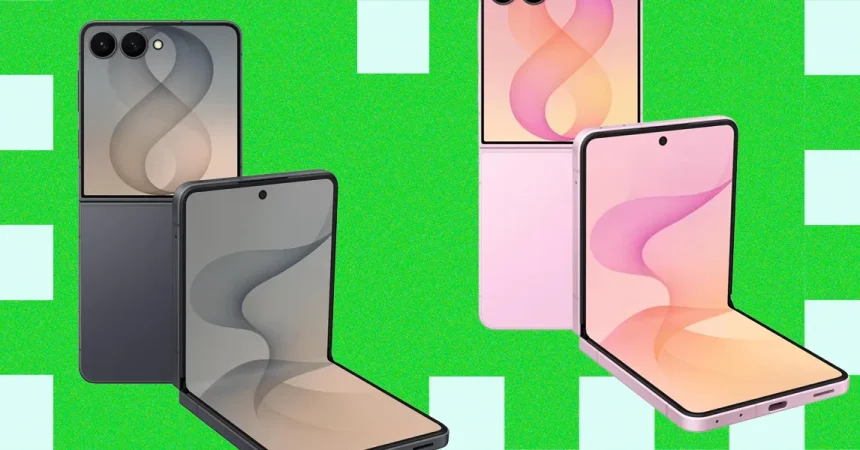
The Curious Case of the Galaxy Z Flip8: Charm, Compromise, and the Pursuit of a Full Day
There is something undeniably delightful about the Samsung Galaxy Z Flip8. The way it snaps shut, the satisfyingly compact footprint that slides into a pocket like a well-kept secret, and the sheer novelty of a phone that folds in half never quite wears off. It feels personal in a way that a traditional slab phone doesn’t. But living with this little marvel of engineering means coming to terms with its inherent contradictions. You are constantly reminded that the magic of the fold comes at a price, and often, that price is measured in the anxiety of watching your battery percentage tick down faster than you would like. While the Z Flip8 is incredibly capable in many respects, it remains, at its heart, a device where size dictates compromise, and the most glaring of those compromises is the one you feel in your pocket when you’re far from a charger.
The battery situation is the kind of thing you don’t fully appreciate until you’ve actually lived with the phone for a week. Inside its svelte frame, Samsung has tucked a 4,300-mAh silicon-carbon battery, which sounds like a futuristic piece of tech and certainly helps in the weight and thinness department. In practice, though, it’s just good enough for the casual user. If you’re the type to check social media, send a few messages, and watch a short video here and there, you’ll likely make it to bedtime with a little to spare. But if you’re someone who actually lives on their phone—streaming music, navigating with GPS, taking photos, and juggling constant notifications—you’ll find yourself hunting for a power outlet long before the sun goes down. It’s not a disaster, by any means, but it’s the nagging voice in the back of your head that tells you to pack a power bank if you’re heading out for a long day, which feels like a step backward from the “just trust it” reliability we’ve come to expect from flagship phones.
What makes this battery situation even more bitter to swallow is the charging speed. While many of its competitors are blowing past 80 or even 100 watts of wired charging, Samsung has decided to play it painfully safe with a maximum of 25 watts wired and 15 watts wireless. The result is a device that takes its sweet time to get back to 100 percent, which feels incongruous with a phone that runs out of juice so eagerly. It means plugging it in for a quick 15-minute boost before heading out the door barely puts a dent in your day. And then there’s the matter of Qi2. The industry’s new wireless charging standard brings magnets into the fold, making it easier to attach accessories, find charging spots, and get a faster, more efficient charge. It’s a genuinely helpful upgrade, and countless Android phones—even budget-friendly ones—have embraced it. Samsung, however, continues to hold out, and the sheer stubbornness of this refusal is maddening. I find myself staring at the flip phone, wondering why such a forward-thinking, design-focused company refuses to implement what is quickly becoming an industry standard, forcing users like me to buy adhesive sticker adapters just to get the magnetic functionality that should have been built-in. It’s a small thing, but it feels like a petty hill to die on.
Moving past the power struggle, let’s talk about the camera, which is a mixed bag of genuine success and frustrating omissions. For a photography enthusiast, you can absolutely find better camera systems in a range of Android phones for the same money, or even less. That high-end price tag buys you innovation, not necessarily the best optics in the class. That said, the main 50-megapixel shooter is far from a slouch. On a sunny day, or even in adequately lit indoor settings, it captures photos that are sharp, vibrant, and perfectly shareable. Most people will be absolutely delighted with the images it produces, and it handles day-to-day photography like a champ. The trouble starts after the sun goes down. In darker settings, you start to see a bit of noise creep into those photos, a grainy texture that softens detail and muddies colors, requiring you to take a few extra shots or use a steady hand to get a clean capture. It is serviceable, but it doesn’t have that effortless, almost magical low-light quality you get from other flagship devices.
The 12-megapixel ultrawide lens is a useful tool when you want to cram the whole family into the frame or capture a sweeping landscape, but it’s a noticeable step down in quality. Images taken on it lack the crispness and color accuracy of the main sensor; edges can look a little soft, and there’s a distinct feeling of compromise in dynamic range. It works, but you’ll likely find yourself defaulting back to the main lens as soon as you can. Sadly, there is also no dedicated telephoto lens, which is a bit of a letdown for a phone that costs this much. You have to rely on cropping into the main sensor to emulate a 2X zoom, which doesn’t lose detail, so it’s passable, but if you try to push further, the results can get ugly. In decent lighting, the phone can produce passable results up to 10X, but don’t expect to capture crisp shots of a distant wild animal or a player on a football field. It feels like a capability Samsung left out to force you to upgrade to a larger phone, which is always a frustrating reality of their lineup structure.
There is a silver lining in the camera department, though, and it’s all about the flip. I don’t see much reason to use the 10-megapixel punch-hole selfie camera outside of video calls. The entire beauty of the Flip8 design is the ability to flip it into a compact tripod, get a live preview on the cover screen, and use that vastly superior main camera to take your selfies, group shots, and even solo vlogs. It’s an ingenious feature that makes the front-facing camera almost irrelevant for photography, and it’s the kind of design benefit that you quickly become spoiled by. I also absolutely love Samsung’s Horizon Lock feature, which uses the gyroscope to keep your video footage perfectly level even if you’re panning wildly or turning the phone in your hands. It might not be the flashiest feature on the spec sheet, but it’s the one that makes your casual home videos look like they were shot with a gimbal, and it’s a huge win.
Then there’s the new suite of AI features, which are a virtual grab bag of promise and gimmickry. One interesting addition is My FanCam, which lets you pick a subject—say, your kid in the school play or your star striker in a soccer match—and the phone will intelligently reframe the video to keep the focus on them, as though a director were panning the camera. It’s a bit of a party trick, but it’s genuinely handy if you’re shooting group activities and want to ensure the star of the moment gets the screen time you promised. You can even apply it to old videos you’ve already taken, which is a fun way to resurrect messy clips. Samsung is also pushing its “Now” suite of intelligence, with Now Brief offering a floating widget that summarizes your calendar events, reminders, and local weather when you wake up, and Now Nudge that uses AI to suggest adding a date to your calendar when it detects a time in a text message, or prompts you to share your location or photos with a contact. These are subtle, helpful little copilots that build trust over time, but they don’t reinvent the way you interact with your phone.
Perhaps the most stubborn thorn in the Flip’s side remains the cover screen. Samsung calls it the FlexWindow, and while it has improved, it still feels like a story half-told. On the bright side, you can now run more full apps on it without unfolding the phone, including Samsung’s own apps like Health, Calendar, and Browser, and you can get quick access to YouTube, Netflix, Google Maps, and Messages. For quick interactions, this is fantastic. But if you want to run any other third-party app on that little display—say, your banking app or Spotify—you have to dive into a deeply hidden menu. The process involves installing Samsung’s Good Lock app, downloading the MultiStar plug-in, then manually scrolling through a list to select the apps you want to allow on the cover screen. It’s stupidly convoluted, especially for a company that prides itself on user experience. I simply cannot understand why this functionality isn’t preinstalled and accessible by default, especially since Samsung is so eager to fill the phone with its own software.
It’s even more insulting when you realize that Samsung eagerly pre-loads Facebook, Spotify, and Instagram onto the cover screen—third-party apps I never asked for—while requiring a complex workaround to enable my other apps. This is a bugbear of mine, but it’s frankly disgraceful that Samsung is including bloatware on a phone this expensive, treating a $1,000+ luxury item like a budget carrier phone from 2015. It creates a sense of inconsistency that undermines the premium feel of the device. You can go to settings and delete them, sure, but they shouldn’t be there in the first place. This, coupled with the cover screen limitations, makes the Flip8 feel less like a polished, cohesive universe and more like a beautiful piece of hardware that is fighting its own software team. It’s a gorgeous, quirky, lovable phone that makes you work for some of its best features, and in the end, that’s what defines the Z Flip8 in a nutshell: a brilliant, charming, frustrating device that you’ll enjoy picking up every single day, even as you complain about the little things while you do it.