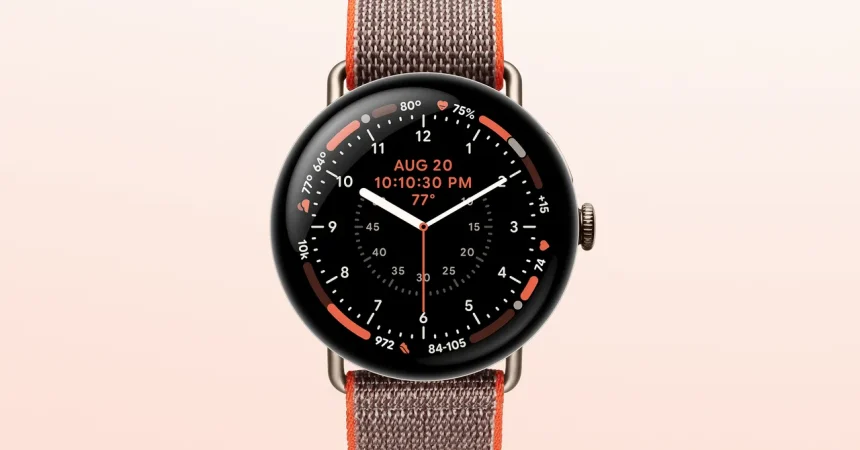
Alright, let’s be real for a second. We’ve all seen the marketing hype for smartwatches – the sleek renders, the promises of effortless health tracking, and the sleek presentations that make a piece of silicon on your wrist look like it can solve all your life’s problems. But when you actually put the thing on and live with it for a few weeks, the truth is usually a lot messier. The Pixel Watch 5, however, feels different. It’s not just a spec sheet thrown together; it feels like a silent, opinionated partner strapped to your wrist, one that’s surprisingly good at getting out of your way while offering a safety net you didn’t know you needed. I’ve been wearing it exclusively, and diving into its quirks, its features, and its stubborn little alarms, I’ve come to realize this isn’t just an incremental update—it’s actually a curated attempt to answer the question: What do we actually need this thing to do?
Let’s start with the gym, because that’s where a lot of us have a love-hate relationship with our devices. For years, the standard smartwatch experience meant keeping your phone within arm’s reach—usually wedged in a water bottle holder or shoved into a pocket that makes bench presses feel awkward. The Pixel Watch 5 finally kills that dependency in a meaningful way. When you start a workout on the watch itself, it independently tracks your reps, sets your rest intervals, and counts your sets, all without needing your phone to be anywhere nearby. Picture this: you’re doing a brutal drop-set on the leg press, sweating through your tank top, and the last thing you want to do is fumble with a slippery plastic slab to start a timer. With the Watch 5, you just glance at your wrist, see the rep count ticking up, and let the vibration on your wrist tell you your rest is over. That’s a massive quality-of-life improvement. It syncs its data seamlessly to the app when you finally get back to your locker, so you don’t lose any of the analytics—it just gives you the freedom to leave the phone somewhere else. It’s the difference between a training partner and a distraction, and for anyone who’s new to the gym and lacking structure, this built-in guidance is pure gold. It takes the guesswork out of “am I resting too long?” and turns it into a gentle nudge that keeps your heart rate elevated.
Now, one of the biggest upgrades that’s quietly flying under the radar is the GPS. We’ve all been there: you’re running through downtown, weaving between tourists, and suddenly your pace reads 12:00/mile when you know you were sprinting a 7:30. This is because tall buildings act like giant mirrors for satellite signals, bouncing them around and throwing off your exact position—this is what tech nerds call “multipath errors.” The Pixel Watch 5’s dual-band GPS is engineered to cut through that noise. By using a more precise frequency (the L5), it can distinguish between the direct signal and the echoes. Google is claiming this makes route tracking up to twice as accurate in urban canyons, and honestly, my experience in Chicago backs that up. Running along the riverfront with the towering Willis Tower and the Hancock building throwing shadows, the watch mapped my route perfectly—no zigzagging across the map, no ridiculous pace spikes. It also claims to handle atmospheric interference better, which is just a fancy way of saying it won’t glitch out when there’s heavy cloud cover or humid air. I’m genuinely curious to see how it handles somewhere like New York City’s Financial District, where the streets are literally carved out of steel and glass. If it can hold a straight line there without flinching, it earns its keep. For anyone who takes their long runs seriously, having a trusty distance is the foundation of your entire training plan—and this feels like a quantum leap from the flaky GPS of a few years ago.
But let’s get to the real headline: the health suite. The Watch 5 retains the critically important stuff like Loss of Pulse detection (which detects when your heart stops and automatically alerts emergency contacts) and the classic ECG for identifying irregular heart rhythms. Now, skin temperature sensors are also on board, giving you a baseline for your overall wellness. However, the big deal is the new “Health Guardian” tools, which drop in September. This is where the watch stops being a passive monitor and starts trying to be a proactive early-warning system, and it’s fascinating if executed right. Let’s talk about Insulin Resistance Trends first. This blew my mind. Normally, checking your insulin resistance requires a blood draw—no one wants to do that daily. The Pixel Watch 5 aims to track this through various physiological markers—like heart rate variability and skin temperature fluctuations—over a period of weeks. It won’t give you a number like “0.5 HOMA-IR,” but it will show you if that number is trending upward or downward. This could be a game-changer for catching pre-diabetic states or simply understanding how your metabolic health shifts with your diet and sleep. Likewise, the Blood Pressure Trends feature is radically different from the finicky cuffed monitors we’ve seen before. It passively tracks pulse transit time (essentially the speed your blood travels) to estimate your blood pressure changes without needing external calibration every few days. That means less fiddling and more actual data.
The Health Guardian suite also introduces Breathing Emergency Detection, which is genuinely terrifying but incredibly reassuring. We’ve all had nights where breathing is disrupted (sleep apnea is wildly underdiagnosed). This feature monitors your blood oxygen saturation and, if it detects a severe breathing disturbance, it can automatically contact emergency services. It’s a literal watchdog for your lungs while you sleep. Alongside that is Sleep Breathing Quality, which tracks minute-by-minute oxygen variations to give you a morning score showing how much of your night was spent in optimal breathing. You might wake up and see, “You had 92% optimal breathing tonight,” and then realize that glass of wine before bed or sleeping on your back caused a few dips. Over a month, that pattern reveals the effect of your nightly habits.
Now, the skeptical voice in your head—and mine—is screaming: “But can I trust this?” The reviewer in the source material rightly points out that most of these are trend identifiers, not diagnostic tools. You absolutely should not skip a doctor’s appointment because your watch says you’re fine. But that’s the point. These metrics aren’t meant to replace medicine; they’re meant to give you a nudge before something becomes a crisis. However, there’s a major caveat: you can’t just buy this thing and expect a health verdict in a week. These features require a full month of consistent wear to build a meaningful baseline. Please don’t panic if your first nights show a dip in breathing; that could just be you adjusting to the watch. The watch is constantly learning your baseline, so what looks like a scary graph on day one is actually just your norm. It’s a marathon of data collection, not a sprint.
Finally, we have to talk about sleep—the battle against our own brain chemistry in the dark. The new Bedtime Mode is a masterclass in digital boundaries. When you turn it on, it silences all notifications, disables the always-on display, and strips the watch face down to a simple, dimmed time. The secret weapon is the red tint. Human bodies are wired to react to blue light; it stops melatonin production. By shifting the screen to that deep red hue, it’s basically telling your brain, “It’s dark, wind down,” without you having to read a sleep hygiene article. It can even detect when you’ve fallen asleep and automatically pause any media playing on your paired phone—so you don’t wake up at 3 AM to your podcast blasting. That’s thoughtful. But then there’s the elephant in the room: Smart Wake Alarms. The idea is brilliant in theory—you set an alarm for 7:30 AM, and instead of jolting you awake at the exact minute, it watches your sleep stages and wakes you during your lightest phase within a 30-minute window (anywhere between 7:00 and 7:30). The theory is that waking during light sleep leaves you feeling refreshed, not groggy. In practice? Well, I’m with the reviewer on this one. I treasure every last minute of sleep. If I set the alarm for 7:30, I want my eyes to open at 7:30’00″. The smart wake inevitably pulls me out of a dream at 7:12, and even if I objectively feel more alert, my lizard brain is furious. It’s like having a well-meaning roommate who pulls your blanket off 18 minutes early to “help you get a head start.” The accuracy of sleep stage tracking is also questionable—it’s a guess based on heart rate and movement, not EEG brain waves. So while it’s useful for identifying long-term patterns, using those stages for a life-altering wake-up call is a gamble.
Ultimately, the Pixel Watch 5 is a fascinating paradox. It wants to take over your workouts, map your city with surgical precision, monitor your insulin, watch your lungs, and then politely tuck you in at night with a red screen. It’s wildly ambitious, but the execution is all about subtlety. It doesn’t yell at you to exercise; it just makes leaving your phone behind effortless. It doesn’t tell you you’re sick; it just whispers that your trends are changing. The only real friction I have with it is that smart alarm, which feels like a gimmick fighting against my precious REM cycles. But aside from that, this feels like the first watch where Google really understood that a wearable isn’t a phone on a string. It’s a coach, a navigator, a guardian, and a nightlight, all rolled into one. It asks for patience and a month of data, but in exchange, it offers a level of insight that feels truly personal—provided you remember to take the daily numbers with a grain of salt and a wink at your doctor.