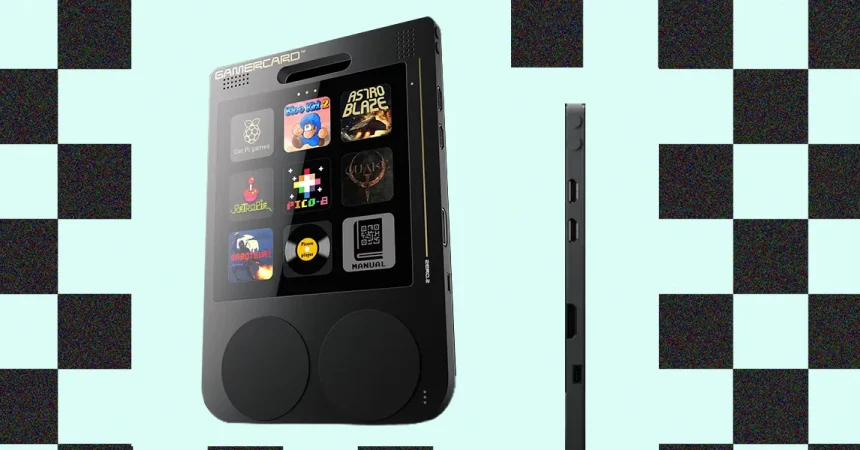
When the GamerCard first fires up, it is hard not to feel a little jolt of delight. The screen is bright and saturated, and games that lean on pixel art absolutely glow against its vivid, colorful display. I loaded up Secret of Mana, that classic SNES action-RPG, and was immediately struck by how lovingly its little sprites and lush backgrounds came across on the device; the same was true for Super Adventure Island, which burst out of the screen like a cartoon fireworks display. The promised 60 frames per second is no lie either. There is a smoothness to the motion that makes these old games feel almost fresh again, as if someone had gone through them with a damp cloth and polished every frame. That initial visual appeal does a lot of heavy lifting, because it tempts you to forgive the device for its other quirks—at least for a while. But the first nagging issue appears almost immediately: the GamerCard stretches everything to fit its square screen. No matter what I did in the RetroPie display settings, the intended aspect ratio of the games was ignored, and my beloved 16-bit characters ended up wider or narrower than they should have been. I went looking for an emulation menu, thinking there must be a proper setting hidden somewhere, and eventually discovered that you can access one by holding the Select button and the “north” face button simultaneously. It works, but there is absolutely nothing on the device or in the packaging that tells you this. It is the kind of undocumented shortcut that only makes sense if you already know it exists, and it feels like a small gatekeeping ritual rather than a user-friendly feature. I found myself hoping that a future update would let players enjoy these games in their original dimensions, because the visual foundation is genuinely good. The hardware is capable of making old art look stunning. It just needs to respect that art enough to leave its proportions alone.
The deeper trouble, of course, is that emulation is a fickle animal no matter what device you run it on. A game can look perfect on one machine and then stutter, glitch, or refuse to boot on another, because so many variables are at play. The quality of the emulation core, the integrity of the ROM file, the processing power of the host hardware, and even the way the firmware was compiled all have a say in whether a game will behave. With the GamerCard, this unpredictability was on full display. I tried loading Game Boy ROMs and nothing would start; the device simply sat there or bounced me back to the menu, and I could not coax a single one into life. SNES games were more cooperative, but even when they launched, the experience was not exactly reliable. Creating save files proved to be an inconsistent affair, and more than once I lost progress because a save simply did not stick. It is difficult to say whether that is the fault of the emulation software, the SD card, or the GamerCard’s own firmware, but the practical result is the same: you cannot fully trust it to preserve your playthroughs. And when games did load, the controls gave me a different kind of headache. Button mapping felt inconsistent across different titles, and there was a persistent, queasy lag in the inputs. I would press a direction or a jump button and the action would arrive a beat late, as if the game were responding through a layer of jelly. That kind of unresponsiveness is poisonous to retro gaming, because those old games were built around precise timing. Secret of Mana’s combat is not the most demanding in the world, but even it felt sloppy when my commands were being echoed rather than executed. The GamerCard can present a beautiful picture, but beauty alone does not make a game playable. It is one thing to display a classic; it is another thing entirely to let me actually enjoy it.
All of that makes me wonder who the GamerCard is really for, because it seems to have an identity crisis at its very core. Picture an ordinary shopper browsing a store, maybe looking for a gift, and spotting a fun-looking little handheld console sitting next to a display of Amazon gift cards. That person is probably not a seasoned retro gaming hobbyist. They likely do not know what ROMs are, let alone how to acquire them legally or otherwise. They have probably never heard of an FTP client, and they definitely do not want to spend an evening configuring one just to get a few games onto the device. Even if someone hands them a pre-loaded SD card, they still have to contend with the control scheme or lack thereof. Which button does what? Why does it change from game to game? Why is there no manual? They will not have the patience to dig through obscure menus, and honestly, they should not have to. What they want is a handful of recognizable, playable games that work out of the box, and the GamerCard does not really offer that. On the other side of the fence, you have the technical enthusiasts, the people who are comfortable with command lines and single-board computers. That crowd might be intrigued by the portability and the custom hardware, but they are also likely to ask a very reasonable question: why not just build my own? A Raspberry Pi is cheap, widely available, and can be stuffed into any number of portable shells or enclosures, often with better controls and more documented software support. The GamerCard is essentially a Raspberry Pi wearing a handheld costume, and for tinkerers, part of the fun is designing their own thing. Buying a fixed piece of hardware feels like surrendering that freedom. So the casual user is alienated by the technical demands, and the technical user is alienated by the lack of flexibility. I kept turning the device over in my hands, trying to figure out who would be happiest with it, and ultimately I could not give a confident answer.
That uncertainty is a shame, because underneath all of the rough edges, there is clearly something worthwhile here. Like any Raspberry Pi-based machine, the GamerCard is a real computer in its own right, not just a toy. The company behind it claims that it is “easily programmable” in MicroPython, C, C++, and Basic, and there is even a version of Pico-8, the beloved little game development environment, available for it. That opens up a whole world of possibility beyond playing old games. You could write your own simple programs, compile them, and run them on a device you hold in your hands; you could learn to code by making a little platformer and then play it on the bus. For educators, that is a genuinely appealing pitch. There is enormous promise for classrooms, maker spaces, and curious kids who want to see their code do something physical and immediate rather than just sit in a terminal window. The GamerCard is also compact enough to take anywhere, which gives it an edge over a desk-bound Raspberry Pi setup. I can imagine a student tucking it into a backpack and showing off their latest creation to friends between classes. It is the kind of device that could spark a lifelong interest in programming, and that is not something to sniff at. The team behind it clearly believes in that vision too. The GamerCard is the brainchild of Grant Sinclair, who happens to be the nephew of the late Clive Sinclair, the British inventor behind the 1980s home computer boom and the famous ZX Spectrum. That lineage matters. The ZX Spectrum was not a polished, user-friendly machine by modern standards; it was a bare-bones computer that demanded effort and rewarded curiosity. It was a machine for hobbyists, learners, and people who wanted to understand how computing worked, not just consume software. The GamerCard seems to be reaching for that same spirit, even if it does not fully get there.
When I thought about it that way, the compromises started to feel more understandable, if not entirely forgivable. A pocketable device with an exposed, hackable operating system and a suite of programming languages is an unusual thing. It sits somewhere between a console and a development board, and it asks the user to meet it halfway. That is a bold choice in an era when most consumer electronics bend over backwards to hide their complexity. The GamerCard does not hide anything. It shows you its seams, its weird button quirks, its undocumented menus, and its occasionally uncooperative emulation. It is a piece of hardware that seems to trust you to figure things out, and it does not apologize for being difficult. For someone who enjoys digging into the nuts and bolts of a system, who likes kitbashing and experimenting, that can be part of the charm. There is a certain romance to wrestling with a device and finally getting it to behave. But for everyone else, that romance quickly curdles into frustration. The question is not whether the GamerCard has potential—it clearly does. The question is whether that potential is enough to carry it through a genuinely rough first impression. Right now, it feels more like a prototype than a retail product, a developer’s dream that has not quite made the jump to something you would confidently hand to a friend or a relative. It is a device for people who see a project and get excited, rather than people who see a product and expect it to work.
Maybe a future GamerCard 2 will solve some of these problems. I would love to see a version with a more intuitive interface, where the controls are not a mystery and the button mapping actually makes sense. I would love to see games designed explicitly for the platform, so the square screen feels like a feature rather than a compromise. And critically, I would love to see much better controls, because right now the laggy inputs and inconsistent layouts are the single biggest barrier to enjoyment. If the team can address those issues, while keeping the programmability and the open-ended heart of the device, they might have something truly fantastic on their hands. They might even bridge that gap between casual users and hobbyists, giving one group recognizable, enjoyable games and the other a sandbox to explore. I hope that version exists someday, because there is something lovable about the GamerCard despite all of its flaws. It has character, ambition, and a genuine sense of wonder underneath its rough surface. It just needs more polish, more patience, and maybe a little more trust in its users. Until then, I would only recommend it to a specific sort of person: the kind who sees a Raspberry Pi as an invitation, not a barrier, and who does not mind spending an evening with an FTP client and a stack of unlabeled buttons in order to make something work. For that person, the GamerCard is a delightful oddity. For the rest of the world, it is a tantalizing glimpse of a future that has not quite arrived. I am rooting for it, but I cannot yet embrace it.