

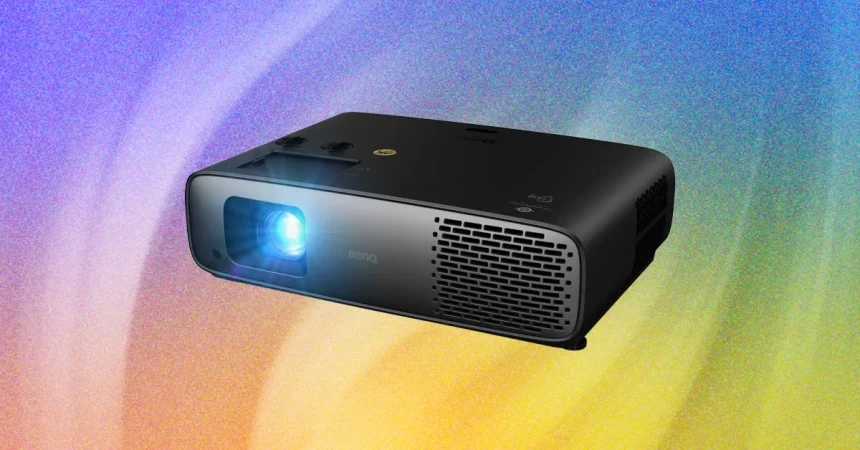
The BenQ W4100i stands as a testament to how far home cinema technology has come, offering a user experience that prioritizes convenience without sacrificing the “big screen” feel. Getting the system up and running is remarkably smooth, especially if you’re already embedded in the Android ecosystem. By utilizing Google Assistant on my Samsung Galaxy S26+, I managed to have my preferred apps synced and the system fully operational in just a few minutes. While iPhone users will need to take a slightly more manual approach by logging in directly, the interface remains intuitive and approachable for anyone accustomed to modern smart devices. While Google Assistant hasn’t quite caught up to the advanced capabilities of Gemini, it remains a reliable tool, even capable of generating voice-narrated slideshows on the fly, and there is persistent speculation that BenQ may eventually transition this model to a full Google TV integration, which would only sweeten the deal.
When it comes to hardware ergonomics, the BenQ W4100i hits a sweet spot that many competitors miss. The remote control is a true highlight of the package; it manages to include a wide array of dedicated buttons for high-level image adjustments while miraculously avoiding that “cluttered” look that plagues so many modern electronics. It is refreshing to have quick-access buttons for fine-tuning picture quality right at your fingertips rather than having to dive into a labyrinth of digital menus. Interestingly, BenQ opted against including dedicated buttons for streaming services like Netflix or Disney+, a choice that feels oddly sophisticated in an era where remotes are often covered in advertisements for various platforms. It feels like a device designed for enthusiasts who value functionality over brand-shilling.
The physical setup process is largely automated, with the projector’s keystone and resizing features handling most of the heavy lifting. Whether I was projecting onto a dedicated screen or a blank living room wall, the W4100i did an admirable job of squaring off the image. I did find myself making a minor manual adjustment here and there to ensure total alignment, which reminded me of the effortless “magic” found in ultra-premium competitors like the Leica Cine Play 1. However, for most home setups, the BenQ’s automated systems are more than capable, turning a wall into a theater in seconds. It strikes a balance between automated ease and the precise control that power users eventually demand from their display hardware.
Once the lights go down, the W4100i’s technical pedigree begins to take center stage. With a brightness output of 3,200 lumens, it is quite clear that BenQ designed this unit to survive in less-than-perfect environments; even in rooms with lingering ambient light, the image remains punchy and engaging. The projector hits the gold standard for color reproduction, covering 100 percent of both the Rec.709 and DCI-P3 color gamuts, while adding support for HDR10+. With features like Dynamic Black and various contrast enhancers, the projector works hard to elevate the visual experience beyond a flat, standard presentation. It is a powerful engine tailored for those who want to bring the cinematic scale into their own homes.
However, moving from raw specifications to the reality of the viewing experience, it becomes clear that “impressive” doesn’t always mean “perfect.” While the W4100i offers a performance that is certainly above average, it struggles when stacked against the absolute titans of the current market. For instance, color fidelity can be a bit hit-or-miss; during my testing, light green grass sometimes leaned into earthy, brownish hues, and scenes featuring mountain mists lost some of that fine, ethereal definition. Compared to the vivid, high-impact colors showcased by Samsung’s The Frame Pro 2026 or the incredibly realistic, saturated tones of the Epson Lifestudio Grand Plus, the BenQ occasionally feels like it’s smoothing over the nuances that make a frame look truly three-dimensional.
In the final analysis, the BenQ W4100i occupies a specific niche. It excels in delivering a high-brightness experience that is easy to manage, user-friendly, and packed with enough settings to keep enthusiasts occupied. While the skintones could use more subtlety and the color accuracy sometimes lacks the crisp realism found in the most expensive elite projectors, it still offers an experience that dwarfs the quality of more entry-level smart projectors. It is a workhorse of a machine that, while perhaps not the king of color accuracy in this specific lineup, provides a reliable, high-lumen, and easily controllable bridge to the world of home cinema. If you value a remote that actually works and a setup process that doesn’t feel like a chore, the W4100i remains an incredibly compelling choice.