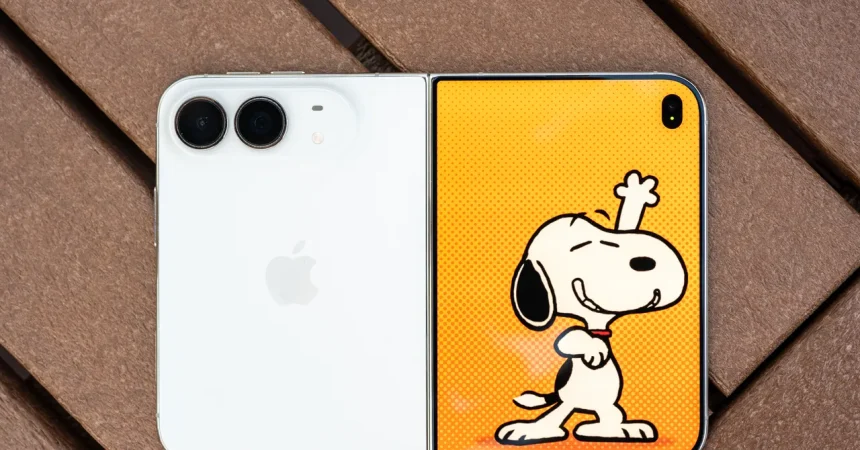
Let’s talk about the physical side of the Duo, because that’s where the personality—and the quirks—come through first. It supports MagSafe, which sounds like a dream. You can just snap the phone onto a MagSafe tripod or mount, no fuss, no awkward clamps, no hunting for the right little screw. And when the Duo is closed, that works great. But open it up, and the laws of physics start to mess with you. The Duo is a wide, unfolding slab of glass and metal, and when you attach it to a magnetic mount, the weight doesn’t distribute the way you’d hope. I tried it with a small MagSafe tripod at my desk the other day, hoping to film a quick video, and the whole assembly slowly sagged to one side, like a tired dog trying to stay awake. The magnet was strong enough to hold, but the center of gravity was all wrong. You end up adjusting it, tightening it, propping it with a book, and eventually you just sigh and hold it in your hand instead. It’s the kind of thing that makes you pause and think, “Oh, this is a first-gen product.” Then there’s the MagSafe wallet question. Yes, a wallet will attach. But Apple’s official wallet—the one that fits iPhones so perfectly—hangs past the bottom edge of the Duo like a shelf that was measured wrong. For a company that obsesses over half-millimeters and chamfers and the exact sound of a click, it’s oddly sloppy. You’d expect them to have redesigned the wallet, or at least made it sit flush. Instead, you have this little overhang that catches on pockets and feels awkward in your hand. There’s no official Apple-made wallet designed for the Duo, so you have to hope third-party accessory makers swoop in with a custom version. And honestly, I suspect they will. Wherever there’s a gap, the accessory market loves to fill it. But right now, you have to make do with aftermarket solutions or just live with a slightly protruding wallet. Neither feels like something you should expect from Apple. It’s a reminder that the Duo is a beautiful, weird, unfinished experiment.
The camera setup is another reminder that this isn’t a Pro iPhone. You get a dual rear-camera system, which is fine for everyday shots, but there’s no dedicated zoom lens. I missed that third lens more than I expected. On a normal phone, I zoom in for details all the time—the kid on the soccer field, the sign across the street, the dog at the park. With the Duo, you have to rely on digital zoom, and that’s just not the same. You pinch to zoom, and the image gets softer, pixelated, less confident. It’s the kind of thing you don’t realize you need until it’s gone. The still photos from the main camera are still good in good light, and colors look natural, but when you want reach, you feel the absence. The selfie cameras, though, are a different story. There are two: one on the outer cover screen and one hidden under the inner display. The under-display camera is the trickier one, because cameras under screens are usually awful. They make you look like you’re behind a frosted glass window, with a weird haze over every image. But on the Duo, both selfie shooters delivered. I didn’t have to apologize for my face looking like a watercolor painting. I got on a Zoom call with my editor, using the inner camera, and she said the video quality looked “really good.” That’s not faint praise. Video in a Zoom call can look like a potato from most under-display cameras, but this was clear, bright, and surprisingly sharp. Zoom itself wasn’t optimized for the folding form—there were some awkward moments with screen layout and a few blank areas where the app didn’t seem to know what to do with the hinge—but the image quality was the highlight. So if you care about selfies and video calls, you’ll be happy. If you care about long-range zoom, you’ll have to make peace with a compromise.
When the software gets out of the way, the Duo feels like magic. The whole point of a foldable is to give you more screen when you need it, and the Duo nails that with apps that are properly optimized. Multi-pane views are the big win. Instead of cramming everything into a narrow column like a regular phone, you get a wide grid that lets you see more of your feed, your email, your calendar, your spreadsheet. I found myself reading news with articles and images side by side, checking my inbox with the list on one side and the full message on the other. It’s not just a bigger version of the same interface; it’s a smarter use of space. You can see your calendar and the details of an event at the same time without tapping through multiple screens. That’s the kind of thing that makes you wonder why we ever accepted a single narrow view. Split-screening two optimized apps is equally satisfying. You can have a video playing on one half and a notes app on the other, and each app has enough room to breathe. No squinting, no awkward resizing, no wrestling with a tiny floating window. It genuinely feels like multitasking, not just toggling between apps. The Duo wants you to keep both windows open and actually use them. It’s a productivity boost that I didn’t know I needed until I tried it. Of course, not every app is optimized. Some still stretch awkwardly, some ignore the hinge, and some just don’t know what to do with themselves when you unfold the phone. But when an app is done right, the experience is chef’s kiss. It makes you as productive as a laptop in a way that a candy-bar phone never can. There’s a learning curve, but once you get used to having all that space, going back to a regular phone feels like trying to read a newspaper through a keyhole.
I should also talk about how you hold and prop this thing up. There are all these angled positions advertised for the Duo—folded halfway like a tent, standing on its side, open at various degrees, each one meant to make you feel like you’re using the future. I thought I’d use those constantly. But in practice, I didn’t. I found myself reaching for Apple’s Folio With Kickstand case, and honestly, that case made all the difference. It props the Duo up at just the right angle for watching videos, taking calls, or doing a little hands-free reading. The kickstand is so useful that I kept wishing it were built into the phone itself. Why doesn’t Apple just embed a kickstand into the frame? That would save me from carrying an extra case and would make the Duo feel complete. As it stands, I strongly recommend investing in an accessory to prop the Duo up. The device is too big and heavy to hold comfortably for long periods, especially one-handed. It’s a two-handed, desk-friendly gadget, and once you accept that, you start using it differently. With a good kickstand case, it becomes a mini workstation. You can sit it on a desk, angle the screen, type on a Bluetooth keyboard, and respond to messages without hunching over a laptop. You can prop it on the kitchen counter while you follow a recipe, or on the nightstand while you watch a show. The case also gives you more confidence when you’re moving around—you don’t have to worry about the Duo slipping out of your sweaty palm as much. It’s funny: the phone has all this flexible design, but the best way to use it is to keep it rigid in a case with a tiny metal prop. That’s not a criticism, exactly. It’s just a reminder that foldables are still finding their way. Until the hardware grows a built-in kickstand, the accessory ecosystem is your friend.
Battery life is where the Duo surprised me the most. With a foldable, you worry about power hogging—two screens, a larger display, all that extra real estate. But in my experience, the Duo has been pretty great. On an average day, with normal use—some browsing, a few calls, a bunch of messages, an hour of video—I’ve ended by bedtime with around 40 percent left. That’s not a phone that’s gasping for a charger at 4 p.m. It’s not the kind of device that gives you low-battery anxiety when you’re out running errands. It’s a phone that can get you through the day and into the evening without making you rethink your plans. The other day I was working entirely off the Duo for most of the workday—writing, answering emails, taking meetings, jumping between apps. By the time I looked up, it was almost 6 p.m., and I had logged over six hours of screen-on time. The battery still sat at 45 percent. That’s genuinely impressive for a device with this much screen real estate. Part of it is probably the efficient chip, part of it is how the OS handles the two displays, and part of it is just good engineering. I didn’t have to baby it, haven’t been hunting for outlets, and haven’t felt that desperate scramble for a charger at the airport. That’s the kind of reliability that makes you trust a phone. You can throw it in a bag, use it heavily, and not have to apologize to anyone at the end of the day. I wish every phone I’d ever used had a battery like this.
All in all, the Duo is a peculiar creature. It has physical quirks that make you grumble—the MagSafe sag, the wallet overhang, the missing zoom camera, the need for a kickstand case. It’s not the polished, perfect Apple product we’ve come to expect, and it won’t be for everyone. But it’s also genuinely delightful in ways that make you want to keep using it. The multi-pane views are a productivity revelation, the split-screen multitasking is actually useful, the under-display selfie camera performs far better than anyone expected, and the battery life is a pleasant shock. You don’t buy this phone because it’s flawless; you buy it because it opens up a new way of working and playing. You adapt to its quirks, maybe buy a kickstand case, maybe a third-party wallet, and you discover that having a big folding screen in your pocket is more than a gimmick. It changes your habits. You start using two apps at once naturally, you stop reaching for a tablet when you’re on the couch, and you actually enjoy finding new ways to prop it up. Yes, there are compromises, and yes, Apple has some details to iron out. But the Duo has heart. It’s the kind of device that makes you smile despite its flaws, because it does things no ordinary phone can. If you’re someone who loves technology that feels a little ahead of its time, that’s a trade you’ll be happy to make. It’s not perfect, but it’s special—and sometimes that’s better.