The Quest for a Budget Laptop That Doesn’t Feel Budget
For months, I’ve been on a mission. Ever since the MacBook Neo hit the scene last spring, I’ve been searching for its Windows equivalent—not a cheap knockoff that cuts corners to hit a low price, but something that understands the real assignment: hiding its compromises so well that you forget they exist. I wanted a laptop that delivers that premium feel without the premium price tag. For a long time, it was radio silence. Then, a silver box arrived at my door, and everything changed. The Dell XPS 13 showed up, and it felt like it understood the brief perfectly. It promised to be the answer to my search, a Windows machine that could go toe-to-toe with Apple’s budget darling. But the big question lingered: could it actually be the better laptop? As I started digging into the testing, the answer genuinely surprised me.
Weighing the Hardware and First Impressions
When Apple first announced the MacBook Neo, it sent shockwaves through the tech world. A $599 starting price for a MacBook felt almost like a misprint. Apple had never dared to bring its iconic laptop down to such a consumer-friendly price point, and even with its current $699 starting price, it’s still in uncharted territory for the company. This move was a direct assault on the territory of Windows laptops, a space where budget options have historically been a mixed bag of compromises. Sure, there are plenty of Windows machines in that price range, but they often suffer from the same tired flaws: cheap plastic chassis that creak under pressure, dim and washed-out displays, and trackpads that feel like an afterthought. Even laptops I genuinely like, such as the HP OmniBook 5, have a weak point—like a trackpad that just doesn’t feel right under your finger.
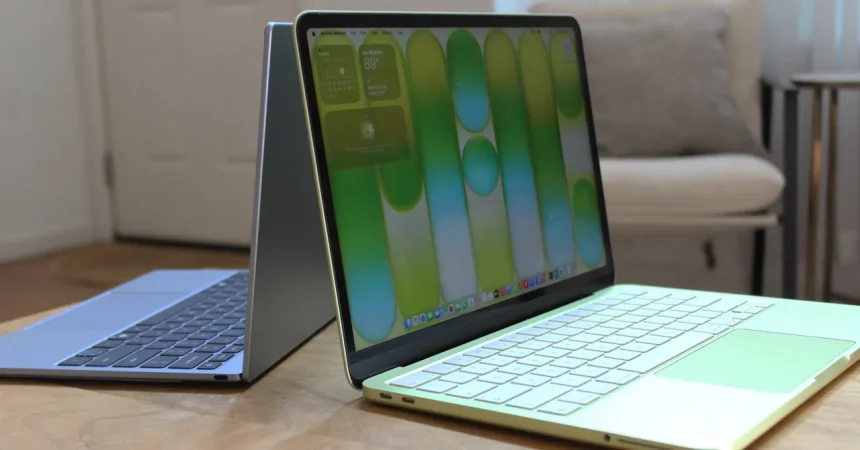
The Dell XPS 13, however, was different. It didn’t just meet the MacBook Neo’s price point; it dove in headfirst, aiming to match the premium quality in almost every single aspect. Both start at $699, making them direct competitors for the same wallet. In my hands, the XPS 13 felt shockingly light at just 2.2 pounds, a noticeable half-pound lighter than the Neo. While the Neo isn’t heavy, the difference is immediately apparent when you’re holding both. Every gram matters when you’re stuffing a laptop into a backpack for a daily commute. It’s also a hair thinner, reinforcing that feeling of portability. When I open the lid, the modern design language of the Dell shines. Despite having a slightly smaller screen diagonally, the XPS 13 sits lower and looks sleeker because of its incredibly thin bezels. The MacBook Neo looks taller and a bit older in comparison, with its thicker black borders around the display. The XPS 13’s larger screen-to-body ratio gives it a futuristic vibe, making it feel like a device from a higher price bracket, which is exactly the kind of illusion I’m looking for.
The Screen and Touch Experience
The display is where things get really interesting. Most $700 laptops have screens that are, frankly, a compromise. They’re not bright enough for a sunny café, and the colors look like they’ve been drained of life. I never expected Apple to cheap out on its display technology, and it didn’t—the MacBook Neo’s screen is respectable, hitting around 509 nits of brightness with decent color reproduction. It’s not a bad screen at all. But the XPS 13 trounces it in three key areas. First, it has a touchscreen, a feature that MacBooks still don’t offer. It’s a surprisingly nice addition to an entry-level laptop, making navigation feel more intuitive and modern. Second, the XPS 13 boasts a 120-Hz refresh rate. This is, to me, the biggest differentiator. Scrolling through long web pages feels fluid, buttery, and instant in a way that even the much more expensive MacBook Air doesn’t match. This kind of feature is practically unheard of on budget laptops, and Dell including it shows a level of commitment to quality I wasn’t expecting.
The third advantage is color. The XPS 13’s panel punches above its weight class with better color saturation, particularly on the Adobe RGB and P3 color scales. In side-by-side testing, colors on the Dell look richer and punchier. It’s honestly one of the best IPS screens I’ve tested on a laptop in this price range, and it’s just as sharp as the MacBook Neo’s display. When it comes to the keyboard and trackpad, both laptops are excellent. I found myself typing away comfortably from the first minute on both machines. The trackpads, in particular, are worth highlighting because they’re often a sore spot on budget Windows hardware. Dell smartly avoided that pitfall, giving the XPS 13 a solid, responsive trackpad that handles gestures flawlessly. Interestingly, Apple is the one that compromised here, by not including Touch ID on the base model and removing keyboard backlighting. The XPS 13 has backlit keys, a feature you don’t realize you need until you’re typing in the dark, making it a clear winner in this category.
Performance, Ports, and Everyday Use
Diving deeper, the XPS 13 continues to pull ahead in several key areas that aren’t immediately obvious. The port situation is a great example. Both devices have two USB-C ports, but the XPS 13 splits them, placing one on the left and one on the right side. This little design choice has a huge practical benefit: you can charge from either side, depending on where the outlet is located. The speed of these ports is a more significant difference. One of the MacBook Neo’s USB-C ports is an outdated USB 2 port, which is painfully slow for transferring large files and can’t natively output to an external display. The XPS 13, on the other hand, includes USB 3.2 Gen 2 ports on both sides, each capable of handling a 4K display and hitting data transfer speeds of up to 10 Gbps. However, the Neo does have one trick up its sleeve: a headphone jack. The XPS 13, in its quest for thinness, has dropped it. While I’m less reliant on wired headphones than I used to be, grabbing a pair of wired earbuds is a nice fallback, but the faster, more flexible port setup on the Dell wins out for most users.
When it comes to storage, there’s a clear winner. The XPS 13 offers 512 GB of storage in both its base and “upgraded” models. The MacBook Neo’s base model starts at a paltry 256 GB, and you have to pay extra not just for storage but also to get Touch ID included. On top of that, the Dell uses faster storage, meaning your apps will load quicker and file transfers will zip by. This is a major advantage for the XPS 13. You’re getting double the space and better performance for the same starting price, which is a massive win. I also found the XPS 13 to be impressive in daily performance. It handles multitasking with ease, streaming video, and running a suite of productivity apps without any stuttering. While neither machine is designed for heavy gaming or video editing, the Dell feels snappy and responsive, no doubt aided by its high-refresh-rate screen and fast storage.
The Battery Life Dilemma and Eco-System
Despite all this praise, the story isn’t one-sided. The MacBook Neo’s secret weapon has always been its legendary battery life. In my testing, the Neo dramatically outlasted the XPS 13 on a single charge. This is the one area where Apple’s silicon shines undeniably bright, offering all-day battery life that the Dell simply cannot match. On a long flight, the Neo is the safer bet; you won’t be scrambling for a wall outlet halfway through a movie marathon. I was able to push the XPS 13 through a typical workday, but only just. By 5 p.m., I was getting nervous and searching for a charger. This is a trade-off that will matter to different people in different ways. If you’re someone who is constantly on the move without access to power, the MacBook Neo is the clear choice. But if you’re usually near a desk and prioritize performance, screen quality, and storage, the Dell becomes much more attractive.
There’s another aspect to consider, and that’s the ecosystem. Apple has a magnetic pull with its software integration. The ability to send a file from your iPhone to your MacBook with a simple tap (AirDrop), copy and paste across devices, or unlock your Mac with your Apple Watch is deeply satisfying. For those already in the Apple ecosystem, this is a huge benefit. The Dell XPS 13 can’t replicate that seamless magic with an Android phone unless you use third-party apps that are a bit clunky. However, Dell has upgraded the webcam on the XPS 13, and it looks noticeably better than the Neo’s camera, which is crucial for all those Zoom meetings and video calls we find ourselves on. So, while the MacBook offers a tighter integration with its own ecosystem, the XPS 13 offers a better front-facing camera for videoconferencing, a practical point in its favor.
The Awkward Reality of AI and Windows
This brings me to the question of the software itself, and this is where the XPS 13 faces its biggest hurdle. The laptop I tested is part of a new generation of “Copilot+” PCs, designed to run AI tasks locally. There are some neat features, like automatic background blurring in video calls or a button on the keyboard that summons the Copilot AI assistant. But the current reality of Windows AI is somewhat disjointed. The Copilot integration feels a bit bolted-on rather than essential. It can be helpful for certain things, like summarizing a webpage, but I found myself using it less and less as the week went on. It hasn’t yet reached the “must-have” level that Apple has achieved with some of its own integrated features. This might be a short-term problem as these tools evolve, but right now, it feels like an unfinished promise rather than a true advantage.
It’s also worth mentioning the aesthetic differences. The MacBook Neo has a certain charm, especially in its lighter color options and the familiar Apple design language. The XPS 13 is undeniably professional, but it’s only available in silver, which can feel a bit sterile. The white keyboard finish on the Mac is easy on the eyes, but I found the black keyboard on the Dell to have slightly better contrast for visibility. The build quality of both is top-notch. The XPS 13’s chassis feels incredibly solid, with no flex in the lid or the base. It feels like a premium piece of kit, which is a testament to Dell’s engineering. This is the crux of the battle: the XPS 13 provides a more modern, equipped experience, but the MacBook Neo offers the ease-of-use and longevity that Apple is known for.
The Final Verdict
So, after all the testing, is the XPS 13 the better budget laptop? The answer is a complicated but enthusiastic yes, with a few caveats. The Dell XPS 13 is simply a more feature-packed and modern-feeling machine. It boasts a superior screen in almost every way, better ports, double the storage, faster charging, and a design that feels closer to a $1,500 laptop than a $700 one. It manages to hide its compromises better than almost any other Windows laptop I’ve tested, which is exactly what I asked for. It’s the serious alternative I was looking for, and it nails the hardware aspect of the challenge.
However, if you live your life in the Apple ecosystem or your most important priority is stretching a single charge across an entire day of travel, the MacBook Neo remains incredibly compelling. Its efficiency is genuinely unmatched in this price range. The choice ultimately comes down to your priorities. For me, the Dell XPS 13 wins the hardware battle decisively. It feels like the future, while the MacBook Neo, for all its strengths, feels like a perfectly trimmed version of the past. If you can live with average battery life and you’re okay with Microsoft’s current AI experiment, the XPS 13 offers a premium experience that’s hard to ignore. It’s a rare thing: a budget laptop that doesn’t want you to settle, but to be thrilled.