Paragraph 1: The Joy of Uninterrupted Creation
There is something undeniably magical about the moment a digital 3D model transforms into a tangible, physical object, right there on your desk. It feels a bit like modern alchemy, and the latest Bambu Lab P2S printer leans entirely into that magic. Over the past few weeks, I’ve been running this machine through its daily paces, printing everything from household repairs to quirky little sculptures. Surprisingly, the biggest compliment I can give it comes from a non-event: I never actually got to test its AI failure detection system. You see, out of more than thirty prints, not a single one failed—aside from a couple of times where my own measurements were off, which is a user error, not a printer problem. The machine’s built-in camera and monitoring software simply never had a crisis to catch. However, I did get to enjoy a glorious side effect of that 1080p camera: the time-lapse feature. If you download the free Bambu Handy app, it quietly compiles a little video of your object being built layer by layer, and I have to admit, I found myself watching these mesmerizing mini-movies far more often than I care to admit. It is oddly relaxing to see a chaotic spool of filament turn into a perfectly engineered gear or a cute little dragon. There is an almost hypnotic rhythm to it, and it instantly elevates the printer from a mere tool into a gateway for creative exploration.
Paragraph 2: The Multicolor Game-Changer – The AMS System
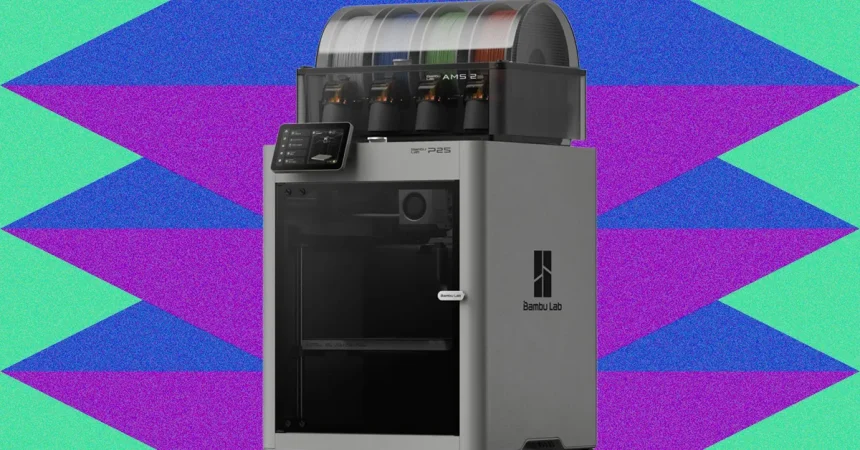
The real star of the show, however, is the “Combo” element of the package—the Automatic Material System, or AMS, that perches elegantly on top of the printer chassis. For the uninitiated, this is a huge deal. This cleverly designed box holds up to four spools of filament on internal rollers and automatically feeds them to your project on demand. If you’ve ever tried to create a multicolor print without this, you know the sheer tedium of the old way: pausing the machine every few minutes, wrestling with a spool in a cramped space, ripping out the old filament, and carefully threading a new one through the side before resuming. It’s enough to make you want to stick to monotone prints forever. The AMS eliminates all of that chaos instantaneously. It transparently swaps between colors with a satisfyingly smooth mechanical click, allowing you to dream up wild, multi-hued designs without a single moment of manual intervention. But there’s another hidden gem here: the P2S’s version of the AMS also functions as a filament dryer. This is incredibly important because 3D printing filament is hygroscopic, meaning it greedily absorbs moisture from the air, and when that moisture hits the hot nozzle, it turns to steam and wreaks havoc on your otherwise perfect print with tiny bubbles and blisters. I tested the P2S on the West Coast during a late-summer dry spell, so the built-in hygrometer showed my filament sitting comfortably below 40 percent relative humidity, and it never needed the drying function. However, if you live in a humid city like Houston, Miami, or even just near the coast, having a built-in dryer is an absolute lifesaver. Paying the extra $299 (if you don’t get the combo) or simply choosing the combo becomes a massive, time-saving investment in print reliability.
Paragraph 3: A Breath of Fresh Air – The Nozzle Swap Revolution
Maintenance has always been the Achilles’ heel of 3D printers, but Bambu Lab has clearly been listening to the community’s collective groans. On the older P1S model, swapping out a nozzle was a rite of passage plagued with frustration. It involved unplugging nearly every cable on the print head, flipping the assembly over, and wrestling with a series of stripped-prone screws to take the whole thing apart—a task that could easily eat up twenty minutes and test your patience. The P2S has thrown all of that out the window. On the new model, the front of the nozzle head is held in place with magnets, so it simply pops right off at the touch of a finger. Once that shroud is off, you unclip the old brass nozzle and clip in the replacement. That’s it. It takes about thirty seconds from start to finish. This is a massive improvement, especially if you are the type of hobbyist who likes to switch between a standard 0.4mm nozzle and a hardened steel 0.6mm one for printing abrasive materials like carbon-fiber-infused filaments. The stress of routine maintenance has evaporated, making tinkering with different material types a joy rather than a chore. It democratizes the upgrade path, meaning even a novice can experiment confidently with different nozzle geometries without fearing they’re going to destroy their new toy. This single design choice elevates the P2S from a “noob-friendly” printer to a “serious-maker” machine all in one magnetic snap.
Paragraph 4: The Inevitable “Poop” and Practical Considerations
Of course, no printer is perfect, and the P2S has one messy quirk that remains steadfastly intact from its predecessor: the wonderful, whimsical, and slightly annoying “poop” chute. To keep the nozzle clean, the printer periodically purges old filament by extruding hot blobs of plastic onto a cleaning pad and then scraping them into a waste bucket at the back of the machine. During monochrome prints, this is a fairly minor nuisance—a few tiny bits of plastic fall here and there. But when you’re doing a multicolor print with four filaments, the P2S spits out a deluge of colorful “nuggets” to ensure the printer head is clean before switching to the next color. I had been warned about this by the online community, yet I was still taken aback by the mountain of rainbow-colored detritus that accumulated on my workbench floor after just one ambitious project. It looks like a troll sneezed gummy bears everywhere. My strongest piece of advice for any new P2S owner is to make a “poop chute” or a collection basket your very first print. It’s a simple, functional accessory that hooks onto the back rail and catches the waste before it scatters across your floor. And once you have a jar full of these plastic blobs, don’t despair—there are actually a ton of creative, fun designs out there, from little board game pieces made from recycled waste to a clever “Poop Atlas” that turns a map of the world into a textured 3D artwork made entirely from your discarded filament. It turns the printer’s major downside into a fun, creative quirk.
Paragraph 5: The Verdict – Do You Actually Need One?
So, the million-dollar question remains: do you need the Bambu Lab P2S Combo? The short, emphatic answer is yes—unless you have incredibly niche requirements. If you are a professional who needs a dual-nozzle printer for water-soluble support structures, or you need a commercial-grade all-in-one unit that also laser-cuts wood and engraves metal, this printer won’t be able to check those boxes. But for the vast majority of users—makers, tinkerers, parents, artists, and engineers—this is the sweet spot. The sheer ease of use is staggering. If you have basic engineering skills, the integration with Bambu Studio is seamless, allowing you to drag, drop, and slice models in minutes. But even if you have zero technical experience, the app guides you through everything with intuitive visual prompts. The ability to print and customize useful household tools, garage organizers, intricate art pieces, or toys for your kids is simply worth the price of admission. It fails rarely, it cleans itself automatically, and the print quality is phenomenal. Whether you’re fabricating a replacement knob for a broken stove or creating a personalized lithophane of a family photo, this machine makes it effortlessly achievable. The price of filament—starting around $15 a roll for Bambu Lab-brand spools—keeps the hobby affordable, allowing you to iterate and experiment without worrying about breaking the bank on 1kg of material.
Paragraph 6: Cautions and Final Warm Thoughts
There is one caveat that potential buyers should keep in mind. In our previous review of the P1S, we flagged some minor inconsistencies with the mobile app when users attempted to use third-party, non-Bambu filaments. The app has a tendency to get a little fussy about recognizing generic spools, often requiring manual calibration or triggering false “material not detected” warnings. Since the P2S has been released with new software, I was curious to see if this issue had been resolved. Unfortunately, I didn’t have any non-Bambu spools on hand during my testing period, so I can’t definitively vouch for whether this particular thorn has been fully extracted from the side of open-source tinkerers. If you exclusively use Bambu’s own filament, you’ll have zero issues, but users who prefer budget-friendly off-brand options might still encounter a few app quirks. However, despite that unverified concern, my overall impression is overwhelmingly positive. The Bambu Lab P2S Combo isn’t just a purchase; it’s an invitation to create. It removes the tedious barriers of calibration, leveling, and filament swapping, instead offering a gateway to pure creation. Watching the time-lapses, snapping in a new nozzle in under a minute, and seeing flawless multicolor prints emerge is genuinely delightful. I have used many printers over the years, but the P2S is the first one that has convinced me to keep printing just for the sheer satisfaction of watching it work. It’s fast, forgiving, practical, and surprisingly fun—a four-color, screwdriver-wielding, plastic-melting workhorse that makes the future of manufacturing feel like it belongs in your living room. If you’ve been on the fence about entering the world of 3D printing, this is the machine that will get you off that fence and into a world of creation.