
The latest iteration of macOS, internally referred to as Golden Gate, marks a significant departure from previous versions by placing sophisticated artificial intelligence at the very heart of the user experience. Apple has clearly listened to the feedback regarding the previous “Tahoe” update, opting to refine the interface while simultaneously introducing “Apple Intelligence” to automate the mundane aspects of our digital lives. One of the standout features is the introduction of Custom Extensions for Safari. Rather than requiring technical expertise or a deep understanding of code, you can now construct these extensions using simple, natural language. Pairing this with a deeper integration with the standalone Passwords app, Safari now proactively monitors your credentials, automatically flagging and replacing compromised or weak passwords so you don’t have to worry about the security of your accounts.
Perhaps the most practical implementation of this new AI initiative can be found in the Shortcuts app. For years, building an automation felt like solving a complex puzzle, requiring users to manually wire together specific functions and app triggers. That clunky method is now a relic of the past. You can now simply describe what you want to achieve—such as, “Whenever I leave the office, calculate my ETA and text it to Pedro”—and the system intuitively bridges the gap between Maps and Messages to execute the task. It is a fundamental shift toward a more conversational relationship with our computers, moving us away from being “operators” of software and turning the system into a proactive assistant that understands intent rather than just syntax.
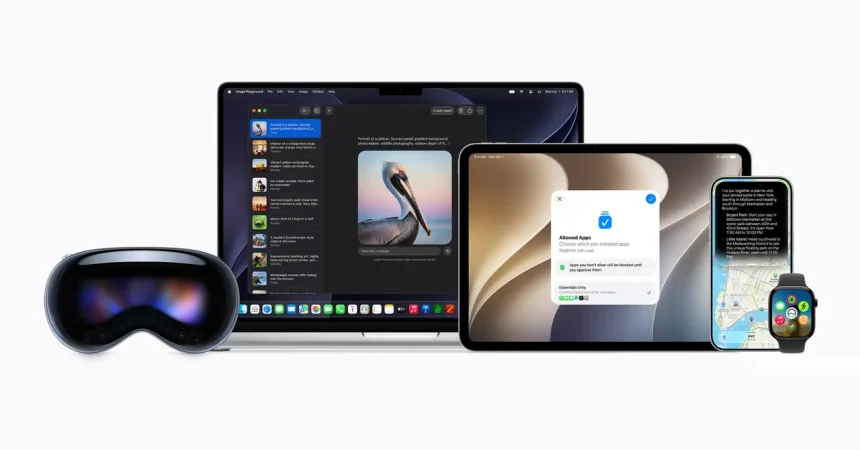
This theme of natural language processing extends across the entire operating system, making day-to-day organization feel significantly less like manual data entry. Whether you are creating a new calendar event or logging an appointment, the system can parse your request, automatically pulling in the correct contact information or location details from your existing records. Furthermore, Apple has supercharged the Image Playground feature. By leveraging Google’s Gemini technology, the image generation capabilities have moved from somewhat abstract or limited results to truly photorealistic outputs. While there are usage caps to keep resources in check, Apple has introduced an incentive for iCloud+ subscribers to scale their access, effectively turning your Mac into a powerful creative studio that can generate high-fidelity visuals on demand.
Beyond the “smart” features, Apple has dedicated substantial effort to fixing the aesthetic friction that plagued the previous Liquid Glass interface. Users previously complained that the translucent menus were cluttered and difficult to read, often causing text to blur into the background. In Golden Gate, Apple has introduced a sophisticated refraction effect in the UI’s transparency. By better obscuring background noise, the foreground text pops with much greater clarity. Even better, this isn’t a “take it or leave it” situation; you can now fine-tune the transparency levels via a slider in System Settings, giving you total control over how your workspace looks and feels during your daily workflow.
The aesthetic refinements don’t stop at transparency; there is a clear push for a more cohesive, “premium” visual identity across the board. The toolbars have been streamlined into a uniform menu system, and the sidebar design has been overhauled to extend to the very edge of each window. In a move that will satisfy those with an eye for detail, the sidebar icons have regained their color, providing better visual cues at a glance. Most impressively, the window control buttons finally boast a consistent corner radius across every application. It’s the kind of small, polished detail that makes the operating system feel more elegant, sophisticated, and unified, ending the era of disjointed visual styles between apps.
Finally, while visual flair is important, a computer must ultimately be fast and responsive to be useful. Apple has turned its attention to the “under the hood” metrics, optimizing memory and CPU usage to ensure that the increased intelligence doesn’t come at the cost of performance. Through refined display rendering and more efficient app-switching protocols, the overall friction of using a Mac has been drastically reduced. The transition between Spaces is now buttery smooth, and summoning Mission Control—an action that was previously prone to slight stutters—is now near-instantaneous. By balancing these deep-level architectural improvements with the convenience of natural language AI and a more readable, customizable UI, Golden Gate succeeds in making the Mac feel more intuitive, dependable, and pleasant to use than ever before.